LetzAI Review: Create Personalized AI Images and Videos Easily

Overview & Purpose

LetzAI is a next-generation generative AI platform that empowers users to create highly personalized images and videos by training custom AI models on their own uploaded photos, products, or artistic styles. Unlike traditional tools that scrape public internet data, it relies exclusively on user-provided content for an ethical, consent-driven approach, ensuring full ownership and control over the resulting models and outputs. Primary use cases include generating branded marketing visuals, personalized portraits or product mockups, artistic creations reflecting unique styles, and virtual try-ons or concept designs for e-commerce and social media.
The target audience spans individual creators and hobbyists seeking fun, custom self-representations; artists and designers wanting to monetize or protect their unique aesthetic; marketers and brands building consistent visual assets; and developers via its API for integrations. Launched with a focus on accessibility, it appeals to both beginners exploring AI creativity and professionals needing scalable, privacy-focused tools.
Key Features & Capabilities
Core functionality revolves around uploading 10+ high-quality, diverse images to train custom AI models (for people, objects, products, locations, or styles), then using text prompts to generate or edit content with those models. Standout features include unlimited model training on paid plans, LetzAI Chat for natural-language image creation/editing, advanced editing tools (inpainting, outpainting, Guided Creation with drawings/arrows/text overlays), upscaling options (including Magnific), video animation from static images, community model sharing via a vibrant gallery and Boards for organization/collaboration, and API access for custom apps.
Differentiators from competitors like Midjourney or Stable Diffusion include true personalization without generic results, model privacy controls (public/private sharing), and a consent-first ethos that avoids training on unlicensed data. Recent V3 updates bring improved models (e.g., Nano Banana Pro, Seedream) with cinematic modes and higher fidelity.
Limitations include a credit-based system that can add up for heavy video or 4K workflows, no offline mode, occasional regional restrictions, and a smaller ecosystem than industry giants. Model training quality depends heavily on input image variety, and some advanced features (e.g., certain video options) remain in active development.
User Experience
LetzAI boasts an intuitive, tab-based interface (Chat, Generate, Edit, Upscale, Animate) that feels modern and welcoming, with real-time previews and natural-language options making it surprisingly accessible even for non-technical users. The learning curve is gentle for basic generation but steeper for optimal prompting and model training—official resources bridge this gap effectively.
Interface quality is clean and responsive, with Guided Creation adding precision to edits via visual markup. Documentation shines through comprehensive official guides, prompt-writing blogs, V3-specific training tutorials, YouTube walkthroughs, and an FAQ covering troubleshooting. Support includes email ([email protected]) and community feedback channels; no dedicated live chat for free users, but paid subscribers get priority.

Performance & Reliability
Generation is fast and efficient on modern models (typically seconds for standard images), with scalable infrastructure delivering reliable uptime even during peak creative sessions. Video and high-res outputs take longer but maintain quality. Users report consistent high-fidelity results when using well-trained models, with minimal artifacts compared to generic tools.
No widespread outages or major bugs appear in recent reviews as of March 2026; common feedback praises speed for personalized outputs. Occasional credit calculation transparency issues or prompt variability exist, but these are minor and addressed via updates. Community sentiment on platforms like Product Hunt (5.0 rating) and Reddit highlights dependable performance for daily creative workflows.

Pricing & Value
LetzAI uses a credit system where operations (image generation ~40–240 credits depending on model/quality, editing similar, video 110–6000 credits, upscaling 20–960 credits) deduct from monthly allocations. The Free plan allows browsing community content and the Playground with no card required (limited ~700 credits/month via invites). Paid plans start around €8–10/month (Beginner: ~5,000 credits), scaling to €50+/month (Pro: 50,000+ credits) with higher efficiency (credits ~0.0015–0.002€ each); monthly credits expire unused. Top-ups (from €4.90) never expire, and model training is free for paid users. Enterprise offers custom limits and support.
Value is strong for personalized use—cheaper long-term than per-image competitors for creators who train reusable models, with API and community adding utility. Compared to alternatives, it excels in ownership and ethics at accessible entry pricing, though heavy users may need top-ups. A 30% first-three-months discount is sometimes available.
Practical Tutorial
Official resources include a full Getting Started guide and video tutorials (e.g., “LetzAI V2 Beginners Tutorial” on YouTube). Here is a step-by-step walkthrough for a common task—training a basic custom model and generating your first personalized image—based on official documentation as of March 2026.
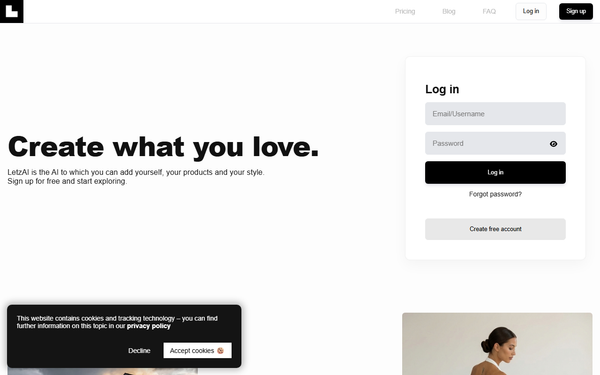
- Sign up and explore: Visit letz.ai, create a free account (no card needed), and browse the community Models page for inspiration.
- Prepare and train a model (requires paid plan for full access; free limited trials sometimes available): Go to the Models section, click “Train New Model.” Upload 10–20 diverse, high-resolution photos (e.g., different angles, lighting, expressions for a person; varied backgrounds for products). Add descriptive tags (e.g., “my_product_front_view”). Training takes ~10 minutes; name it privately or publicly. (Full details: letz.ai/blog/v3_trainingguide).
- Navigate to Generate: Click the “Generate” tab.
- Craft your prompt: Select your new model from the dropdown. Write a specific prompt, e.g., “my_custom_style wearing a futuristic outfit in a cyberpunk city, golden hour lighting, highly detailed, cinematic.” Adjust aspect ratio (e.g., 16:9) and quality (Standard/HD).
- Generate and refine: Hit Generate (costs credits). Use LetzAI Chat for natural tweaks (“make the background a beach”) or switch to Edit tab for Guided Creation—draw on the image, add arrows/text, and describe changes.
- Organize and upscale: Save to a Board for projects, then Upscale tab for higher resolution. Animate for video if desired.
For advanced prompting or editing masterclass, see letz.ai/guides or letz.ai/blog/7_imagegenerationguide. Experimentation yields best results—start simple!
Final Verdict
Overall rating: 4.7/5 – a polished, ethical standout in personalized AI generation.
Who should use it: Creators, artists, marketers, and brands wanting full ownership of custom styles/products without generic outputs or data-privacy worries—ideal for consistent branding or fun self-expression.
Who should avoid it: Users needing completely free unlimited generation, offline work, or massive-scale production without budgeting for credits.
One-sentence recommendation: If you want an intuitive, consent-first AI that truly captures your style or brand, LetzAI is one of the most empowering tools available today—sign up and start training your first model.