Levity Review: Automate Logistics Email Workflows with No-Code AI
Overview & Purpose

Levity (https://levity.ai/) is a no-code AI automation platform that enables businesses to build, deploy, and scale reliable automations for complex, unstructured workflows—primarily high-volume email operations in logistics and supply chain environments. It turns chaotic email inboxes into structured, actionable processes by classifying messages, extracting data from emails/attachments (text, images, PDFs), generating responses, summarizing threads, and routing tasks to downstream systems.
Primary use cases include spot quoting, bookings, track & trace, document requests, arrival notices, accounts receivable/payable, damage claims, and customs processing. It also supports broader applications like customer support ticket routing, survey response handling, document classification, content moderation, sentiment analysis, and inventory-related queries through custom AI models trained on user data. The platform connects seamlessly to existing tools (Gmail, Outlook, Cargowise, SAP, Zendesk) and custom APIs, making it suitable for operations-heavy teams dealing with repetitive manual email handling.
Target audience is primarily logistics and operations teams in freight, shipping, and supply chain companies that process thousands to millions of emails daily. It appeals to non-technical business users (ops managers, customer service leads) rather than pure developers, though it offers API extensibility for technical teams. Marketers or designers may find limited direct value unless handling high-volume email outreach or content workflows.
Research note: This review is based on the official website and trusted sources as of April 13, 2026. Levity has specialized further into logistics email automation while retaining core no-code AI capabilities for custom document/image/text processing.
Key Features & Capabilities
Core functionality revolves around three pillars: Analytics (inbox scanning to identify repetitive tasks and bottlenecks across millions of emails), Automation (visual drag-and-drop flow builder with triggers, custom classifiers, and AI actions), and Governance (human oversight, quality control tickets, feedback loops for continuous model improvement).
Standout features include:
- Custom AI model training with minimal labeled data for classification, extraction, and generation tasks.
- AI Actions such as drafting email replies, summarizing conversation threads, extracting key dates/pricing/details, and prioritizing messages.
- Multimodal support for emails, attachments, PDFs, and images.
- Seamless integrations with email providers, ERP/TMS systems (Cargowise, SAP), helpdesks (Zendesk), and custom APIs.
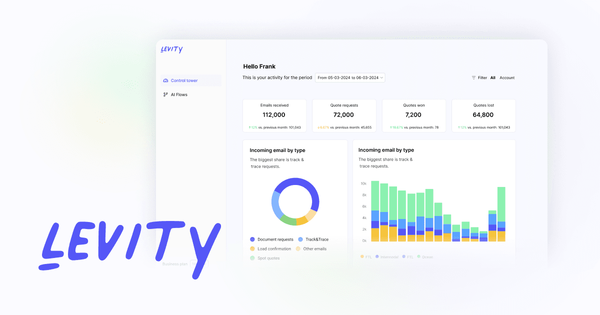
- Built-in analytics dashboard and Control Tower for monitoring live automations.
- Enterprise-grade security and compliance (ISO 27001, SOC 2 Type I, GDPR).
These differentiate Levity from general automation tools like Zapier or Make.com by emphasizing production reliability for unstructured data in regulated, high-stakes environments, with strong human-in-the-loop governance rather than pure rule-based or LLM chaining.
Limitations include a narrower current marketing focus on logistics (potentially less emphasis on general marketing or creative workflows compared to 2024–2025 descriptions), opaque public documentation for advanced customizations, and dependency on quality training data and ongoing human feedback for optimal accuracy. It lacks some consumer-facing creative AI features found in broader platforms.
User Experience
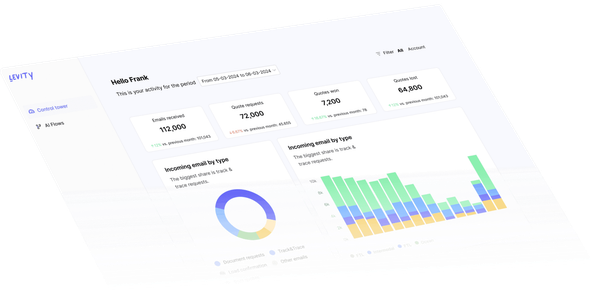
Levity offers an intuitive no-code interface with a visual flow editor that minimizes the learning curve for non-technical users. Signing up, connecting inboxes, uploading sample data for training, and building flows can be done quickly via drag-and-drop components (triggers → classifiers → conditions → AI actions → integrations). The dashboard provides clear analytics and monitoring, making oversight straightforward.
Interface quality is clean and modern, focused on operational efficiency rather than flashy design. Users report it feels more approachable than code-heavy tools like n8n for business teams. Documentation is somewhat limited publicly (primarily in-app guidance, API references, and demo videos), but support is responsive via email, scheduled demos, and a dedicated solutions team for custom integrations. Community resources are sparse, with most guidance coming from YouTube tutorials and official walkthroughs.
Overall, the ease of use is a major strength for ops teams, though enterprise setups may require initial guidance from Levity’s team.
Performance & Reliability
Levity is built for production scale, currently processing over 100 million emails with high reliability in live logistics environments. Automations run efficiently with low latency for classification, extraction, and reply generation, thanks to optimized custom models rather than generic LLMs. Users highlight consistent performance once models are trained and refined.
Known issues are minimal in public feedback, but common themes from limited reviews (G2 rating of 3.8/5 based on 2 reviews) include the need for iterative corrections to maintain accuracy in edge cases and initial setup time for training data. No widespread complaints about downtime or major bugs were found; the platform’s governance features (ticketing bugs, severity tagging, feedback loops) actively mitigate reliability risks. Enterprise security certifications further support its use in sensitive operations.
Pricing & Value
Pricing is usage-based and not transparently listed on the public site (pricing page returns 404 as of April 2026); plans are typically discussed via demo. Aggregated sources indicate:
- Startup: ~$49–$100/month (500 actions or limited emails per month, unlimited AI blocks/trainings, community support).
- Business: ~$139–$299/month (5,000–2,000 emails/actions, basic integrations and email support).
- Enterprise: Custom (starting ~$1,500/month) for high volumes, dedicated support, advanced integrations, and SLA guarantees.
A free trial is available. Additional actions/emails incur extra costs. Value is strong for mid-to-large logistics teams where time savings (reported in thousands of hours) quickly offset costs versus manual staffing or less specialized tools. Compared to Zapier + custom LLMs or RPA platforms like UiPath, Levity offers better handling of unstructured multimodal data and built-in governance at similar or lower entry points for niche use cases. Smaller teams or low-volume users may find it less cost-effective due to usage scaling.
Practical Tutorial
Official tutorials are primarily video-based (e.g., founder demos on “How Levity works” and model training walkthroughs on YouTube). No exhaustive public knowledge base exists, but here is a practical step-by-step walkthrough for a common task—automating Track & Trace email responses—based on the platform’s visual builder and official flow examples (as of April 2026). You can replicate this after signing up at levity.ai and connecting your inbox.
-
Sign up and connect data sources: Create a free account, then connect your Gmail/Outlook inbox via the integrations panel. Grant permissions for Levity to read (and optionally write) emails.
-
Analyze inbox (optional but recommended): Go to the Analytics dashboard. Let Levity scan recent emails to automatically surface common patterns (e.g., “Track & Trace” requests) and suggest automation opportunities.
-
Train a custom classifier: Navigate to AI Models or Flows. Upload 20–50 example emails (or drag in from inbox). Label them with categories like “Track & Trace,” “Booking,” “Quoting,” or “General Inquiry.” Levity trains the model in minutes—no code required. Test accuracy and retrain with corrections if needed.
-
Build the Flow in the visual editor:
- Add Trigger: “New email received in Gmail/Outlook.”
- Add Classifier: Select your trained model to categorize the email body/subject/attachments.
- Add Conditions: If classification = “Track & Trace,” proceed.
- Add AI Action: “Extract key data” (e.g., tracking number, container ID) + “Generate draft reply” (prompt it with your standard response template).
- (Optional) Add “Summarize thread” for context.
-
Integrate downstream actions: Connect to your TMS/ERP (e.g., Cargowise) to update records automatically, or route to Zendesk for human review.
-
Test and deploy: Run test emails through the flow. Monitor results in the Control Tower. Enable live mode once satisfied.
-
Monitor and improve: Use the quality control system to flag incorrect outputs, tag severity, and submit feedback. The model improves automatically over time.
For video guidance, search YouTube for “Levity AI how it works” or “Levity train machine learning model no code.” Schedule a demo via the site for personalized walkthroughs.
Final Verdict
Overall rating: 4.2/5 – A solid, reliable choice for its niche but held back by limited public transparency on pricing and reviews.
Who should use this tool: Logistics and operations teams in freight/shipping companies drowning in email volume should strongly consider Levity. It excels at turning unstructured inbox chaos into automated, auditable workflows with minimal coding, delivering fast ROI through time savings and error reduction.
Who should avoid this tool: Small teams, marketers, or generalists needing broad creative automations, transparent self-serve pricing, or extensive public community support may find better fits in more generalist tools like Zapier, Make.com, or Microsoft Power Automate. Those uncomfortable with usage-based scaling or initial data training should also look elsewhere.
One-sentence recommendation: If your business runs on high-volume logistics emails and you want production-grade, no-code AI with human oversight, Levity is an excellent specialized investment—book a demo to see if the fit is right.