Linguix Review: The Best AI Writing Assistant for Teams

Overview & Purpose
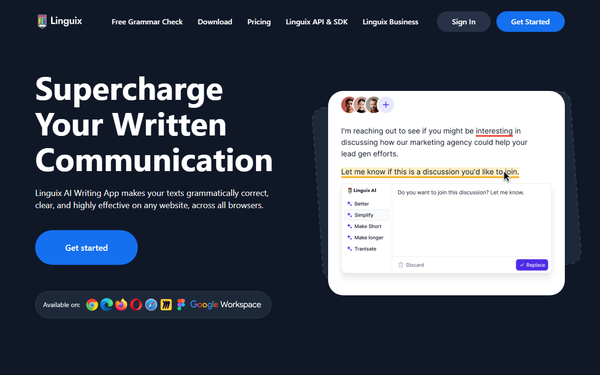
Linguix is an AI-powered writing assistant designed to help users and teams produce clear, error-free, and professional written communication across websites and documents. It automatically detects language and delivers real-time grammar, punctuation, spelling corrections, AI-driven rewriting, content scoring, and productivity tools such as customizable shortcuts and corporate style guides. Primary use cases include drafting compelling sales proposals, crafting marketing copy, responding to customer support tickets, and maintaining consistent team messaging to improve efficiency and reduce miscommunication. It is especially valuable for non-native English speakers and business professionals who write frequently online.
The target audience consists primarily of sales, marketing, customer support, and HR teams, as well as individual professionals, content creators, and non-native speakers. Features like team management dashboards and shared style guides make it particularly suited for collaborative business environments rather than solo developers, designers, or purely creative writers.
Key Features & Capabilities
Core functionality revolves around multilingual proofreading (English, French, German, Spanish, Portuguese, Italian, and Polish with automatic detection), AI paraphrasing/rewriting, and a content score that evaluates readability, sentence length, vocabulary, and passive voice usage—allowing users to benchmark text against AI-generated content like ChatGPT outputs.
Standout features that differentiate Linguix from competitors include:
- Typing shortcuts (Turbo): One-word commands (e.g., “//intro”) expand into full templates or rewritten text, claimed to cut writing time by up to 90%.
- Custom style guides: Team-wide rules ensure polite, inclusive, and brand-consistent language (e.g., correct executive titles or event naming).
- Team management: Centralized analytics track individual error rates, readability scores, and activity reports with email summaries.
- Broad browser extension: Works seamlessly on Gmail, Google Docs, OpenAI interfaces, Canva, LinkedIn, Figma, Miro, Microsoft Office, and millions of other sites without needing a desktop app.
These team-oriented tools and time-saving shortcuts set it apart from more individual-focused tools like basic Grammarly versions. Limitations include fewer advanced tone or fluency suggestions compared to top-tier competitors, occasional over-suggestions in creative writing, and support limited to seven languages (with English being the most robust). No native desktop app or offline mode is available, and some integrations (e.g., Microsoft Word) may experience minor hiccups.

User Experience
Linguix offers a clean, intuitive interface with minimal visual clutter—users frequently praise the color scheme and non-intrusive highlights compared to denser competitors. The learning curve is very low: most users become productive within minutes of installing the browser extension, as corrections appear automatically and AI tools activate with simple clicks or highlights.
Documentation is comprehensive via the official help center (help.linguix.com), which includes clear articles on installation, shortcut creation, team onboarding, and troubleshooting. Support resources include email tickets and a community forum, though user ratings for responsiveness are mixed. Overall setup is straightforward, with high ease-of-use scores across review platforms.
Performance & Reliability
The extension delivers fast, real-time suggestions with almost no noticeable lag on supported sites. AI rewriting and content scoring process quickly, and the shortcuts feature performs reliably for repetitive tasks. Most users report consistent performance across Gmail, Docs, and web forms.
Common complaints include occasional glitches (e.g., extension failing to load on certain pages, false positives, or “word salad” suggestions), cursor issues in long documents, and rarer offline errors. Some reviews note that grammar accuracy lags behind Grammarly in edge cases or complex sentences, and older AI models (pre-GPT-4 in early versions) produced less nuanced results. Billing and support responsiveness have surfaced as pain points in a minority of feedback, but the core engine remains stable for day-to-day use. No widespread outages reported as of March 2026.
Pricing & Value
Linguix offers a limited free version via the browser extension for basic checks. Paid plans include:
- Individual Premium/Pro: $14.99/month or approximately $8/month when billed annually ($96/year).
- Team/Business plans (starting at 2 seats): Approximately $10–20 per member per month (monthly billing) or $5 per member per month (annual billing), with centralized admin controls and all Pro features plus shared style guides and analytics. Enterprise and EDU options require contacting sales for custom quotes.
Value is strong for teams seeking cost-effective alternatives to Grammarly Business—especially those who will leverage shortcuts and style guides—delivering measurable time savings and consistency at a lower per-user price point than many enterprise competitors. Annual discounts and the unique team dashboard provide excellent ROI for frequent writers, though users needing only basic proofreading may find the paid tiers less compelling without the productivity extras.
Practical Tutorial
Official tutorials are available in the Linguix Help Center (https://help.linguix.com/docs/tips-and-tutorials/), covering installation, shortcuts, and team features. Below is a step-by-step walkthrough for a common task—rewriting and optimizing a sales email in Gmail using the browser extension and shortcuts (tested conceptually from documented features and user examples as of March 2026).
-
Install and set up: Go to the Chrome Web Store (or equivalent for your browser), search “Linguix”, and click “Add to Chrome”. Sign up for a free account or log in; grant necessary permissions. The extension icon appears in your toolbar.
-
Open Gmail and draft: Compose a new email. Type a rough draft example: “Hi team, hope this email finds you well. We have a new product that can help your business grow fast.”
-
Apply real-time checks: Underlined errors appear automatically (red for spelling/grammar, blue for style). Hover and click suggestions to accept grammar fixes or punctuation improvements.
-
Rewrite with AI: Highlight the entire paragraph. Click the Linguix icon or the “Rewrite” button that appears. Choose options like “Make more professional” or “Shorten.” The AI instantly generates a refined version: “Hello, Our new product can accelerate your business growth—let’s discuss how it fits your needs.”
-
Use a shortcut for efficiency: In the extension settings or dashboard, create a custom shortcut: Type “//intro” and map it to your standard polite opening template. In the email, type “//intro” and hit the expansion key (usually Tab or space)—it instantly inserts and adapts the full greeting.
-
Check content score and finalize: Click the Linguix sidebar or score indicator for a readability rating (e.g., 85/100). Adjust passive voice or complexity as suggested, then send.
This workflow typically reduces drafting time dramatically. For team use, admins can share the “//intro” shortcut across members via the dashboard. Full video-style examples and variations appear in the help center’s Turbo section.
Final Verdict
Linguix earns a solid 4.3 out of 5 stars. It excels for sales, marketing, and customer support teams that value time-saving shortcuts, team-wide consistency tools, and broad website coverage at a competitive price—making it an excellent Grammarly alternative for collaborative business environments. Users who prioritize deep tone analysis, maximum language coverage, or flawless customer support may find it less ideal and should consider premium competitors instead. Highly recommended for growing teams seeking efficient, clear communication without overpaying.