LockedIn AI Review: The Ultimate Stealth Interview Copilot
Overview & Purpose

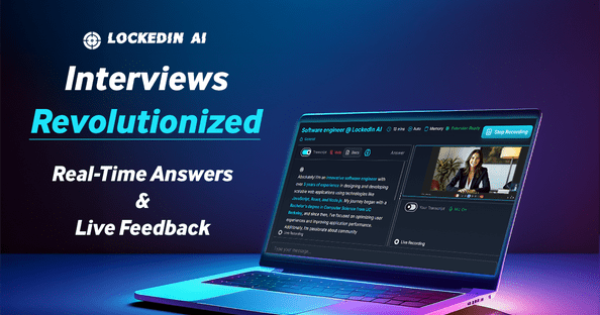
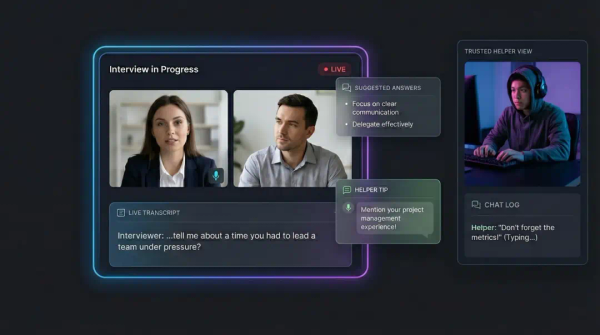
LockedIn AI is a desktop and browser-based AI copilot that listens to system audio during online interactions and delivers private, real-time suggestions, answers, feedback, and corrections visible only to the user. It functions as an invisible “trusted helper” that transcribes conversations, generates tailored responses, debugs code, and provides behavioral guidance without interrupting the flow of the call.
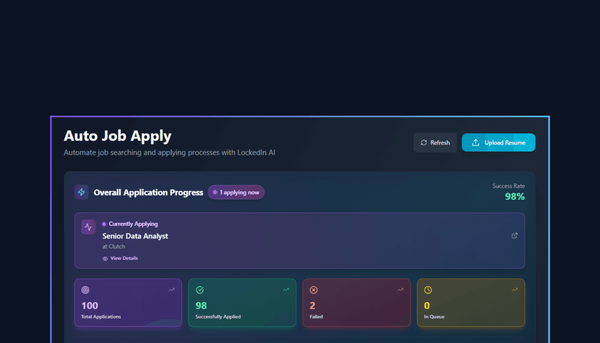
Primary use cases include live job interviews (coding, system design, behavioral, case studies), online assessments on platforms like HackerRank or CodeSignal, sales calls, mock interviews, phone screenings, and general professional meetings on Zoom, Google Meet, or Microsoft Teams. It also supports auto-job applications and resume optimization as part of a broader career ecosystem.
The target audience is primarily job seekers—especially in tech (software engineering, DevOps, AI, data science, cybersecurity), finance, consulting, sales, marketing, UX design, product management, and legal roles—plus working professionals who want a competitive edge in high-stakes virtual interactions. The tool markets itself to anyone who has ever felt “alone” in an interview or meeting and wants instant, personalized support.
Key Features & Capabilities
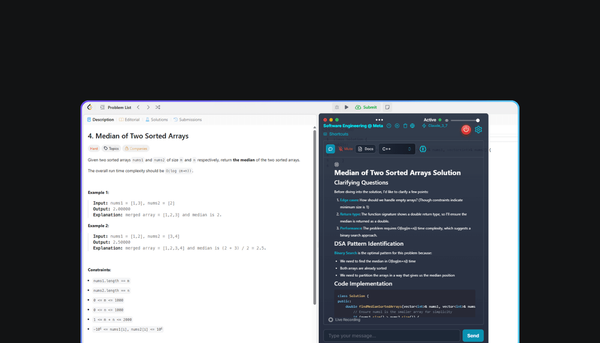
Core functionality revolves around real-time audio capture and analysis: the AI transcribes speech, understands context, and surfaces private on-screen nudges, full answers, or corrections within 116 ms on average. Users can activate via global keyboard shortcuts, upload resumes or job descriptions for personalization, and receive code reviews, algorithm breakdowns, or STAR-method structuring for behavioral questions. It supports 50+ languages with regional accents and multiple top-tier models (DeepSeek, Azure OpenAI, Google Gemini, Claude, Grok) plus integrated web search.
Standout features that differentiate it include:
- Stealth Mode desktop app (macOS/Windows): completely invisible in task managers, docks, and screen shares; aliased processes and global hotkeys make detection nearly impossible.
- LockedIn Duo: invite a friend or mentor into the session for real-time human notes or audio guidance (included in higher plans).
- Dual-layer system: AI copilot plus optional remote human assist.
- Free ancillary career tools (resume builder/checker, LinkedIn optimizer, cover-letter and headshot generators, job tracker).
Limitations include a 1.5-hour per-session cap on the standard unlimited plan, occasional overload during rapid multi-speaker exchanges, and the fact that full stealth and advanced models require the paid desktop app. Some users report that highly niche technical terminology or extremely fast-paced conversations can reduce accuracy, and ethical concerns around “cheating” in interviews remain a personal consideration rather than a technical flaw.
User Experience
Setup is straightforward: sign up with email or Google, download the desktop app (or use browser mode), grant microphone and screen-share permissions, and you’re ready. The learning curve is low for basic use—most users are operational within minutes—but customizing response styles, tones, or deep-think mode takes a short exploration of the dashboard.
The interface is clean and minimal: a dashboard for session history and reports, plus a discreet on-screen overlay during calls. The desktop app’s mouse-free hotkeys and auto-scrolling feel polished for live use. Documentation consists of in-app FAQs, a help center, and several official YouTube walkthroughs; community support lives on Discord. Customer service receives mixed feedback—quick email responses for some, but reports of rude or unhelpful interactions when billing issues arise.
Performance & Reliability
Response speed is a genuine strength, frequently described as “noticeably faster” than competitors in live tests, with 99.9 % claimed uptime. Transcription accuracy hovers around 90-95 % even with accents, and the stealth mode works reliably across major video platforms.
Known issues include occasional overload when conversations move too quickly, minor UI bugs reported on macOS, and rare account lockouts without clear explanation. Trustpilot reviewers (3.7/5 average from 76 reviews as of March 2026) highlight these reliability hiccups alongside praise for the core AI assistance. No widespread outages or data-breach incidents were found in public sources.
Pricing & Value
LockedIn AI offers a limited free tier for basic copilot use and a full suite of free career tools. Paid plans are subscription-only:
- Monthly: $54.99
- 3-month plan: $39.99 per month (billed quarterly, 27 % savings)
Both deliver unlimited sessions, access to all models, document uploads, summaries/reports, and LockedIn Duo. A money-back guarantee is advertised, though some users report refund difficulties. No enterprise tier is publicly detailed.
Value is strong for candidates facing multiple interviews in a short period—the unlimited model pays for itself quickly compared with per-minute competitors. Casual users or those on a tight budget may find the price steep relative to occasional use, especially given occasional billing complaints. Compared with alternatives like Sensei AI or Final Round AI, LockedIn often wins on speed and stealth but loses on refund flexibility and customer-service consistency.
Practical Tutorial
Step-by-step: Setting up and running a real-time assisted mock interview (based on official workflow, March 2026)
-
Sign up and prepare – Go to app.lockedinai.com, create a free account (email or Google). Upload your résumé and the target job description under the Copilot section.
-
Download the desktop app (recommended for stealth) – Visit lockedinai.com/desktop-app, install for macOS or Windows, and launch. Grant system audio and microphone permissions when prompted.
-
Create a new session – In the dashboard, select “Interview Copilot” → choose type (e.g., Behavioral or Coding). Fill in industry, company, role, and objective. Upload any additional documents. Toggle AI Coach on for live feedback.
-
Customize settings – Choose response style (concise/detailed), language, tone (professional/casual), and format (e.g., STAR). Select your preferred AI model and enable “Deep Think” for tougher questions. Set keyboard shortcut if desired (default Ctrl/Cmd + Shift + U).
-
Start the session – Click “Start Recording.” Join your mock interview (Zoom, Google Meet, etc.) and share screen/tab while enabling system audio. The overlay appears only on your screen.
-
Use in real time – When asked “Tell me about yourself,” the AI instantly suggests a tailored answer in the overlay. Use hotkeys to pause/resume or request code examples. Your invited Duo partner (if premium) can send private notes simultaneously.
-
End and review – Click “Stop Recording.” Instantly receive a full transcript, summary, performance report, and improvement suggestions. Review history for future sessions.
Official tutorial video: https://www.youtube.com/watch?v=cGG6TRgiDso (4-minute walkthrough with live demo). Practice on a phone browser first via the mobile-optimized site for zero-commitment testing.
Final Verdict
Overall rating: 4.0 / 5
Job seekers who regularly face technical or behavioral interviews—especially in competitive tech, finance, or consulting fields—should use this tool because the real-time stealth assistance and speed genuinely reduce anxiety and improve response quality, often translating to landed offers. Candidates on a single-interview budget, those uncomfortable with AI assistance on ethical grounds, or anyone needing flawless reliability and hassle-free cancellations should avoid it due to pricing, occasional bugs, and reported billing friction.
One-sentence recommendation: LockedIn AI delivers a powerful, nearly undetectable edge for high-volume interview preparation, but try the free tier and money-back guarantee before committing to the subscription.