Locus Extension Review: The Ultimate AI Upgrade for CTRL+F
Overview & Purpose

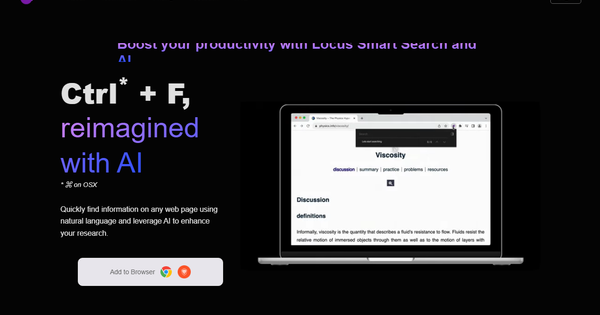
Locus Extension is an AI-powered Chrome browser extension that reimagines traditional CTRL+F (or ⌘+F) search using natural language processing. It enables users to quickly locate, highlight, organize, and synthesize information across web pages and PDFs. Beyond basic keyword matching, it leverages large language models (LLMs) to understand search intent, generate summaries, brainstorm related topics, and create interactive study note cards from highlights collected in an "Action Drawer."
Primary use cases include rapidly extracting key insights from news articles or long-form content, navigating dense academic papers or online textbooks, and synthesizing research notes across multiple sources without switching tabs or apps. It targets students, researchers, analysts, and professionals who regularly handle large volumes of online text—such as physics textbooks, lab papers, or daily news briefings—as evidenced by user testimonials on the official site.

Key Features & Capabilities
Core functionality centers on AI-powered Smart Search that highlights relevant sections in context, supports mixing content from multiple pages/searches/summaries, and automatically converts highlights into interactive cards for easy organization and synthesis. Additional capabilities include page- or section-level summarization for quick TL;DRs, brainstorming for further research topics and documents, note-card creation for retention and studying, and favorites saving.
Standout features that differentiate it from competitors (such as basic keyword finders or standalone summarizers like Glasp or Perplexity extensions) include seamless multi-LLM support (OpenAI GPT-4o/4o-mini/3.5, Anthropic Claude 3 Haiku, Google Gemini 1.5 Flash, and Deepseek in v3.0), dedicated AI profiles tailored for academic research, legal analysis, or general curiosity, and the option to bring your own OpenAI API key for truly unlimited token usage without extra per-query costs. Quick updates to the latest models and PDF/web compatibility further enhance its edge.
Limitations include a restrictive free tier (only 3 documents daily), requirement for account signup and email verification to unlock the sidepanel, and document data expiration per plan (favorites are retained). Missing features noted in user feedback include multi-document search across tabs, quiz generation from cards, Firefox/Arc browser support, and more robust PDF processing reliability.
User Experience
Installation is straightforward via the Chrome Web Store, with a low learning curve for users familiar with browser extensions—the natural language query interface feels like an intuitive upgrade to CTRL+F. Full features require a quick free signup and email verification; optional OpenAI API key setup takes minutes via the dashboard. The sidepanel and Action Drawer provide clean, integrated access without disrupting browsing.
Interface quality is modern and functional, focusing on in-browser efficiency rather than flashy design. Documentation is basic, limited to an FAQ covering account verification, password resets, manual updates (for red-dot notifications), and OpenAI integration tips. Support resources include a public feedback portal at locusai.featurebase.app and standard Chrome Store channels; no extensive video tutorials or live chat are available.
Performance & Reliability
Search and summarization perform efficiently on text-heavy pages, with Pro plan claims of faster processing and newest-model access. Version 3.2.1 (updated November 2025) added Deepseek support and refined card synthesis.
As of research conducted in March 2026, known issues from the official feedback portal include occasional PDF loading delays ("preparing document" stuck) and inconsistent search accuracy on certain PDFs, though core web-page functionality receives consistent praise for speed and relevance. The Chrome Web Store shows a 3.5/5 average rating from 28 reviews with approximately 5,000 users—no major widespread outages or security complaints appear in external searches. Reliability suits daily academic or professional use but may frustrate heavy PDF-dependent users until refinements.
Pricing & Value
Locus offers a generous free tier ($0 forever) with Smart Search, AI helpers, 3 documents daily, web/PDF support, and favorites. The Professional plan costs $9/month (monthly) or $7.5/month billed annually ($90/year), including a 14- or 30-day free trial. Pro unlocks unlimited searches/documents/actions, advanced models, personalized AI roles, faster processing, and unlimited tokens via your own OpenAI key.
Value proposition stands out for budget-conscious power users: cheaper than many full AI suites (e.g., ChatGPT Plus at $20/month) while delivering browser-native integration and synthesis tools unavailable in generic LLMs. It outperforms basic free alternatives in depth of organization and multi-model flexibility, making it particularly cost-effective for students and researchers who exceed the free document limit.
Practical Tutorial
Official tutorials are limited to basic FAQ steps; below is a complete walkthrough for a common task—extracting and synthesizing key concepts from an online physics textbook PDF (example: searching for Newton's laws on a public textbook site or uploaded PDF viewed in Chrome).
- Install Locus from the Chrome Web Store and pin the extension icon.
- Visit locusextension.com or click the icon to sign up for a free account and verify your email (required for sidepanel access).
- Open your target PDF or webpage in Chrome.
- Click the Locus icon (or use the popup) and enter a natural language query such as: "Extract and explain the three laws of motion with examples and key equations."
- Locus scans and highlights relevant sections instantly; review highlights, select the most useful, and add them to the Action Drawer (mix from multiple pages if needed).
- Open the Action Drawer (via icon or sidepanel), where highlights are organized; click "Create Cards" to auto-generate interactive note cards with summaries and flashcards for studying.
- (Pro/OpenAI key optional) Switch to an "Academic Research" AI profile in the sidepanel and prompt for brainstorming: "Suggest related real-world applications or follow-up reading."
- Save favorites for later reference. For updates, right-click the icon > Manage extension if a red dot appears.
This process typically takes under 2 minutes and turns a 50-page chapter into actionable study aids. For account troubleshooting, refer to the official FAQ.
Final Verdict
Overall rating: 3.8/5. Locus Extension excels for students, researchers, and analysts who frequently read dense online documents or PDFs and want an affordable, in-browser tool to accelerate search, summarization, and note synthesis—its natural language intelligence and card-based organization deliver genuine productivity gains with minimal setup. Avoid it if you need unlimited free usage, cross-browser support, rock-solid PDF reliability, or extensive documentation, as the small user base and occasional processing hiccups reflect its maturing stage. One-sentence recommendation: Give the free tier a try today if CTRL+F frustrations slow your research—Locus turns passive reading into active, AI-assisted mastery.