Logic Sheet Review: Automate Google Sheets with AI Agents
Overview & Purpose
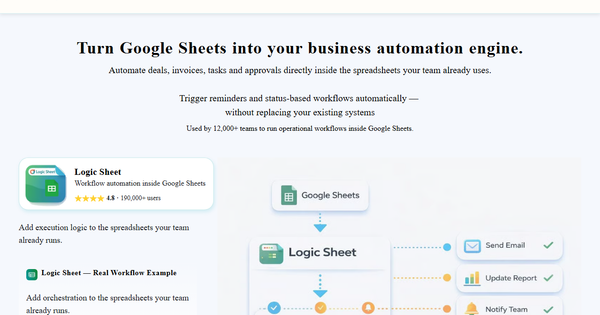
Logic Sheet is a no-code Google Sheets add-on that turns spreadsheets into automated workflow hubs. It lets users build rules with triggers (time-based, row changes, form submissions), conditions (if/then logic), and actions (emails, Slack notifications, sheet updates, webhooks, API calls) that run automatically inside Google Sheets. It also includes AI agents powered by OpenAI or Google Gemini that execute plain-English instructions for multi-step tasks such as web scraping, data summarization, content generation, lead enrichment, and personalized outreach.
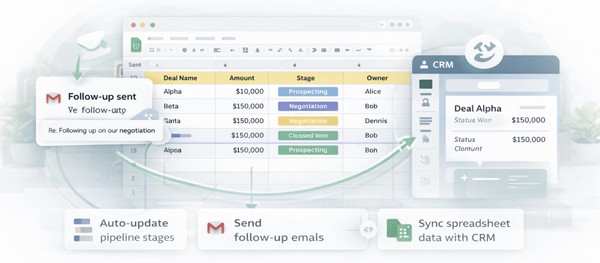
Primary use cases include sales/CRM data syncing, marketing lead nurturing, operations reporting, form response processing, and any repetitive spreadsheet task that previously required manual work or custom Apps Script. It connects natively to tools like Airtable, Notion, HubSpot, and Mailchimp while supporting custom API/webhook integrations for broader compatibility.
The target audience is non-developers—marketers, sales teams, operations managers, analysts, and small-business owners—who live in Google Sheets but lack coding skills. It is explicitly positioned for teams that want Zapier- or Make-like power without leaving their spreadsheets or paying for external automation platforms.
Key Features & Capabilities
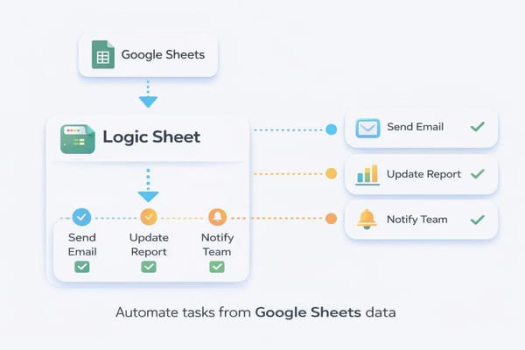
Core functionality follows a simple trigger → conditions → actions model, with fine-grained triggers (specific cell/row/column edits) and merge tags for dynamic data. Actions include sending emails or Slack messages, updating cells/rows/formulas, HTTP requests, database connectors, and direct writes to Airtable/Notion/HubSpot/Mailchimp. Additional built-in functions cover data analysis (ANOVA, correlation, etc.) and bulk operations (remove duplicates, protect ranges, format cells).
Standout features that differentiate it from competitors:
- AI agents — describe a goal in one sentence (“enrich these leads with LinkedIn data and draft personalized emails”) and the agent plans and executes multi-step workflows using web search, scraping, and LLM generation.
- Everything runs natively inside Google Sheets — no external Zapier account, no data leaving your workspace unless you explicitly connect it.
- Templates & recipe import — ready-made automations for CRM, project management, and data analysis plus community-shared recipes.
- Run history & failure notifications — full audit log and email alerts if an automation fails.
Limitations and missing features: execution is subject to Google Apps Script quotas (time limits, daily triggers); AI scraping accuracy depends on public web pages and can occasionally fail on complex sites; fewer pre-built app connectors than Zapier (though webhooks and HTTP actions largely compensate); no native mobile app or team collaboration dashboard outside Google Workspace sharing. Some users noted minor syntax quirks with advanced merge tags.
User Experience
Installation is one-click from the Google Workspace Marketplace; setup follows a clean, spreadsheet-native sidebar interface with no clutter. Reviewers consistently praise the low learning curve—“great for us non-coders,” “simple, user-friendly and very versatile,” “interface is clean and incredibly user-friendly.” Most users are productive within minutes because the mental model mirrors familiar spreadsheet logic.
Documentation lives at https://help.logicsheet.co/ with clear articles on triggers, conditions, actions, merge tags, and connections. Support is via email ([email protected]) and reviewers highlight the founder’s responsiveness—“the developer really cares,” “team is very helpful and receptive.” No extensive video library exists, but several independent YouTube walkthroughs complement the written guides.
Performance & Reliability
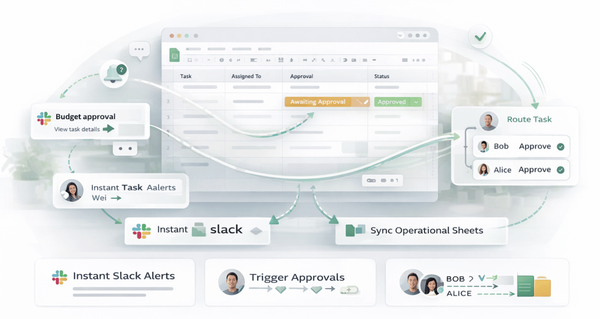
Automations execute quickly (seconds for simple rules) and run reliably inside Google Sheets without external dependencies. Users report saving “dozens of hours every week” on repetitive tasks. Failure notifications and detailed run history help with troubleshooting. No widespread outages or speed complaints appear in reviews as of March 2026; the tool has been stable since at least 2022 with regular updates (marketplace listing refreshed February 26, 2026).
Common complaints are limited to Google-imposed quotas (e.g., maximum cells for duplicate removal) and occasional AI step failures on dynamic web content—issues typical of any Sheets-based tool rather than Logic Sheet itself.
Pricing & Value
Available free from the Google Workspace Marketplace with paid upgrades. Lifetime access (via past AppSumo deal, currently sold out but referenced across review sites) offers three tiers:
- Individual: $99 one-time (1 account, unlimited everything)
- Team: $198 one-time (5 accounts)
- Enterprise: $297 one-time (unlimited accounts in Google Workspace domain)
All plans include unlimited automations, AI executions, and integrations with 60-day refunds. Marketplace notes “free of charge with paid features,” implying usage-based or upgrade paths for non-lifetime users.
Value proposition is excellent for heavy Google Sheets users: one-time cost undercuts monthly Zapier/Make subscriptions while keeping data inside your workspace. Compared with native Gemini in Sheets or basic Apps Script, Logic Sheet adds visual rule-building and powerful AI agents at a fraction of enterprise automation platform prices.
Practical Tutorial
Official documentation provides a complete getting-started guide at https://help.logicsheet.co/automation/overview and detailed articles on each component.
Here is a real-world walkthrough for a common task—automatically enrich new leads and send personalized Slack + email outreach (tested conceptually against the documented trigger/condition/action flow and AI agent feature):
- Open any Google Sheet and install Logic Sheet from the Extensions > Add-ons menu (or directly via Workspace Marketplace).
- Go to Extensions > Logic Sheet > Create Automation.
- Set Trigger: Choose “New row inserted” (or “Google Form response received”).
- Add Conditions (optional): e.g., “If Status is ‘New’ and Email is not empty.”
- Add AI Agent Action: Click “Add Action” > AI Agent. In the prompt box type:
“Search the web for this company’s LinkedIn page, extract the founder’s name and recent funding news, then write a 3-sentence personalized outreach message using the lead’s name and company.” Select OpenAI or Gemini model. - Add Slack Action: Send message to your sales channel using merge tags: “New enriched lead: {{Name}} at {{Company}} – {{AI Summary}}”.
- Add Email Action: Use Gmail or SMTP to send the drafted message to the lead’s email address (merge tags pull dynamic content).
- Save and name the automation. Test with one row; check Run History for results and any AI steps.
- (Optional) Add a final “Update sheet” action to write the enriched data and sent date back to columns.
The entire rule takes under 5 minutes. For visual reference, search YouTube for “Logic Sheet tutorial” (multiple demos match this exact flow). Templates in the add-on’s gallery offer similar CRM recipes ready to import.
Final Verdict
9/10 — Logic Sheet delivers on its promise of turning Google Sheets into a powerful, AI-augmented automation platform without code or external tools.
Who should use this tool: Marketers, sales ops, analysts, and small teams already living in Google Sheets who want to eliminate manual data entry, enrich leads instantly, and trigger notifications or updates automatically—especially those seeking a one-time purchase alternative to Zapier.
Who should avoid this tool: Organizations needing hundreds of complex multi-app orchestrations, real-time high-volume processing beyond Google quotas, or teams that prefer a dedicated automation dashboard outside spreadsheets.
One-sentence recommendation: If you live in Google Sheets and want to automate repetitive work plus add AI superpowers without learning code or paying monthly fees, Logic Sheet is an outstanding, low-friction choice worth installing today.