Transform Your Brand with Logo Theme AI: A Complete Review

Overview & Purpose

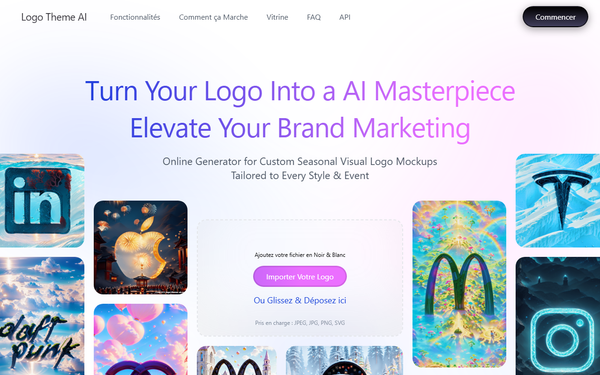
Logo Theme AI is an AI-powered online platform that adapts and customizes existing logos for specific themes, events, seasons, and occasions. Users upload their current logo (preferably in black and white, supporting JPEG, JPG, PNG, or SVG formats) and receive transformed versions tailored for marketing needs, such as seasonal social media graphics, newsletters, app icons, banners, and avatars. Its primary use cases include refreshing brand visuals for holidays, monthly promotions, or trending events to boost engagement across digital channels without repeated manual design work.
The tool targets small business owners, marketers, social media managers, event planners, and non-designers who manage branding for websites, apps, or social profiles. It appeals especially to teams lacking dedicated graphic designers but needing quick, professional-looking thematic variations to keep their brand fresh and relevant.
Research for this review was conducted as of March 7, 2026.
Key Features & Capabilities
Core functionality follows a straightforward three-step process: upload your logo and specify the desired output format, select from over 200 pre-defined themes or create a custom one by guiding the AI, then generate, preview, and download the result. Outputs adapt seamlessly to formats like avatars, banners, and app icons, with support for high-resolution files.
Standout features include a continuously updated library of 200+ templates reflecting current trends and upcoming events, plus automated email delivery of new themed logos triggered by seasons or occasions—eliminating the need for users to manually check or request updates. This event-driven automation and focus on preserving an existing brand identity set it apart from general-purpose AI logo creators (such as LogoAI or Looka), which emphasize initial design rather than ongoing thematic refreshes.
Limitations include the requirement for an existing logo upload (no from-scratch generation), dependency on input quality for optimal results, and a lack of advanced post-generation editing tools or full brand kit exports. Commercial rights, vector precision controls, and software integrations are not prominently detailed on the site.

User Experience
Logo Theme AI offers a low learning curve thanks to its intuitive three-step workflow and drag-and-drop upload interface, making it accessible even for complete beginners with no design skills required. The platform emphasizes quick results through a clean, modern web layout focused on preview and download functionality.
Interface quality appears straightforward and user-friendly based on site descriptions and limited user feedback. Documentation is limited to a basic FAQ section covering common queries (e.g., confirming no design expertise is needed), with support available via email. No extensive tutorials, knowledge base, or community forum are provided, though the homepage includes a clear “how it works” guide.

Performance & Reliability
Generation occurs rapidly—in seconds—producing high-resolution adaptations efficiently for most users. Reliability appears solid for its niche purpose, with no widespread reported outages or major bugs as of March 2026. Early user mentions highlight successful holiday-themed outputs without significant artifacts when using suitable input files.
Known issues or complaints remain minimal due to the tool’s relatively niche presence; sparse reviews note occasional variability in AI interpretation or generic results depending on custom prompts, but no systemic performance problems, downtime, or quality failures appear in public discussions. Overall, it performs reliably for quick thematic updates.
Pricing & Value
The platform operates on a freemium model with a free basic plan offering core access and limited features (such as basic resolutions or watermarked outputs). Premium plans unlock full template access, higher-resolution downloads, advanced customization, and priority support, priced around $16 per month according to third-party review aggregators (exact details may require signup for confirmation, as the official site does not display transparent pricing pages). No enterprise options are explicitly listed.
Value is strong for its specialized use case: marketers can save significant time and designer fees (often $200–$500+ per custom seasonal variant) by automating refreshes, making it cost-effective compared to general AI tools or manual platforms like Canva. The unique automation provides ongoing utility that general logo makers lack, though pricing transparency could be improved for better comparison.
Practical Tutorial
No official video tutorials or external guides were found, but the homepage provides a clear built-in walkthrough. Below is a practical, step-by-step tutorial for a common task—creating a spring-themed social banner for a fictional eco-friendly coffee brand called “EcoBrew” (using a simple leaf-and-cup logo). This is based directly on the official process and can be completed in under 2 minutes.
-
Visit https://logo-theme-ai.com/ and click the prominent “Get Started” or upload button. Prepare your EcoBrew logo in black and white for best results (PNG or SVG preferred). Upload the file and select “Banner” as the output format to optimize for social media or newsletters.
-
Browse the 200+ pre-defined themes or choose the custom option. For this example, select or describe a “Spring Bloom” or “Earth Day” theme, prompting the AI with details like “add subtle green floral accents and eco elements while preserving the original leaf-and-cup icon and brand colors.”
-
Tap “Generate” to let the AI process the transformation. Preview the result instantly—a refreshed banner version with seasonal overlays that maintains core branding identity. If needed, regenerate with slight prompt tweaks (e.g., more vibrant tones).
-
Once satisfied, download the high-resolution file (PNG, JPG, or SVG). For ongoing use, create a free account to enable automated email updates—EcoBrew will then receive future seasonal variants (e.g., summer or holiday versions) directly in the inbox without further action.
This approach works equally well for app icons or avatars; simply change the format selection in step 1. Results can be further refined in free tools like Canva if minor tweaks are desired.
Final Verdict
Overall rating: 4.2/5. Logo Theme AI delivers a focused, innovative solution for seasonal logo adaptations with strong automation and simplicity, though its niche scope and limited documentation hold it back from a perfect score.
Who should use this tool: Small businesses, marketers, social media managers, and event organizers who already have a solid logo and want effortless, automated thematic refreshes to boost engagement without hiring designers or learning complex software.
Who should avoid this tool: Users needing to generate a logo from scratch, professional designers requiring pixel-perfect editable vectors or deep integrations, enterprise teams demanding extensive support and transparency, or anyone prioritizing broad user reviews and proven scalability.
One-sentence recommendation: If your brand needs quick, AI-driven seasonal makeovers and automated updates to stay visually fresh year-round, Logo Theme AI is a convenient and affordable choice worth trying via its free tier.