Loman AI Review: The Ultimate AI Phone Agent for Restaurants
Overview & Purpose

Loman AI is a 24/7 voice-based AI phone agent built exclusively for restaurants. It answers every incoming call, takes food orders for pickup and delivery, books reservations, handles FAQs, processes secure payments, and syncs everything directly to the restaurant’s POS and reservation systems. The goal is simple: eliminate missed calls (which can cost restaurants up to 30% of peak-hour volume), reduce labor expenses, increase order accuracy, and drive incremental revenue through smart upselling—all without adding staff.
Primary use cases include high-volume single-location spots, multi-unit chains, and enterprise restaurant groups that rely heavily on phone orders and reservations but struggle with staffing shortages or after-hours coverage. It is not aimed at developers, marketers, or designers; the target audience is restaurant owners, operators, and general managers who want to turn their phone line into a revenue-generating, always-on team member.
Key Features & Capabilities
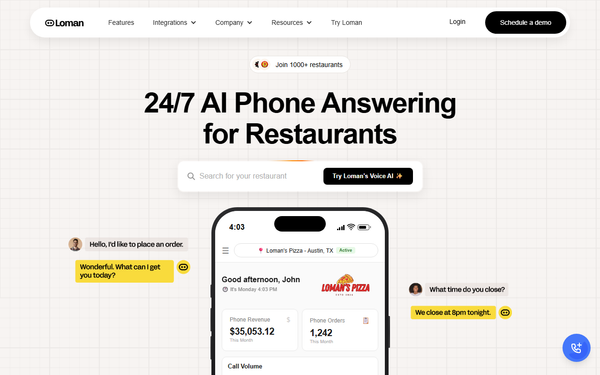
Core functionality centers on natural, human-like voice conversations that handle unlimited (or up to 50 simultaneous in Starter) calls without hold times or busy signals. The AI quotes wait times, gives directions, routes complex issues, updates menus in real time for out-of-stock items, and uses a “smart guest memory” to personalize repeat interactions. Standout differentiators include:
- Deep, native integrations with Square, Toast, SpotOn, Clover, and OpenTable for instant ticket creation and reservation syncing.
- Secure on-call credit-card payments and dynamic upsell prompts that lift average ticket size.
- A live analytics dashboard showing transcripts, revenue metrics, peak-call patterns, and ROI.
- 98.6% claimed order accuracy (well above industry voice-AI averages) and support for over 30 languages.
- Onboarding in 24–48 hours with zero downtime.
Limitations include no public free trial (only a 30-second demo call and occasional first-week-free promotions), limited public documentation beyond blog posts, and occasional reports of integration hiccups requiring manual support. Unlike some competitors, it lacks a documented “failsafe” manual-order fallback if POS sync temporarily drops. Multilingual depth is strong on major languages but not the 50+ dialects offered by a few newer entrants.
User Experience
Setup is deliberately low-friction: most restaurants go live within 24–48 hours via marketplace installs (e.g., Toast or Shift4) or a quick onboarding call. The web dashboard is clean and restaurant-focused—upload your menu once, tweak hours/specials, and monitor live calls in real time. No coding or technical expertise is required; the learning curve is essentially zero for non-technical operators.
Interface quality earns praise in owner testimonials for its simplicity and actionable insights. Documentation is light—primarily blog articles and in-onboarding guidance rather than a comprehensive knowledge base—but 24/7 phone/email support is included. Real-user feedback on Reddit and review sites is limited but leans positive, with operators highlighting “peace of mind” and the ability to leave early on busy nights.

Performance & Reliability
Call handling is fast and conversational, with interruption support and context retention that feel natural. Restaurants report 17–26% labor-cost reductions and 22–28% phone-revenue lifts in case studies. Enterprise-grade uptime is advertised, and the system has processed millions of calls with 98.6% accuracy.
Known issues are infrequent but documented: one verified user reported persistent order-taking bugs over four months with poor follow-up support and unexpected billing. A few comparison reviews note occasional address-verification hiccups on delivery orders. Overall, public complaints are rare compared with the volume of glowing owner testimonials, suggesting reliability for most mid-to-high-volume restaurants.
Pricing & Value
Two transparent plans (as of March 2026):
- Starter — $199/month + $149 one-time setup (basic inquiries, up to 50 simultaneous calls, SMS, dashboard).
- Premium — $399/month + $149 setup (adds full takeout/delivery ordering, reservations, POS & OpenTable integration, payments, upsells, and smart menu updates).
Enterprise custom pricing available for multi-unit groups. No overage fees are published; minutes appear unlimited within the plan tier. A free interactive demo call is available instantly; some early promotions included the first week free.
Value is compelling versus hiring a full-time phone staffer ($2,500–$4,000/month) or generic answering services. Restaurants routinely report payback in 10–30 days and ongoing monthly gains of $2,000–$8,000 in recaptured orders. Compared with newer competitors, Loman’s flat-rate structure (no hidden per-minute charges) and restaurant-specific POS depth give it an edge for most operators, though ultra-high-volume chains may need to negotiate enterprise terms.
Practical Tutorial
Loman provides official implementation guides and POS-specific quickstarts. Below is a real-world walkthrough for the most common task—going live with phone ordering and POS sync—drawn directly from their published steps and user onboarding flow.
Step-by-step: Launch Loman AI for Takeout & Delivery Orders (Premium plan)
-
Book onboarding — Visit loman.ai/demo or install Loman from your POS marketplace (Toast, Square, Clover, Shift4). Fill the 30-second form; a success manager schedules a 15-minute call within 24 hours.
-
Connect your systems — During the call, grant API access to your POS and (if using) OpenTable. Loman auto-imports your menu, hours, and specials. Confirm payment gateway for on-call credit cards.
-
Customize the AI — In the dashboard, upload voice samples if you want cloning, add house rules (e.g., “no substitutions on burgers”), set upsell prompts (“Would you like to add our popular garlic knots?”), and enable multilingual detection.
-
Test thoroughly — Place 5–10 test calls via the demo line. Review transcripts and tickets in real time. Adjust any menu phrasing that trips the AI.
-
Flip the switch — Update your phone greeting to “You’ve reached [Restaurant]—our AI assistant is ready to take your order!” Route your existing number (or get a new toll-free). Go live instantly—no downtime.
-
Monitor & optimize — Check the dashboard daily for the first week. Use built-in analytics to spot peak times and refine prompts. Most restaurants see full ROI within 10–14 days.
Full official guide: https://loman.ai/blog/how-to-implement-an-ai-phone-agent-in-your-restaurant-a-step-by-step-guide. POS-specific quickstarts (e.g., Shift4, Clover) are also available on the site.
Final Verdict
Overall rating: 4.7/5 — Excellent execution of a painfully common restaurant pain point.
Who should use this tool: Independent to multi-unit restaurant operators who lose revenue to missed calls, hate phone chaos, and want a true “set-it-and-forget-it” AI employee that pays for itself quickly.
Who should avoid this tool: Ultra-small operations with very low call volume (Starter may still be overkill), restaurants needing 50+ niche dialects, or owners who prefer fully open-source/custom AI and are uncomfortable with limited public support documentation.
One-sentence recommendation: If your restaurant still relies on humans to answer the phone, Loman AI is the fastest, most reliable way to capture every order, cut labor costs, and never miss another hungry caller—highly recommended for any operation doing more than 30 phone orders a day.