LunaCal Review: The Ultimate Conversion-Focused Booking Tool

Overview & Purpose
LunaCal.ai is an online appointment booking and scheduling platform designed to streamline client meetings by letting users create professional, shareable booking links or embeddable widgets that reflect real-time calendar availability. It connects directly to Google, Outlook, and Apple calendars (with support for multiple accounts), automates email and SMS reminders, handles group or team scheduling, and enables paid bookings without transaction fees. The primary goal is to eliminate email ping-pong while turning the booking experience into a branded marketing asset through rich landing-page-style customization.
Key use cases include booking discovery calls, coaching sessions, real estate viewings, classes or webinars, parent-teacher meetings, and agency client consultations. It excels for global teams thanks to automatic timezone detection, 13+ language support, and multi-location handling. The target audience spans solo professionals (consultants, coaches, freelancers), growing agencies, service businesses (real estate, healthcare, fitness, education), and sales/recruiting teams who want more than basic scheduling—they seek higher conversion through trust-building content on the booking page itself. Over 2,500 companies reportedly trust the tool, positioning it as a strong Calendly alternative for users prioritizing aesthetics and conversion over minimalism.
Key Features & Capabilities
Core functionality revolves around unlimited event types, real-time calendar syncing, automated reminders (email/SMS), buffers, notice periods, custom pre-booking questions, and manual approval workflows. Users can embed booking calendars on websites, generate shareable links, and collect payments directly via Stripe or PayPal at 0% commission.
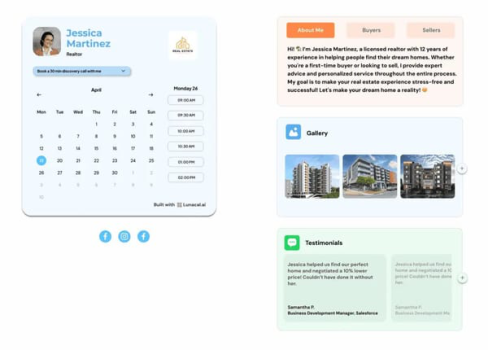
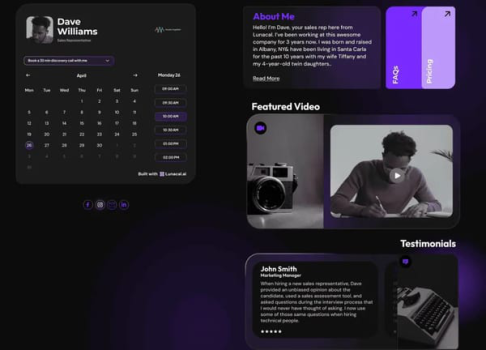
Standout features that differentiate LunaCal from competitors include highly customizable booking pages that function like mini landing pages—add videos, testimonials, images, social feeds, FAQs, maps, and company profiles to build instant trust (users report higher conversion rates around 15% versus industry averages of ~10%). Other differentiators are inline email embeds for personalized time-slot selection, round-robin and collective team scheduling, group bookings for classes/webinars, session packages/coupons, multi-language support with local date/time formats, and trigger-based workflows for pre- and post-meeting automation. Integrations cover Zapier, webhooks, video tools (Zoom, Google Meet, Microsoft Teams, even FaceTime), and CRM options (HubSpot, Pipedrive, Salesforce in higher plans).
Limitations include no native mobile app (only responsive web), advanced CRM and custom integrations locked behind the Enterprise plan, potential extra carrier fees for SMS (not covered by the platform), and a richer page-builder that can feel like extra work for users needing ultra-simple internal scheduling. Duplicate event types lack a one-click copy function in some user feedback, and while reliable, the tool is younger than legacy competitors, so its ecosystem of third-party templates is smaller.
User Experience
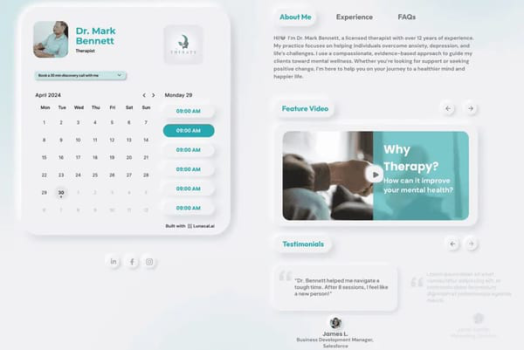
LunaCal offers an intuitive, modern interface with low learning curve—most users can set up their first booking page in under 15 minutes thanks to clean dashboards, drag-and-drop customization, and helpful onboarding flows. Themes range from minimalist professional to bold creative, with full color/logo control and custom domains for seamless branding. The booking page preview updates live, making iteration fast.
Documentation is functional but basic: the site includes quick-start guides, and community resources like detailed YouTube setup videos fill gaps; no extensive public help center was prominent during research, though email support is responsive (with live meetings and dedicated managers in higher plans). Users on G2 consistently praise the “clean booking experience” and “professional customization,” noting it feels more engaging than plainer alternatives.
Performance & Reliability
The platform delivers fast load times for booking pages and reliable real-time syncing across calendars, with automated reminders proven to reduce no-shows. Timezone handling and conflict detection across multiple calendars work smoothly, even for global users. No widespread outages or major technical complaints surfaced in 2026 reviews; performance remains consistent for small-to-medium teams.
Known issues are minor: occasional subtle timezone display quirks in booking details, and some users report that heavy customization can slightly slow initial page rendering (though still under a second). Support response times are generally quick and human, though isolated Trustpilot notes mention delays during peak periods. Overall, reliability is strong for its price point, with GDPR compliance and secure data handling as standard.
Pricing & Value
LunaCal uses a per-user monthly subscription with no free tier (signup requires choosing a plan, though a trial-like experience is available via the app). Plans are:
- Standard ($9/user/month or ~$7.20 annually): Unlimited events/calendars, 1:1 and group bookings, full page customization, payments at 0% commission, Zapier, basic reminders/workflows, and email support.
- Teams ($15/user/month or ~$12 annually): Adds round-robin/collective scheduling, team organization, webhooks, custom questions, multi-location support, remove branding, and live-meeting support.
- Enterprise ($25/user/month or ~$20 annually): Includes everything plus CRM integrations (HubSpot, Pipedrive, Salesforce), custom integrations, dedicated account manager, and advanced analytics.
Yearly billing saves up to 20%. Value shines for users who leverage the rich branding and payment features—especially compared to Calendly’s higher per-user costs and transaction fees on some plans. It delivers strong ROI for service businesses through higher conversion and time savings, though pure freelancers needing only basic links may find the per-user model less economical than one-time alternatives. Past limited-time lifetime deals (~$59 via AppSumo) have been noted in reviews but are not currently offered on the official site.
Practical Tutorial
A common task is setting up a branded 1:1 discovery call booking page. Here is a step-by-step walkthrough (based on the platform’s flow as of March 2026; for video guidance see the official “Lunacal Tutorial: Complete Setup Guide” on YouTube).
-
Sign up and connect calendars: Go to app.lunacal.ai/signup, create an account, and verify email. In Settings > Calendars, connect Google, Outlook, or Apple (multiple allowed). Grant permissions for availability syncing.
-
Create your first event type: From the dashboard, click “New Event Type” > select “One-on-One.” Name it (e.g., “30-Min Discovery Call”), set duration (or let bookers choose), and define availability (working hours, buffers, notice period, custom day overrides).
-
Customize the booking page: Open the page editor. Add your profile photo/logo, headline, and description. Use the widget builder to drag in videos, testimonials, images, social feeds, FAQs, or a company map. Choose a theme/color scheme, embed social proof, and enable custom questions (e.g., “What’s your main goal?”). For branding, add a custom domain (Teams+ plans).
-
Set up payments, reminders, and workflows (optional): Toggle “Paid Booking,” connect Stripe/PayPal, set price/packages/coupons. Configure automated email/SMS reminders and post-meeting follow-up sequences.
-
Configure team or advanced options (if applicable): For teams, enable round-robin or collective mode and organize members. Add manual approval if needed.
-
Publish and share: Copy your booking link (e.g., lunacal.ai/yourname/discovery), embed the widget on your website, or use the inline email embed. Test by booking a slot yourself—conflicts are automatically blocked.
Official resources and video walkthroughs are linked from the dashboard after signup. Total time: 10–20 minutes for a polished page.
Final Verdict
LunaCal earns a strong 4.8/5 for its beautiful, conversion-focused booking pages, zero-commission payments, and reliable automation at an accessible price—making it one of the highest-rated scheduling tools on G2 (4.9/5).
Service-based professionals, coaches, consultants, agencies, and small teams who want their booking link to double as a trust-building marketing asset should use it: the customization depth and global features deliver clear time savings and higher close rates. Avoid it if you need a completely free plan, a native mobile app, ultra-simple internal-only scheduling, or deep enterprise-grade admin controls without scaling to the $25/user tier.
Highly recommended for anyone tired of plain scheduling pages—LunaCal turns booking into a branded experience that actually helps you win more clients.