Magai Review: The Ultimate All-in-One AI Multi-Model Platform

Overview & Purpose
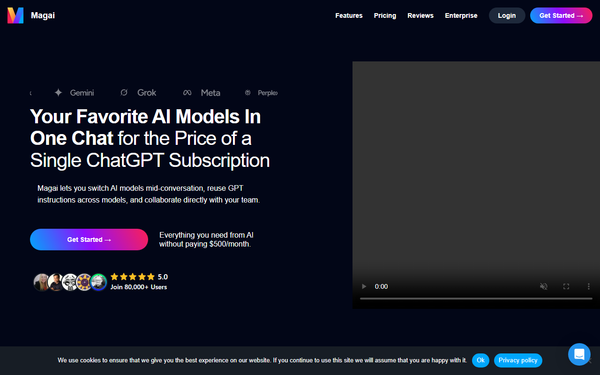
Magai (https://magai.co/) is an all-in-one AI platform that grants access to over 50 advanced AI models—including ChatGPT, Claude, Gemini, DeepSeek, Perplexity, and various image/video generators—through a single, intuitive chat interface. Users can switch models mid-conversation while retaining full context and history, perform real-time web research, automatically retrieve and analyze YouTube video transcripts, upload PDFs and files for chatting or summarization, edit documents directly in-chat, and collaborate with teams. Primary use cases include content creation (articles, emails, landing pages, social posts, YouTube scripts), research synthesis, marketing copywriting, storytelling, code debugging, and organized team workflows.
The target audience encompasses content creators, digital marketers, YouTubers, copywriters, leadership coaches, freelancers, and small-to-medium business teams (including those in schools, healthcare, legal, and finance) who seek to streamline AI usage, enforce brand consistency, and boost productivity without juggling multiple subscriptions. Research conducted as of March 2026.
Key Features & Capabilities
Core functionality centers on a unified chat interface supporting seamless model switching, auto model selection, and integrated tools for research and creation. Users interact with any model, apply specialized instructions, upload files, search the web, and generate content without leaving the platform.
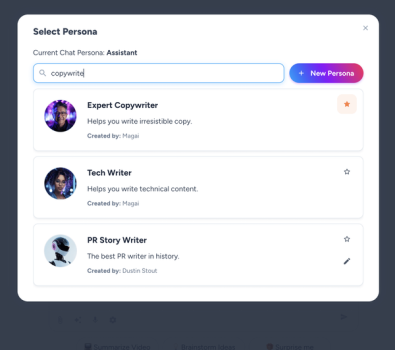
Standout features that differentiate it from competitors like standalone ChatGPT include reusable AI personas (50+ pre-built options plus a Persona Marketplace for custom or community-shared ones that apply brand voice or task-specific expertise across all models), an in-chat document editor for real-time writing, editing, and exporting as PDF or DOCX, a prompt library and enhancer for saving/reusing and improving inputs, real-time URL content retrieval and YouTube transcript auto-fetch, PDF/file uploads for analysis, team collaboration via invites, role-based workspaces, shared secure links, chat folders, search/filtering, and brand separation through workspaces. Additional capabilities encompass image and video generation directly in-chat, easy migration of chat history and custom instructions from other platforms, and enterprise-grade privacy (no training on user data).
These elements provide superior organization and consistency compared to single-model tools, where switching requires restarting conversations or facing rate limits. Limitations include monthly word-based usage caps (no rollover reported by users), output quality varying by chosen model (occasionally generic), and dependence on underlying model performance. Missing features noted in reviews include deeply specialized coding IDEs or unlimited free usage tiers.

User Experience
Ease of use stands out with a clean, familiar ChatGPT-style interface augmented by sidebar controls for models, personas, workspaces, and tools—resulting in a short learning curve for anyone already using AI chats. Advanced elements like custom personas or team permissions require minimal exploration thanks to intuitive dropdowns and in-app guidance.
Interface quality is modern and visually striking, supporting real-time edits, organized dashboards, and seamless navigation across folders and searches. Documentation includes a robust help center (help.magai.co) with step-by-step articles on features such as the document editor and prompt saving, plus an official YouTube channel (@heymagai) offering video walkthroughs on personas, workspaces, image editing, and team management. Support resources feature founder engagement through a Facebook community, though user feedback on response times remains mixed.
Performance & Reliability
Speed is generally efficient for content generation, with no traditional cooldowns or rate limits thanks to instant top-ups and context preservation across models. Reliability shines in chat history retention—even during external API issues—and smooth handling of web research, transcript fetching, and migrations. Efficient models allow users to stretch allowances significantly (average consumption reportedly under 30% of monthly budget).
Known issues and common complaints from users include occasional slower response times compared to native model apps (especially with complex prompts or during peak loads), rapid depletion of word budgets on less efficient models, and occasional generic or incorrect outputs. Trustpilot reviews highlight sluggish performance and feature bugs (e.g., imports), though many G2 users rate the aggregator experience highly for daily workflows. Overall, it proves stable and productive for professional use, outperforming fragmented alternatives in consistency.

Pricing & Value
Magai employs a simple tiered structure with no free tier or trial, but a 100% 30-day money-back guarantee. The Solo plan costs $20 per month for 1 user and approximately 100,000 words of monthly usage. The Team plan is $40 per month for 5 users with triple the usage (~300,000 words), where additional seats add further word allowances. Enterprise plans offer custom pricing, volume discounts, and white-glove onboarding for larger organizations (contact [email protected]). Instant top-ups allow extra usage without plan changes, and word budgets stretch further with efficient models.
The value proposition excels for multi-model users: access to premium capabilities that could otherwise cost hundreds monthly across separate subscriptions, plus unique organization, personas, and collaboration tools unavailable in basic plans. It outperforms single-tool alternatives like ChatGPT Plus for versatility and workflow efficiency, making it particularly cost-effective for teams or heavy creators—though light users or those needing unlimited access may find top-ups necessary.
Practical Tutorial
Step-by-Step: Creating a Custom AI Persona for Branded Marketing Content (Common Task for Marketers and Copywriters)
This workflow demonstrates Magai’s strengths in consistency and research integration for producing on-brand content quickly.
-
Log in at https://magai.co/ (or start a subscription with the money-back guarantee) and select or create a Workspace for organization.
-
Navigate to the Personas section (or browse the Persona Marketplace). Click “Create New” and name it, e.g., “AcmeBrand Marketing Expert.”
-
Enter detailed instructions: “You are a senior copywriter specializing in eco-friendly products for Acme Co. Use persuasive, benefit-driven language with a professional yet approachable tone. Incorporate SEO keywords, structure with headings/bullets/CTAs, and reference our brand values of sustainability and innovation.” Optionally upload a PDF of brand guidelines or sample content as knowledge.
-
Save the persona—it becomes instantly available across all models and chats.
-
Start a new chat, apply your custom persona from the dropdown, and choose a model (e.g., Claude for creativity or Auto for optimization).
-
Incorporate research: Paste a YouTube video URL (Magai auto-fetches the transcript) or webpage URL. Example prompt: “Analyze the transcript from [YouTube link] and key statistics from https://example.com/research. Summarize insights relevant to sustainable product launches.”
-
Generate content: “Using the research, draft an 800-word SEO-optimized blog post on launching our new eco-line targeted at millennials. Include outline, full draft, and social teaser.”
-
Refine mid-chat: Switch models (e.g., to Perplexity for fact-checking or Gemini for thumbnails ideas). Use the prompt enhancer if needed, then open the in-chat document editor to rewrite sections live.
-
Collaborate or finalize: Invite team members for comments, generate accompanying images/videos, save the prompt to your library for reuse, and export the polished document as PDF or DOCX. Organize the finished chat in folders for easy retrieval.
This process typically takes 10–20 minutes. For visual demos, watch official YouTube tutorials such as “How to Create AI Personas in Magai That Produce 10X Better Content” or consult help.magai.co articles on personas and the document editor.
Final Verdict
Overall rating: 4.0 out of 5.
Magai stands out as a powerful productivity booster for professionals managing multiple AI needs, delivering strong organization, brand consistency via personas, and cost savings through consolidated access. Who should use this tool: Content creators, marketers, YouTubers, and small teams seeking a unified workspace that replaces juggling separate AI subscriptions while enhancing collaboration and workflow efficiency. Who should avoid this tool: Users satisfied with a single model’s native interface, heavy users sensitive to word-budget management and variable speeds, or those requiring immediate premium support. One-sentence recommendation: Magai is a compelling upgrade for serious AI-powered creators and teams who value versatility, organization, and multi-model power in one intuitive platform.