Magic AI Avatars Review: Create 200+ Personalized Digital Avatars
Overview & Purpose
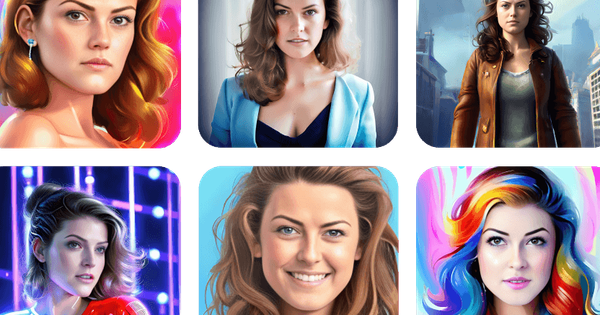
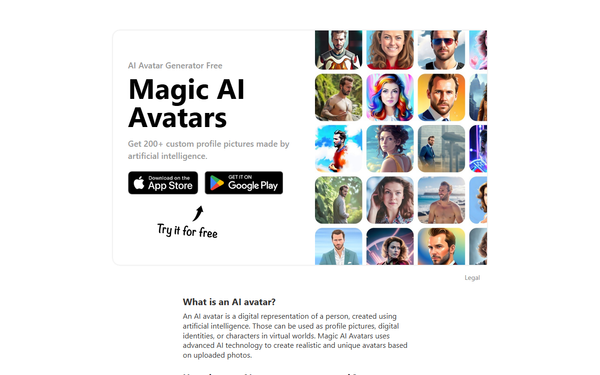
Magic AI Avatars is an AI-powered avatar generator primarily available as a mobile app (iOS and Android) promoted via https://magicaiavatars.com/. It allows users to upload close-up selfies or photos, which the AI analyzes using deep learning to create over 200 personalized, high-quality digital avatars. These avatars place the user in diverse scenarios, styles, and themes—such as relaxing on a beautiful beach with palm trees, standing in front of famous global landmarks, or appearing as a professional businesswoman or businessman—while maintaining a realistic resemblance to the original face.
The primary use cases include generating unique profile pictures for social media platforms (Instagram, LinkedIn, etc.), creating digital twins or representations for virtual reality/gaming environments, enhancing online anonymity or privacy, and producing fun, shareable images for personal branding or family use (with consent). It targets everyday consumers and social media enthusiasts rather than specialized professionals like developers, marketers, or designers—though creators seeking quick, varied profile content may find it useful. The tool emphasizes simplicity and accessibility, with no email or signup required for basic use, positioning it as an entertaining, privacy-conscious alternative to manual photo editing.
Research conducted as of April 2026.
Key Features & Capabilities
Core functionality revolves around photo upload and AI generation: users provide 6–12+ clear close-up selfies (ideally with varied angles, expressions, and lighting), and the system produces packs of realistic avatars in multiple predefined themes and styles. Outputs are high-resolution and customizable to some extent through theme selection (e.g., vacation, professional, fantasy, anime, cyberpunk). The app claims advanced AI for unique, tailored results that closely mimic facial features.
Standout features include the high volume of avatars (200+ per generation in some packs), strong emphasis on privacy (photos stored temporarily and deleted post-processing), no-email onboarding, and mobile-first accessibility across iOS and Android. It differentiates from some competitors by focusing on sheer quantity and variety of personalized scenarios rather than hyper-stylized artistic filters alone, making it suitable for quick "digital twin" experimentation.
Limitations include reliance on preset templates rather than fully custom prompts, no desktop/web version (mobile app only), and inconsistent output quality reported by users. There is limited fine-grained customization beyond theme packs, and advanced features like video avatars or integrations are absent. Some reviews note it feels template-driven rather than deeply innovative compared to tools like Lensa AI or PhotoAI.
User Experience
The app offers a straightforward, low-learning-curve interface ideal for non-technical users: simply download, upload photos, select a pack/theme, and generate. Navigation is intuitive with minimal clutter, though in-app purchase prompts can feel pushy. Processing is mostly hands-off once started.
Interface quality is clean and modern on mobile, with easy preview/download options for generated images. However, App Store feedback (4.6/5 average from hundreds of ratings) highlights frustrations like upfront payment requirements, lack of a robust free trial, and occasional auto-reprocessing of old photos without user control. No dedicated documentation or extensive help resources exist beyond basic in-app guidance; support is limited, and users rely on YouTube tutorials or community feedback. Overall, it's beginner-friendly but can feel sales-oriented.
Performance & Reliability
Generation speed varies: basic outputs may take minutes, but full packs often require 45 minutes to several hours (or longer during peak times), as the AI processes on remote servers. Efficiency is acceptable for mobile but not instant.
Reliability is mixed. Many users praise realistic likeness and high-quality results for certain themes, but common complaints include inconsistent facial matching (e.g., altered skin tone, aging effects, or "weird" distortions), variable realism across styles, and occasional failures to capture the user's essence accurately. No major widespread outages reported, but processing delays and the need for multiple photo uploads for best results are noted issues. Privacy handling appears solid per official claims, with no major data breaches documented in available sources.
Pricing & Value
Magic AI Avatars follows a freemium model: the app is free to download with limited or teaser generations possible, but full access requires in-app purchases. Pricing includes one-time packs starting around $0.99–$5.99 (or higher for premium bundles) and subscription options around $3.99/month or weekly plans up to $7.99+. A free trial or limited free avatars may be advertised, but reviews often describe it as "pay upfront" with no substantial no-cost output.
Value proposition is solid for casual, one-off use—delivering 100–200+ avatars at a low entry cost compared to professional photo shoots or more premium tools like Lensa AI. It offers good bang-for-buck in variety if results satisfy, especially versus manual editing. However, compared to alternatives (e.g., PhotoAI or free web generators), it may feel less valuable due to mobile-only access, potential subscription traps, and quality variability. Best for budget-conscious users seeking fun experimentation rather than enterprise-scale or pro workflows.
Practical Tutorial
A step-by-step tutorial for the common task of generating personalized avatars (e.g., seeing yourself on a beach or as a business professional) is available via the official app and community resources. No comprehensive official documentation exists, but the process is simple and mirrored in YouTube overviews.
- Download and install the Magic AI Avatars app from the App Store (iOS) or Google Play (Android) via links on https://magicaiavatars.com/.
- Open the app and grant photo library permissions (no account or email required).
- Upload 6–12 high-quality close-up selfies: Use good lighting, varied angles/expressions, and neutral backgrounds for optimal AI training.
- Select a theme pack or style (e.g., "Vacation/Beach" or "Business/Professional") and complete the in-app purchase if prompted (free teasers may appear first).
- Tap "Generate" and wait for processing (typically 15–60+ minutes; keep the app open or check notifications).
- Preview the generated avatars (often 8–200+ images), discard unwanted ones if options allow, and download favorites in high resolution.
- Share directly to social media or save to your device.
For visual walkthroughs, refer to community tutorials like "Magic AI Avatars App Overview!! How to create Amazing Avatars using AI" on YouTube (https://www.youtube.com/watch?v=4aNqH6cZ3eE). Results improve with better input photos; experiment with packs for different scenarios.
Final Verdict
Overall rating: 3.8/5 – Strong on accessibility and variety for casual fun, but held back by inconsistent quality, processing delays, and payment friction.
Who should use this tool: Casual social media users, individuals seeking quick personalized profile pictures or lighthearted digital transformations (e.g., beach/vacation or professional looks) who value simplicity, privacy, and high avatar volume on a budget.
Who should avoid this tool: Professional designers, marketers, or creators needing consistent high-fidelity results, instant generation, desktop access, or advanced customization—better options like Lensa AI or PhotoAI may suit them more reliably.
One-sentence recommendation: Magic AI Avatars is a convenient, entertaining mobile tool for generating dozens of personalized AI avatars with minimal effort, ideal for spicing up your online presence if you can overlook occasional quality hiccups and wait times.