Magnific AI Review: The Ultimate AI Image Upscaler and Enhancer

Overview & Purpose
Magnific AI is an advanced AI-powered image upscaler, enhancer, transformer, and generator that uses generative AI to not only increase resolution but also add intricate new details—often referred to as "hallucinations"—guided by user text prompts and intuitive sliders. It transforms any input image into a dramatically higher-resolution version while reimagining elements for greater realism, creativity, or artistic flair, making the output feel "indistinguishable from magic."
Primary use cases include enhancing AI-generated artwork (e.g., from Midjourney or Stable Diffusion), restoring vintage photos, beautifying digital illustrations, game assets, 3D renders, portraits, landscapes, architecture visuals, and even product photography or film stills. It supports upscaling up to 16x or examples reaching 77MP (10,752 × 7,168 pixels).
The tool targets professionals and enthusiasts in photography, graphic design, digital art, illustration, game development, architecture visualization, and AI content creation. It appeals particularly to users who already work with generative tools and need a final "magic" polish for marketing materials, prints, or high-end visual projects.
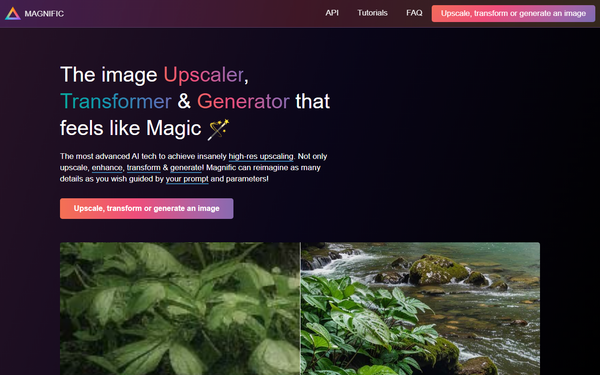
Key Features & Capabilities
Core functionality revolves around uploading an image, entering a natural-language prompt, and adjusting sliders for Creativity (controls new detail generation), Resemblance (fidelity to original), HDR (dynamic range), and newer additions like Fractality, plus optimization modes (e.g., Portrait, Art, Landscapes) and AI engines (Automatic, Illusio for artistic, Sharpy for photo). Users can select upscale factors, presets (Subtle, Vivid, Wild, Custom), and newer Precision v2 modes for more controlled, fidelity-preserving enhancements on real photos versus creative reimagination.
Standout features that differentiate it from competitors like Topaz Photo AI or Upscayl include its generative "hallucination" capability—adding realistic textures, details, and reimagined elements rather than just sharpening existing pixels—and seamless integration of prompts with sliders for guided creativity. It excels at turning low-res AI art into ultra-detailed masterpieces and now includes Precision v2 (Sublime/Photo) for natural photo results with controls like Sharpness, Smart Grain, and Ultra Detail.
Limitations include potential artifacts or unwanted changes (e.g., distorted hands or overly painterly textures) if sliders and prompts are not tuned precisely, dependence on input image quality, no offline/local processing, maximum output around 10k pixels in practice, and processing times that consume credits quickly during iteration. It does not automatically fix severe flaws in the source image.
User Experience
The web-based interface is clean, intuitive, and accessible even for beginners, with a simple upload area, prompt box, slider controls, preset selectors, and background processing so users can continue working while jobs run. The learning curve is gentle thanks to visual feedback and presets, though mastering prompts and sliders for consistent results takes some experimentation.
Interface quality feels modern and responsive, with real-time previews of parameter effects in many cases. Documentation and support resources are strong: official YouTube channel and founder threads on X provide in-depth walkthroughs, a community for sharing tips, and planned knowledge base. Customer support is generally responsive via billing and community channels, though some users note slower responses during high demand.
Performance & Reliability
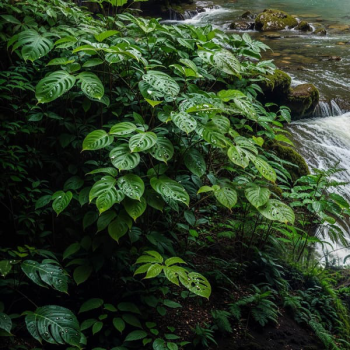
Processing typically takes 10–15 minutes per image (longer at peak times or for higher scales), but runs reliably in the background on cloud GPUs. Output quality is frequently described as stunning for creative tasks, with high detail preservation and natural additions, earning praise in benchmarks (e.g., strong fidelity in Precision v2 mode) and Product Hunt ratings of 5.0/5.
Known issues include occasional artifacts (e.g., weird textures on skin or hair), slower performance during busy periods, and reports of quality dips or inconsistent results in dense/complex scenes. Some users complain of high credit consumption during trial-and-error and minor blurring or over-smoothing. Reliability is solid for subscribed users, but the GPU-intensive nature means no refunds for failed or undesired generations.

Pricing & Value
Magnific AI operates on a subscription-only model with no free tier or meaningful trial (due to high GPU costs). Plans are Pro at $39/month, Premium at $99/month, and Enterprise/Business at $299/month. Annual subscriptions include two months free, and payments are securely handled via Stripe (credit/debit cards only, no PayPal or crypto). Credits/tokens are consumed per job and typically do not roll over if you cancel; unused credits may expire monthly.
The value proposition is excellent for frequent professional users who leverage the unique creative enhancement—delivering results that cheaper or one-time alternatives (e.g., LetsEnhance starting at $9/month or free local tools like Upscayl) cannot match in detail hallucination and artistic control. It is less compelling for casual or pure-photography upscaling needs, where traditional desktop software may offer better cost efficiency.
Practical Tutorial
A common task is upscaling and creatively enhancing a low-resolution AI-generated image (e.g., from Midjourney). Here is a step-by-step walkthrough based on the official workflow and popular tutorials:
- Visit https://magnific.ai/, create an account, and subscribe to a plan (Pro or higher required).
- Click to upload your image (supported formats include standard photo and illustration files).
- In the editor, enter a descriptive prompt (e.g., "highly detailed realistic textures, intricate foliage, cinematic lighting").
- Select an optimization mode (e.g., Art or Landscapes) and preset (e.g., Vivid), then adjust sliders: set Resemblance to 60–80% for fidelity, Creativity to 2–5 for added details, and tweak HDR/Fractality as needed. For photo-real results, switch to Precision v2 mode with Sharpness and Ultra Detail.
- Choose your desired upscale multiplier (up to 16x or custom resolution).
- Click "Generate" or "Enhance"—the job processes in the background (expect 10–15 minutes).
- Review the result in the gallery; download the high-res image or iterate by adjusting parameters and regenerating.
For visual guidance, refer to official examples on the homepage or detailed YouTube tutorials such as "How To Use Magnific Ai - Full Beginners Guide 2025" and "The #1 AI Image Upscaler | Magnific Tutorial."
Final Verdict
Overall rating: 8.5/10. Magnific AI excels for digital artists, AI creators, illustrators, and designers who want transformative, detail-rich enhancements that go far beyond simple upscaling—making it ideal for professional workflows involving generative art, 3D renders, or high-impact visuals. It should be avoided by casual users, budget-conscious hobbyists, or anyone needing instant results, strict fidelity without experimentation, or free/local processing, due to its subscription cost and processing time. One-sentence recommendation: Magnific AI delivers truly magical, creatively reimagined images that justify its premium price for dedicated creatives seeking next-level detail and resolution.