Mails.ai Review: Scale Cold Email Automation with Unlimited Inboxes

Overview & Purpose
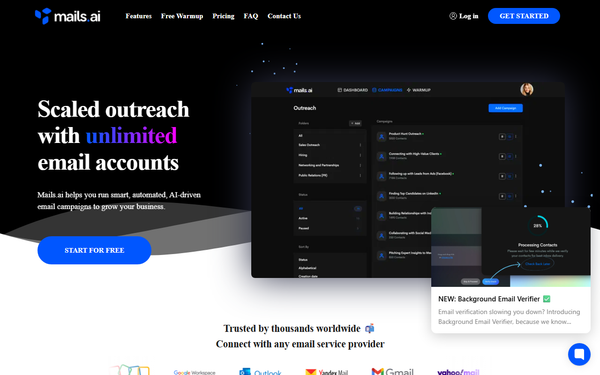
Mails.ai is an AI-powered cold email automation platform designed to help businesses scale outreach through automated email campaigns and follow-ups. It focuses on cold email sequences, enabling users to connect unlimited email accounts, generate personalized emails with AI, verify leads, warm up inboxes for better deliverability, and run campaigns on autopilot. Primary use cases include sales prospecting, lead generation, marketing campaigns, and agency outreach where high-volume, personalized cold emailing is needed to drive responses and ROI without daily send limits.
The target audience primarily consists of marketers, sales teams, agencies, solopreneurs, and small-to-medium businesses engaged in outbound sales or lead nurturing. It is not aimed at developers (lacking advanced API customization) or designers, but suits non-technical users who want an all-in-one tool for email growth hacking.
Key Features & Capabilities
Core functionality revolves around building and automating multi-step cold email sequences. Users connect any email provider (Gmail, Outlook, custom SMTP), upload leads, verify emails, and let AI handle writing and scheduling. Standout features include:
- Unlimited email accounts and inboxes with no per-account fees.
- AI Email Writer that generates full 5-step sequences based on simple prompts about your product/service, including personalization and spintax.
- Advanced deliverability tools: automatic mailbox warmup (sending to a pool of real users), campaign-specific warmup, inbox rotation, reputation monitoring, and real-time email verification.
- Unlimited uploaded contacts, unlimited emails per month (limited only by active contacts tier), open/click/reply tracking, and automated follow-ups.
- Done-For-You (DFY) service (separate cost) for setup, leads, or campaign management.
These differentiate Mails.ai from competitors like Instantly or Lemlist by offering truly unlimited inboxes and contacts upload at competitive flat pricing, plus a combined warmup system claimed to maximize inbox placement.
Limitations include tiered restrictions on "active contacts" (unique leads first emailed per month, resetting monthly) and email verifications. The free plan offers unlimited accounts/warmup but minimal campaign functionality. Some users report AI outputs needing heavy editing for authenticity, and the platform lacks advanced CRM integrations or hyper-personalization beyond basic variables.
User Experience
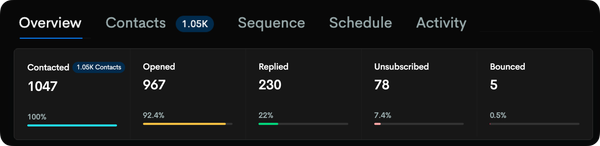
Setup involves connecting accounts, DNS configuration (SPF/DKIM/DMARC), and warmup—straightforward with guided flows but time-consuming for beginners, with a moderate learning curve. The interface is functional and dashboard-based for campaigns, analytics, and contacts, though some users describe it as clunky or basic in design.
Documentation is solid via the Help Center with articles on getting started, campaign setup, and troubleshooting. Support includes tickets (priority on higher plans) and live chat, but user feedback highlights slow or automated responses rather than personalized help. Overall, it's accessible for non-experts once initial setup is complete, with AI assistance reducing manual work.
Performance & Reliability
Campaigns run efficiently on autopilot with daily sending based on user-set limits (e.g., 20-40 emails/day per inbox recommended for safety). Warmup and rotation features aim for high deliverability, with many users reporting improved open rates and inbox placement after proper configuration. No inherent speed issues noted in automation.
However, reliability draws mixed feedback. Common complaints include warmup not always sending emails as promised, occasional campaign bugs (e.g., not sending or scheduling failures), and risk of blacklisting if DNS/warmup is mishandled. Support responsiveness is a frequent pain point. As of April 2026 research, these issues appear in a notable portion of reviews but do not affect all users.
Pricing & Value
Mails.ai offers a free plan (unlimited email accounts and email warmup, limited campaigns/verifications) and a free trial/start option. Paid plans are tiered by monthly active contacts:
- Startup: $49/month ($24/month annually) — 1,000 active contacts, 2,000 verifications.
- Growth: $99/month ($49/month annually) — 5,000 active contacts, 10,000 verifications.
- Pro: $199/month ($99/month annually) — Unlimited active contacts, 50,000 verifications.
All plans include unlimited accounts, emails, campaigns, warmup, AI writer, team members, and advanced features like custom tracking domains. Higher tiers add priority support and more verifications. Annual billing saves up to 50%. DFY service is extra.
Value is strong for users needing many inboxes without per-account fees—more affordable than many alternatives for scaling. It provides an all-in-one solution at a flat rate, making it cost-effective for high-volume outreach compared to tools charging per inbox or email. However, if active contacts are low or support is critical, alternatives may offer better perceived value.
Practical Tutorial
Mails.ai provides official guides in its Help Center. Below is a step-by-step walkthrough for a common task: setting up and launching your first AI-powered cold email campaign (based on official documentation as of April 2026).
-
Sign up and connect accounts: Create a free account at mails.ai. Go to account settings and connect email accounts (Google Workspace, Outlook, custom SMTP/IMAP). Enable app passwords or OAuth as required. Set up SPF, DKIM, and DMARC on your domain for deliverability.
-
Warm up inboxes: Navigate to the Warmup section. Enable automatic mailbox warmup (it sends safe emails to a real-user pool) and campaign warmup. Monitor reputation metrics daily—aim for steady warmup over 7–14 days before heavy sending.
-
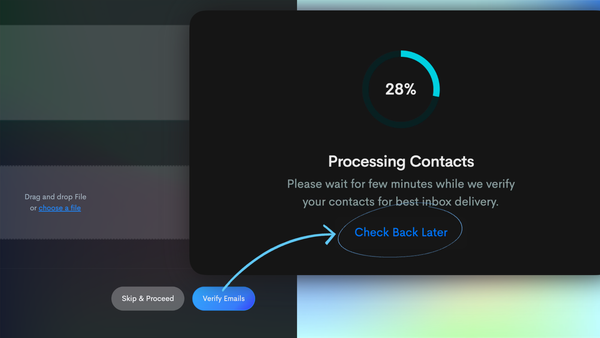
Import and verify leads: Go to Campaigns > + New Campaign. Upload a CSV lead list (with columns for email, name, company, etc.). Click "Verify Emails" using the built-in verifier. Delete invalid/unknown addresses; keep only valid ones. Assign dynamic variables (e.g., {{first_name}}).
-
Craft the sequence with AI: In the campaign builder, use the AI Writer. Input details about your company, product, and goal (e.g., "Software for sales teams seeking 30% more meetings"). The AI generates a 5-step sequence with suggested delays. Edit for tone, add personalization/icebreakers, and enable spintax for variation. Keep emails short (under 150 words) with minimal links.
-
Configure and launch: Set daily sending limits, select multiple inboxes for rotation, enable/disable tracking, and schedule based on lead time zones. Review analytics options. Click Launch—the system sends daily on autopilot and routes replies to your inbox. Monitor opens, replies, and bounces in real-time.
For more, see official guides: Getting Started and Campaign Setup. Test with a small list first.
Final Verdict
Overall rating: 3.8/5. Mails.ai excels as a budget-friendly, scalable cold email tool for users prioritizing unlimited inboxes and AI automation, delivering solid deliverability and efficiency when properly set up.
Who should use it: Sales professionals, marketers, and agencies running high-volume cold outreach who value cost savings on multiple accounts and can manage initial DNS/warmup setup independently.
Who should avoid it: Teams needing premium, responsive support, ultra-polished UI, or guaranteed zero-risk deliverability—opt for more established platforms if reliability complaints are deal-breakers.
One-sentence recommendation: If you're scaling cold email without breaking the bank on per-inbox fees, Mails.ai is a capable all-in-one choice worth the free trial, provided you invest time in proper warmup and monitoring.