Mapify Review: Transform Any Content Into AI Mind Maps Fast
Overview & Purpose

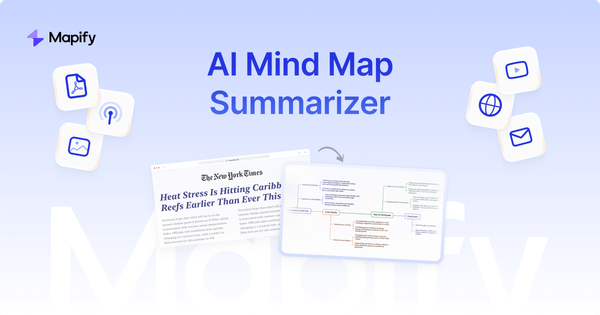
Mapify (https://mapify.so/) is an AI-powered mind mapping tool developed by the Xmind team that automatically converts various content sources—including PDFs, documents, websites/URLs, YouTube videos, audio recordings (podcasts or meetings), text prompts, and even images (with OCR)—into visually structured, editable mind maps in seconds. Powered by top LLMs such as GPT, Gemini, and Claude, it analyzes input, extracts key concepts and relationships, and organizes them into intuitive hierarchical diagrams that boost comprehension and retention.
Primary use cases include summarizing lengthy study materials or lectures for quick review, processing business reports and research papers, organizing video or podcast content, brainstorming ideas, and transforming information overload into digestible visuals ready for presentations or sharing. It also supports converting finished mind maps into polished slides.
The target audience primarily includes students and learners preparing for exams, researchers synthesizing information, professionals (marketers, analysts, managers) handling reports or pitches, educators, and knowledge workers. While broadly useful for anyone dealing with complex information, it is especially valuable for visual learners; it is less targeted at developers needing code-specific diagramming or designers requiring highly artistic manual customization, though teams benefit from easy sharing.

Key Features & Capabilities
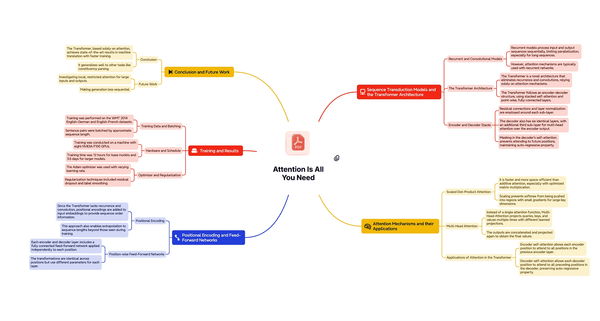
Core functionality centers on one-click mind map generation: users paste a URL, upload a file, or input text, and the AI instantly produces a structured map that users can then edit by adding, removing, or rearranging branches.
Standout features that differentiate it from competitors include broad multi-format input support (especially direct video/audio transcripts and image OCR), an integrated AI chat assistant for asking contextual questions, expanding ideas, or refining content; one-click “Present as Slides” mode to turn maps into professional presentations; multi-language summarization and translation; AI image generation for visual enhancement; ready-made templates; a browser extension for on-the-fly web or YouTube summarization; cross-platform sync (web, iOS/Android apps, extension); and rich export options (PDF, PNG, SVG, Markdown, Xmind format).
Compared to alternatives like NotebookLM or basic AI summarizers, Mapify excels with superior format versatility, presentation tools, and seamless editing/export integration—particularly its ability to handle video and audio natively while maintaining Xmind compatibility.
Limitations and missing features include a credit-based usage system that restricts heavy users on lower tiers; basic collaboration limited to link sharing (no robust real-time simultaneous editing); fewer advanced styling, icons, or manual customization options than dedicated traditional tools; occasional file-size limits; and typical AI dependencies that may miss subtle nuances or introduce minor inaccuracies.
User Experience
Mapify offers a very low learning curve thanks to its straightforward upload-or-paste-and-generate workflow, making it accessible even for beginners with no prior mind-mapping experience. The modern, clean interface emphasizes visuals and responsiveness across devices, with intuitive drag-and-drop editing and inline modifications that feel natural rather than cluttered.
The integrated AI chat adds helpful interactivity without overwhelming the layout. Documentation is solid via an active blog with practical guides and YouTube tutorials covering specific workflows (PDFs, videos, etc.). Support resources include an FAQ, email ([email protected]), and strong community presence; the platform also earns high marks on the App Store (4.8/5) and Product Hunt.
Performance & Reliability
Mind map generation is impressively fast—often completing detailed maps from long videos, PDFs, or articles in just seconds—with efficient key-point extraction and hierarchical organization that handles multimedia transcripts and OCR well.
Known issues from user feedback on platforms like G2, Reddit, and Trustpilot include occasional summarization inaccuracies common to AI tools, credit depletion from failed generations, and rare technical glitches (such as loading errors or blank screens). Overall reliability is strong with no widespread outages reported; the tool has scaled successfully to over 5 million users and continues to receive positive updates. Performance remains excellent for its core quick-visualization purpose as of March 2026 research.
Pricing & Value
Mapify follows a freemium model. The Free tier provides 30 AI credits one-time (no credit card required), allowing limited trials such as 5 PDF/doc conversions, 5 YouTube videos, prompt-based mapping, audio summarization, and basic editing—sufficient to test core capabilities across web, extension, and mobile apps.
Paid plans (Basic, Pro, Unlimited) unlock substantially more credits and full features, with pricing approximately $5.99–$9.99/month (billed annually) for Basic, scaling to $11.99–$19.99 for Pro and $17.99–$29.99 for Unlimited (monthly rates higher). A 40% annual discount, 30% education savings for students/educators, and custom enterprise/team plans (contact sales) are available. One subscription works across all platforms, and the site holds ISO/IEC 27001:2022 certification for data security.
Value proposition is strong for individuals and light teams: the time saved on information processing and learning (often described as 10x efficiency) easily justifies the cost versus manual mind mapping or less visual AI alternatives. It outperforms free options in versatility and exports while remaining competitive with other AI tools; heavy users benefit most from the Unlimited tier, though budget-conscious users may find lower-tier credits restrictive.
Practical Tutorial
Mapify maintains official how-to guides on its blog. Below is a step-by-step walkthrough for a common task—summarizing a YouTube video into an editable mind map and converting it to presentation slides (drawn directly from official processes and tutorials).
Example: Convert a 20-minute TED Talk on productivity into a mind map and slides.
- Visit https://mapify.so/ and sign in (or create a free account for 10–30 starter credits).
- On the dashboard or main input panel, select the YouTube/video option (or simply paste the URL into the central field).
- Copy the YouTube video link and paste it; optionally add a prompt such as “Focus on key strategies and real-world examples in English.”
- Click “Mapify” or Generate. The AI processes the transcript, extracts main ideas with relationships, and builds a clean hierarchical mind map in seconds.
- Review and refine: expand/collapse branches, use the integrated AI chat to ask follow-ups (e.g., “Add more examples here” or “Explain this point”), or right-click nodes for AI-generated expansions.
- Customize further: drag to reorganize, edit text, or incorporate AI images for visual icons.
- Switch to “Present as Slides” mode to instantly transform the map into a polished, ready-to-present slide deck.
- Export as needed: PDF for printing, PNG/SVG for images, Markdown for notes, or Xmind format for deeper editing elsewhere. All maps sync automatically across devices.
The entire process typically takes under two minutes. For PDFs the steps are nearly identical (just upload the file). Full official guide: https://mapify.so/blog/how-to-create-a-mind-map-with-ai. Numerous free YouTube demos (search “Mapify Tutorial 2026”) provide visual walkthroughs.
Final Verdict
Overall rating: 4.5 out of 5.
Mapify is ideal for students, researchers, professionals, and educators who regularly consume long-form content (videos, PDFs, articles, recordings) and want to convert it rapidly into clear, memorable visual structures that enhance learning and productivity. It shines when speed, multi-format support, and presentation-ready output matter most.
Avoid it if you need advanced real-time team collaboration, fully unlimited free generations without credits, or heavy manual diagramming customization beyond AI assistance.
One-sentence recommendation: Mapify is a standout AI tool for instantly transforming overwhelming content into insightful, shareable mind maps—highly recommended for any knowledge worker seeking massive efficiency gains.
Sources consulted include the official website and blog (mapify.so), Product Hunt, G2, comparison reviews, and user forums; features and pricing can evolve rapidly. Research conducted March 2026.