MinutesLink Review: The Best AI Meeting Assistant for Zoom & Meet
Overview & Purpose

MinutesLink is an AI-powered meeting assistant primarily designed for Google Meet and Zoom that automatically joins calls, records audio, provides real-time transcription, generates summaries, action items, and comprehensive meeting minutes. It transforms raw conversations into organized, searchable, and shareable notes, allowing participants to focus fully on discussions rather than note-taking. The tool integrates with Google Calendar for automatic attendance of scheduled meetings and supports collaboration through editing, commenting, and sharing features. It also includes a “Deep Research” mode for querying past meetings with source-linked answers and participant quotes.
Primary use cases include remote team syncs, sales calls, HR interviews, client consultations, educational sessions, and any scenario where accurate capture of decisions and follow-ups is critical. The target audience encompasses professionals and businesses—particularly sales teams, HR/recruiting specialists, consultants, educators, and remote-first organizations—who rely heavily on Google Meet or Zoom. It appeals to users seeking productivity gains without complex setup, with future expansion via personalized digital avatars that replicate a user’s communication style and knowledge base for task automation and potential monetization.
Research conducted as of March 10, 2026.
Key Features & Capabilities
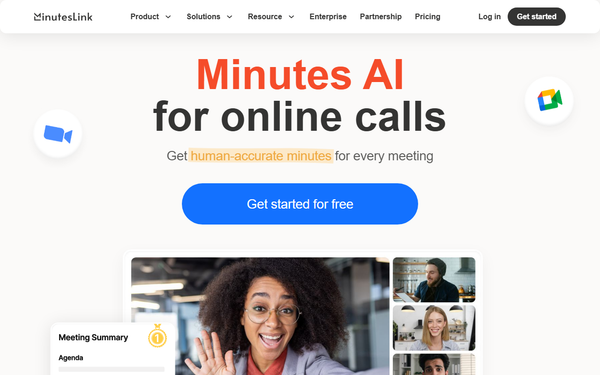
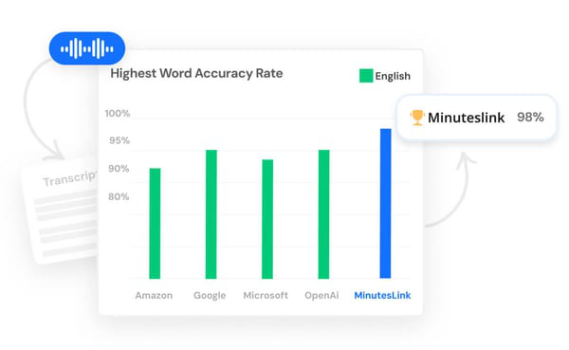
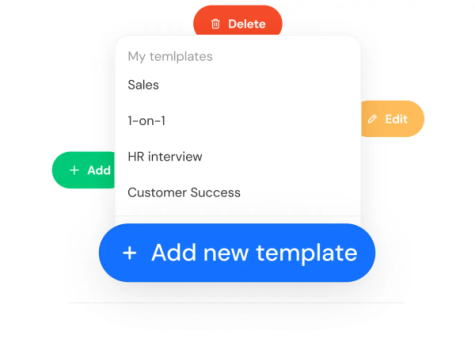
Core functionality revolves around seamless bot integration: users paste a meeting link or rely on calendar sync to have the AI join, record, and transcribe in real time (supporting 100+ languages with claimed human-level accuracy that outperforms leading models by up to 40%). Post-meeting, it instantly produces editable summaries using the largest selection of templates, extracts action items, and stores unlimited recordings and notes. Additional capabilities include speaker detection, keyword-based search across meetings, team collaboration tools, and the Deep Research query engine.
Standout features differentiating MinutesLink include its generous free tier, distraction-free interface with no installation beyond a simple Chrome extension, automatic language detection, and the forward-looking digital avatar technology that builds a personalized AI replica from meeting data over time. Security is emphasized with end-to-end encryption, GDPR/CCPA compliance, and user-controlled data deletion.
Limitations include primary support for Google Meet and Zoom (Microsoft Teams integration is mentioned in FAQs but not fully rolled out), no native mobile app, basic integrations beyond calendar, and a relatively small user base with limited advanced analytics or CRM connections compared to established competitors like Fireflies or Otter.ai. Some users report the need for clear audio for optimal accuracy, and the free plan caps processed AI minutes at 10 calls per month (up to 60 minutes each).
User Experience
Setup is straightforward and takes under two minutes: install the free Chrome extension (version 1.0 as of June 2025), sign up with Google, authorize calendar access, and either paste a Meet link to add the bot or enable auto-join for scheduled events. The interface is clean, intuitive, and distraction-free, with a simple dashboard for organizing past meetings. Learning curve is minimal—even non-technical users praise the “5-click” process and straightforward navigation.
Documentation consists of an FAQ section, blog guides, and comparison pages on the official site, though in-depth video tutorials are limited. Support is responsive via email or in-app channels according to positive testimonials, but some users note sparse external help resources. Overall, the experience feels lightweight and professional, ideal for quick adoption.
Performance & Reliability
Transcription and summarization are fast and generally reliable, with post-meeting notes available within seconds and high claimed accuracy in clear audio conditions. The bot joins reliably whether the host is present or not, and unlimited storage ensures long-term access. Users on G2 and site testimonials highlight consistent capture of key points and action items, boosting team accountability.
Known issues include occasional dependency on strong internet and audio quality, as well as significant user complaints about aggressive marketing: upon calendar connection, the tool has reportedly sent spam invites and emails to contacts using the user’s name without explicit consent. This privacy concern appears in multiple recent Trustpilot reviews and has led some organizations to flag the app. With only a small install base (15 users on Chrome Web Store as of early 2026) and limited independent benchmarks, long-term reliability data remains emerging.
Pricing & Value
MinutesLink offers a transparent three-tier structure:
- Basic (Free): $0 forever – 10 AI-processed meetings per month (60-minute limit per call), unlimited notes and recordings, basic summaries, and collaboration.
- Pro: Approximately $9 per user/month (billed annually) – up to 360 meetings/year, full features including unlimited AI summaries and Deep Research.
- Business: Approximately $24 per user/month (billed annually) – higher quotas (e.g., 1,200+ meetings/year) plus team administration tools.
The value proposition is strong for light-to-moderate users thanks to the generous free tier and low entry cost compared to competitors like Otter.ai or Fireflies.ai. Annual billing saves up to 47%. It delivers excellent ROI for Google/Zoom-centric teams by eliminating manual note-taking, though heavy users or those needing broader platform support may find value diminished by limitations and reported privacy practices.
Practical Tutorial
A common task is setting up MinutesLink to automatically capture and summarize a recurring Google Meet team meeting. Here is a step-by-step walkthrough (based on official documentation and how-it-works guidance as of March 2026; always verify on the site for updates):
- Visit https://minuteslink.com/app and sign up for a free account using your Google credentials.
- Authorize Google Calendar access in the dashboard settings—this enables automatic bot attendance for scheduled meetings.
- For a specific or one-off meeting: In the MinutesLink dashboard, paste the full Google Meet link into the “Add AI Assistant” field and click “Add a bot.” The bot will join at the scheduled time (or immediately if the meeting is live).
- Join your Google Meet as usual. The bot operates silently in the background (visible to participants as “MinutesLink AI”).
- After the meeting ends, open the MinutesLink dashboard. Locate the meeting by date, title, or keyword. Review the full speaker-detected transcript, AI-generated summary (choose from multiple templates), and auto-extracted action items.
- Edit notes, assign tasks, add comments, or use Deep Research by typing a query (e.g., “What decisions were made about Q2 budget?”) to receive sourced answers. Share the minutes via link or export for collaboration.
Example: For a weekly product sync, add the recurring Meet link once; every Friday you receive polished minutes with decisions and to-dos already highlighted. For more resources, visit the official tools page at https://minuteslink.com/tools/ai-notetaker-for-google-meet or the blog guides section.
Final Verdict
MinutesLink earns a 4.0 out of 5 rating. It excels as a simple, affordable, and accurate AI note-taker for Google Meet and Zoom users who want to reclaim time and improve meeting follow-through, especially with its generous free tier and promising digital avatar roadmap.
Professionals, remote teams, sales reps, HR specialists, and educators in the Google ecosystem should use it for effortless documentation and collaboration. Avoid it if you prioritize full Microsoft Teams support, have strict privacy requirements (due to reported spam issues), or need mobile apps and deep third-party integrations.
Try the free plan today if you’re tired of manual notes—MinutesLink delivers solid automation with room to grow into a truly personalized AI companion.