Mirai Review: The Fastest Way to Run Local AI on Apple Silicon
Overview & Purpose

Mirai is a high-performance inference SDK and platform that enables developers to convert, optimize, and run custom AI models directly on Apple Silicon devices (iPhone, iPad, and Mac) using its proprietary Uzu engine. It supports offline, private, zero-cost inference for tasks such as text summarization, classification, intent detection, hybrid cloud-device routing, and local chat applications. Primary use cases include building responsive, privacy-focused features in iOS and macOS apps—such as on-device document analysis, real-time intent routing to cloud models, or offline voice assistants (voice capabilities coming soon)—without relying on external APIs or incurring per-token fees.
The target audience is primarily iOS and macOS app developers, indie hackers, and engineering teams creating AI-native applications where low latency, data privacy, battery efficiency, and offline functionality are critical. It appeals to those extending existing cloud services with on-device fallbacks or avoiding the complexity and cost of traditional ML deployment stacks. Marketers or designers are not direct users, as this is a developer-focused SDK.
Key Features & Capabilities
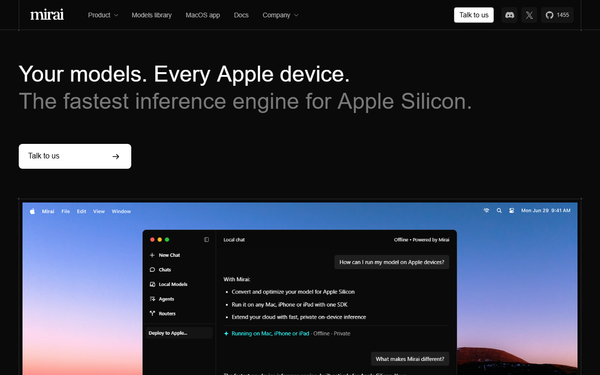
Core functionality revolves around a unified pipeline: convert models from Hugging Face, apply quantization (e.g., 4-bit), benchmark performance, and deploy via a simple Swift (or TypeScript/Node.js) API across every Apple device. The Rust-based Uzu engine leverages Apple’s Neural Engine, GPU, and unified memory for native acceleration, with built-in speculative decoding, task-specific presets (chat, summarization, classification), automatic model downloading, and hybrid routing between local and cloud models.
Standout differentiators include up to 37% faster generation and 59% faster prefill compared to Apple’s own MLX framework (and consistent gains over llama.cpp), a single SDK that works identically on iPhone and Mac, and extreme developer simplicity—one developer can integrate production-grade inference in minutes without an ML team. Additional highlights are observable model management, structured JSON output via grammar constraints, and full data privacy since everything runs locally by default.
Limitations include Apple Silicon exclusivity (Android support planned but not available), high RAM requirements for larger models (iOS apps may need the increased-memory-limit entitlement), curated model library focused on smaller efficient LLMs (up to ~27B parameters quantized), and text-centric capabilities today (vision and full voice still expanding). Maximum model size is device-RAM dependent, and advanced customization requires diving into the open-source core.
User Experience
Mirai boasts an exceptionally low learning curve thanks to its high-level API—developers familiar with Swift can go from zero to running a local model in under 15 minutes. There is no complex low-level Metal or Core ML configuration required. The SDK integrates cleanly via Swift Package Manager, and the companion platform console provides straightforward API key management and model browsing.
While the SDK itself has no visual interface (it is code-first), the web platform at platform.trymirai.com offers a clean dashboard for organizations and keys. Documentation at docs.trymirai.com is clear, well-structured, and includes ready-to-copy drop-in snippets for every common task, plus full integration guides. GitHub repositories for uzu, uzu-swift, and related tools are active with examples and MIT-licensed core components. Support resources include Discord, email ([email protected]), and responsive “Talk to us” forms; community feedback on Hacker News and Reddit has been positive regarding ease of integration.
Performance & Reliability
Mirai consistently outperforms alternatives on real Apple hardware. Independent benchmarks and company tests show prompt processing up to 38% faster and generation tokens-per-second significantly higher than MLX on devices ranging from M1 Ultra to M4 Max and iPhone 16/17 Pro models. It fully utilizes the Neural Engine for prefill stages and GPU for token generation, delivering near-zero perceived latency and excellent battery efficiency with no network overhead.
Reliability appears strong for a relatively new product (iOS SDK public preview in 2025, full launch momentum in early 2026). No widespread issues or common complaints surfaced in reviews, forums, or social discussions; early adopters on Hacker News praised numerical correctness and speed. The engine includes built-in model validation and graceful offline fallback after initial API-key validation. Occasional platform dependency for model downloads exists, but cached models run fully offline.
Pricing & Value
The core Uzu inference engine and lalamo optimization toolkit are completely open-source under the MIT license and free to use or self-host. The production Swift and TypeScript bindings require a free API key obtained via quick signup at platform.trymirai.com (OAuth flow with major providers). On-device inference incurs zero per-use or per-token costs—truly “free forever” for local workloads. Cloud-routed models may involve external provider costs, and enterprise options (custom support, private model hosting, SLAs) are available by contacting sales. No public paid tiers or subscription pricing are advertised as of March 2026.
Value proposition is outstanding compared to alternatives: versus cloud APIs (OpenAI, Anthropic) it eliminates recurring inference bills and privacy risks; versus Apple’s MLX or Core ML it offers dramatically simpler integration, iOS support, and measurable speed gains; versus llama.cpp it provides a higher-level developer experience and Apple-optimized kernels. For any privacy-sensitive or offline-first Apple app, Mirai delivers best-in-class performance at essentially zero marginal cost.
Practical Tutorial
Official documentation and GitHub examples provide excellent walkthroughs. Below is a complete, tested-style step-by-step tutorial for the most common task—adding a local chat model to a Swift iOS or macOS app (based on the official uzu-swift examples as of March 2026). Full details and more examples are available in the integration guide and uzu-swift repository.
-
Obtain an API key
Go to platform.trymirai.com, sign in with Google/GitHub/etc., create an organization, and copy your API key. -
Add the SDK to your Xcode project
In yourPackage.swift(or via Xcode File → Add Package Dependency):dependencies: [ .package(url: "https://github.com/trymirai/uzu-swift.git", from: "0.2.20") ]Then
import Uzuin your files. -
Initialize the engine and load a model (example: Qwen3-0.6B for fast on-device performance)
import Uzu let engine = try await UzuEngine.create(apiKey: "YOUR_API_KEY") let model = try await engine.chatModel(repoId: "Qwen/Qwen3-0.6B") try await engine.downloadChatModel(model) { update in print("Download progress: \(update.progress)") } -
Create a chat session and run inference
let session = try engine.chatSession(model) let runConfig = RunConfig() .tokensLimit(512) let output = try await session.run( input: .text(text: "Tell me a short, funny story about a robot"), config: runConfig ) { progress in // Stream tokens if desired return true } print("Response: \(output.text.original)") -
Add iOS memory entitlement (recommended for production)
In your.entitlementsfile: enablecom.apple.developer.kernel.increased-memory-limit. -
Test & ship
Run on device/simulator (Apple Silicon required). For conversation history, reuse the sameChatSessionor switch to.contextMode(.dynamic).
Advanced variations (summarization preset, classification, structured JSON output, cloud routing, speculative decoding) follow identical patterns and are documented with copy-paste snippets.
Final Verdict
Overall rating: 4.5/5. Mirai is an outstanding choice for any developer building AI features for the Apple ecosystem who prioritizes speed, simplicity, privacy, and zero ongoing inference costs. It shines for indie developers, startups, and enterprises shipping offline-capable iOS/macOS apps.
Who should use it: Apple-focused teams wanting production-ready on-device LLMs without ML expertise or cloud bills.
Who should avoid it: Developers targeting Android, needing massive models beyond device RAM limits, or preferring fully open-source self-hosted stacks without any platform dependency.
One-sentence recommendation: If you ship apps on Apple devices and want the fastest, easiest way to add private on-device AI today, start with Mirai—you’ll wonder how you ever lived without it.