MiriCanvas Review: The Best AI-Powered Canva Alternative
Overview & Purpose
MiriCanvas is a free online graphic design platform that allows users to create professional visual content such as social media posts, presentations, YouTube thumbnails, event promotions, interactive quizzes, and posters using a drag-and-drop editor. Its primary purpose is to democratize design by providing an accessible tool for quick, high-quality visuals without requiring advanced skills or software downloads. It supports cross-device use on PC, tablet, and mobile, with strong emphasis on AI-assisted creation to speed up workflows.
Target audience includes students, small business owners, marketers, content creators, educators, and non-design professionals who need fast, versatile output for personal, educational, or business use. With over 2 million monthly active users across 180+ countries and 400 million+ designs created, it appeals to anyone seeking an easy alternative to more complex tools.
Key Features & Capabilities
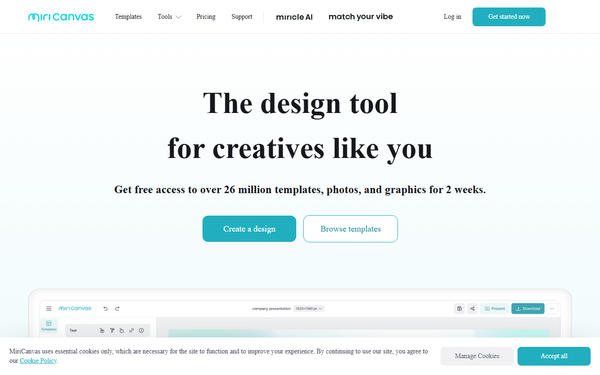
Core functionality revolves around an intuitive drag-and-drop interface, a massive library of over 530,000 templates and 10 million+ graphic elements (photos, icons, videos, audio), one-click animations, and easy export options. Standout AI-powered features include an AI image generator, AI presentation builder (which creates full drafts from a simple topic), AI background remover, AI object remover, AI upscale, and AI writing assistant—capabilities that significantly reduce time spent on ideation and editing.
Differentiators from competitors like Canva include deeper AI integration for instant presentation generation and object manipulation, a focus on high-speed creation, and a generous free tier with substantial assets. The platform also supports real-time collaboration and keyboard shortcuts for efficiency.
Limitations include restricted premium templates and graphics on the free plan (only 50,000 templates and 350,000+ photos/graphics accessible), 1GB storage cap, and no advanced enterprise integrations in lower tiers. Features like unlimited background removal and 7-day work history recovery are Pro-exclusive; very high-resolution professional printing workflows or extensive third-party app integrations may feel lighter than Adobe or enterprise-focused tools.
User Experience
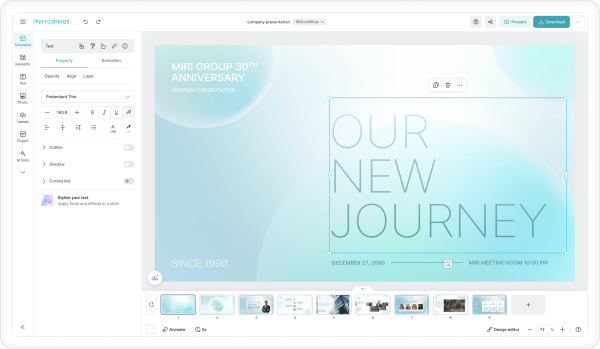
MiriCanvas offers an exceptionally low learning curve, with users praising its clean, intuitive interface that lets non-designers produce polished results in minutes. The drag-and-drop editor feels responsive and modern, similar to industry leaders but with faster AI shortcuts.
Documentation is solid via an English-language Help Center featuring articles on editor basics, keyboard shortcuts, real-time collaboration, and mobile app usage, plus video tutorials and a new editor beta guide. Support includes live chat options and community resources, though English-speaking users note the platform's Korean origins mean some advanced help may lean toward multilingual availability.
Overall, the experience is beginner-friendly and enjoyable, with minimal friction for common tasks.
Performance & Reliability
The platform performs efficiently for most users, with quick loading of templates, fast AI generation, and smooth editing even on standard devices. Cross-device syncing works reliably, and users report consistent uptime suitable for deadlines.
Common complaints are minor: occasional lag in the editor during peak times (especially on free plans) and slower performance for very large files or high-res exports in some user videos. No widespread outages or major bugs were noted in available reviews as of March 2026; the tool is generally considered stable and reliable for daily use.
Pricing & Value
MiriCanvas uses a straightforward tiered model:
- Free: $0 forever — 50,000 templates, 350,000+ photos/graphics, 1GB storage.
- Pro: $129.99/year ($10.83/month, 10% yearly discount) — unlimited premium templates/graphics, 10GB storage, full AI access, unlimited background removal, 7-day history recovery.
- Enterprise: Custom pricing (contact sales) — advanced team collaboration, smart asset management, dedicated support.
A free plan is available to all, with no mandatory trial for Pro (upgrades are instant).
Value is excellent compared to alternatives like Canva Pro (typically higher monthly cost) or paid design suites, especially for individuals or small teams needing AI boosts without subscriptions. The free tier provides real usability, while Pro delivers strong ROI through time savings. Enterprise suits growing organizations seeking scalable teamwork.
Practical Tutorial
Official resources include video tutorials on the MiriCanvas YouTube channel and Help Center guides. Here is a step-by-step walkthrough for a common task—creating a professional YouTube thumbnail using AI image generation (based on platform functionality as of March 2026):
- Go to www.miricanvas.com/en and sign up/log in with email or Google (free account works).
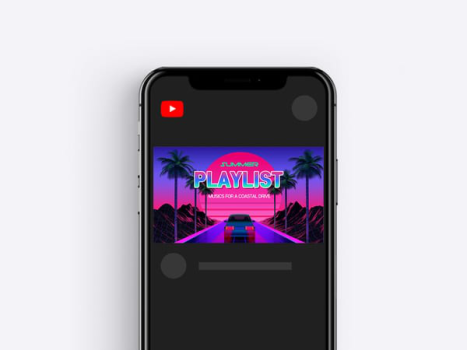
- Click “Create New Design” and search for “YouTube Thumbnail” in the template library (or start blank and set custom 1280x720 dimensions).
- Use the AI tools: Click the AI Image Generator icon, type a prompt like “vibrant gaming character with futuristic city background, high energy,” and generate options. Select one and drag it onto the canvas.
- Add text: Use the text tool for a bold headline (e.g., “Top 10 Tips 2026”), apply AI Writing Assistant if needed for catchy copy, and customize fonts/colors from the sidebar.
- Enhance with elements: Search the library for icons/arrows, apply one-click animation if desired, and use AI Background Remover on any imported photo for clean layering.
- Preview on mobile view (built-in toggle), make adjustments, then click “Download” (PNG/JPG options; Pro unlocks higher quality/unlimited exports).
- Save to workspace for future edits or share via link for collaboration.
This process typically takes under 10 minutes. For official video guidance, search “MiriCanvas YouTube Thumbnail” on their channel or visit the Help Center for related editor shortcuts.
Final Verdict
Overall rating: 4.5/5 — a highly capable, affordable tool that punches above its weight in AI features and accessibility.
Who should use this tool: Students, freelancers, small business owners, marketers, and content creators who want quick, professional designs without steep costs or learning curves—especially those leveraging AI for presentations or social content.
Who should avoid this tool: Professional graphic designers needing pixel-perfect vector tools, advanced animations, or deep ecosystem integrations (better suited to Adobe Illustrator or Figma), or large enterprises requiring extensive custom branding controls beyond Enterprise tier.
One-sentence recommendation: MiriCanvas is an outstanding Canva alternative for anyone seeking fast, AI-powered design with a truly usable free tier—start here if time and simplicity matter more than enterprise polish.