MockFlow Review: The Best AI-Powered Tool for Rapid Wireframing
Overview & Purpose
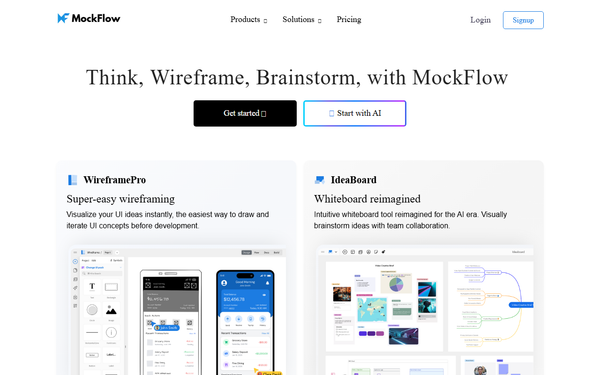
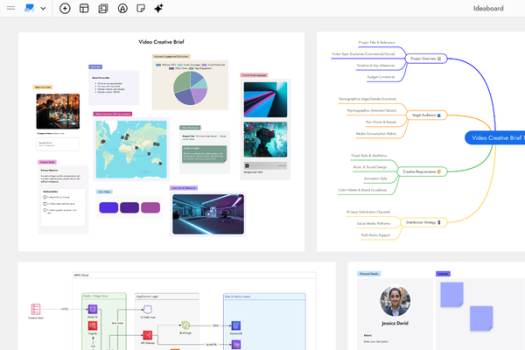
MockFlow is an intuitive online wireframing and collaborative ideation platform that enables users to rapidly visualize and iterate on user interface designs for websites, mobile apps, and desktop applications. It combines two core products—WireframePro for structured UI wireframing and prototyping, and IdeaBoard for AI-enhanced whiteboarding and brainstorming—to streamline the early stages of product design. Primary use cases include quick UI conceptualization, user flow mapping, stakeholder presentations, interactive prototyping, and team collaboration before handing off to developers, ultimately reducing rework and development costs.
The tool targets a broad audience: UI/UX designers for rapid prototyping, developers for code export and handoff, project managers and business analysts for visualizing requirements and user flows, startups building MVPs, and cross-functional teams needing real-time or async collaboration. It is particularly suited for non-designers who want accessible tools without steep learning curves.
Key Features & Capabilities
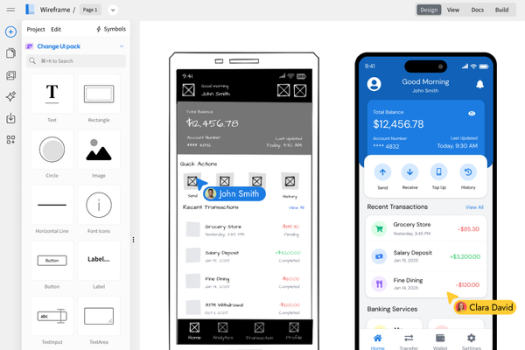
Core functionality revolves around a drag-and-drop editor with extensive pre-built UI kits, templates, symbols, master pages, and interactive linking for turning static wireframes into clickable prototypes. Users can create low- to high-fidelity layouts, add charts, data grids, and responsive mobile views.
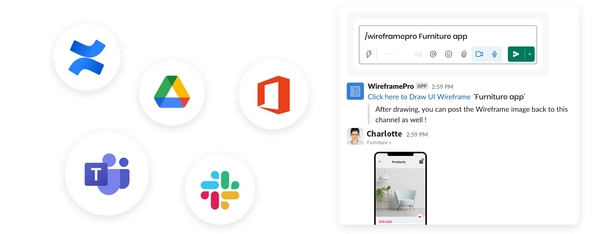
Standout features that differentiate MockFlow include powerful AI capabilities (generate wireframes from text prompts or screenshots/URLs, auto-create content/images/data, suggest design improvements, export to production code in frameworks like React/Tailwind/iOS, and integrate with tools like ChatGPT/Claude), offline desktop apps for Mac/Windows, real-time multiplayer editing with comments/video meetings, and deep integrations (Figma, JIRA, Confluence, Slack, Microsoft Teams/Office, Trello, Google Drive/Docs/Meet, Visual Studio, Chrome extension). Additional strengths are code export (CSS, full frameworks), sitemap/flow diagram generation, and secure sharing/preview links.
Limitations include restricted advanced customization and shortcuts compared to full design suites like Figma or Sketch (e.g., some users note missing keyboard efficiencies or pixel-perfect controls for highly complex projects), occasional UI updates that can feel disruptive, and free-tier restrictions (only 1 Wireframe project, limited AI credits, public sharing only). High-fidelity visual design is not its focus—users often pair it with tools like Figma for later stages.
User Experience
MockFlow boasts a low learning curve and high ease of use, making it accessible for beginners and efficient for professionals. The clean, intuitive drag-and-drop interface allows quick onboarding—most users report being productive within minutes thanks to templates and AI assistance. Interface quality is modern and focused, with responsive design and helpful features like on-canvas comments and revision history, though some find frequent updates mildly irritating.
Documentation and support resources are solid: a dedicated help center with video tutorials, blog guides, and an AI support agent (MIDA). Official videos cover getting started, page management, exporting, and interactions; the blog offers practical walkthroughs. Email support is available, with generally positive feedback on responsiveness for paid users.
Performance & Reliability
The platform performs efficiently for its intended purpose—quick wireframing and ideation—with fast loading, smooth drag-and-drop, and responsive AI generation. Desktop apps provide true offline editing and local file saving, enhancing reliability for users without constant internet. Real-time collaboration works seamlessly for small-to-medium teams.
Known issues are minimal; users rarely report crashes or slowdowns. Common complaints center on occasional tedious sharing setup or limits in very large projects, but overall reliability is strong with no widespread performance grievances in recent reviews. Version history and backups add peace of mind.
Pricing & Value
MockFlow offers a generous forever-free Basic plan ($0) limited to 1 editor, 1 Wireframe project, public sharing, and 100 AI credits. Paid plans (billed yearly for full features like offline apps) start at $7/month for IdeaBoard, $14/month for WireframePro (unlimited projects, 2200 AI credits/user, full collaboration), and $17/month for the Bundle (combined access, 2800 AI credits). Enterprise options include custom licensing, SCIM, and bank transfer/PO billing; additional AI credits are purchasable. Startup and education discounts are available.
Value is excellent for teams focused on rapid ideation and wireframing—more affordable and specialized than Figma or full suites while delivering AI and code export that accelerate workflows. It shines for budget-conscious users or those who don’t need advanced visual design tools, offering strong ROI through time savings and reduced development iterations.
Practical Tutorial
Official resources include a full library of video tutorials and blog guides. Below is a practical, self-contained step-by-step walkthrough for a common task: creating a basic mobile habit-tracker app wireframe in WireframePro (adapted from official guides and real templates; tested conceptually as of March 2026). For the full video, see the official Getting Started tutorial or the habit-tracker example.
-
Sign up and start a project: Go to mockflow.com/app (or download desktop app), sign up for free, and click “New Project” > select “WireframePro”. Choose a mobile canvas (e.g., iPhone 14 template) or start blank with responsive grid.
-
Map user flow (optional prep): Use the built-in SiteMap tool or simply sketch screens on paper first—e.g., Home (dashboard with streaks), Add Habit, Progress Log.
-
Build the layout with drag-and-drop: From the left panel, open UI Packs (Mobile > iOS/Android kits). Drag elements: header with title/logo, navigation tabs at bottom, content area with cards (habit list). Add placeholders like text blocks (“Today’s Habits”), buttons (“+ Add Habit”), progress circles, and data tables for logs.
-
Enhance with components and AI (if paid): Use Symbols for reusable elements (e.g., habit card). For speed, use AI: click “Generate with AI” > prompt “mobile habit tracker dashboard with streaks and add button” or upload a screenshot of a similar app. Refine colors, icons (from built-in libraries), and add interactions (link “Add Habit” button to new screen).
-
Add interactivity and prototyping: Select elements > Properties panel > set links (e.g., tab navigation). Enable hover/click states. Switch to Review mode for live presentation.
-
Collaborate and gather feedback: Share via secure preview link or invite teammates for real-time editing/comments. Use AI design feedback tool for suggestions.
-
Export and hand off: Export to PDF/PNG for stakeholders, or click “Export to Code” for React/Tailwind. Save to Google Drive or integrate with JIRA/Trello.
Real example: MockFlow’s official habit-tracker template starts with a master page for the tab bar, then builds three linked screens in under 10 minutes. For more, visit https://mockflow.com/templates/ or the blog step-by-step guide.
Final Verdict
Overall rating: 4.3 out of 5. MockFlow excels for teams that need fast, collaborative, AI-powered wireframing without the complexity or cost of full design platforms—ideal for designers, developers, PMs, and startups iterating early-stage ideas. It should be avoided by those requiring pixel-perfect high-fidelity visuals, advanced animations, or enterprise-scale design systems (where Figma dominates). Highly recommended as a lightweight, value-packed starting point for any product team prioritizing speed and clarity over polish.