Modulify AI Review: The Fastest AI Website Builder for Webflow
Overview & Purpose
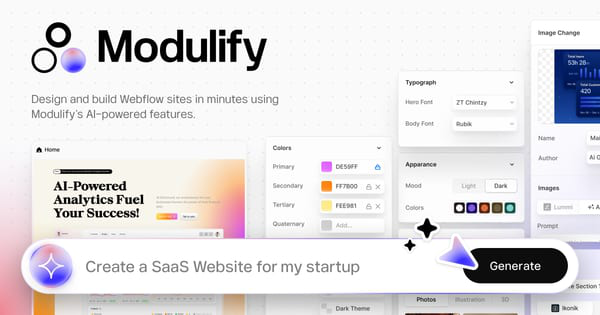
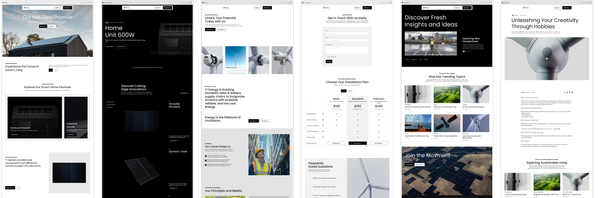
Modulify AI is the fastest AI website builder built exclusively for Webflow. It enables users to generate complete, production-ready websites from a simple text prompt—creating editable sitemaps, solution-driven wireframes (with light and dark modes), and fully styled designs complete with typography, colors, spacing, icons, and responsive components—then copy-paste them directly into Webflow with one click.
The primary use cases include rapidly prototyping and launching client websites, portfolios, SaaS landing pages, agency sites, restaurants, and enterprise-scale projects. By skipping the traditional Figma-to-Webflow handoff, it lets teams go from idea to publishable site in minutes rather than days or weeks.
Target audience is primarily Webflow-native professionals: freelance web designers, digital agencies, junior-to-senior Webflow developers, and growing businesses already invested in the Webflow ecosystem. It is not intended for complete beginners with no Webflow knowledge or users of other platforms (Framer, WordPress, etc.). As of March 2026, the tool claims over 27,000 users among designers and agencies.
Key Features & Capabilities
Core functionality revolves around a streamlined AI playground:
- Prompt-based sitemap generation and editing (add, remove, reorder pages/sections).
- AI-powered wireframes using pre-built, UX-optimized components (hero sections, portfolios, pricing tables, testimonials, bento grids, contact forms, etc.).
- One-click styling with premium “Vibes” design systems that instantly apply consistent typography, colors, shadows, animations, and responsive behavior.
- Built-in AI image generation (powered by Lummi) and icon library (Ikonic).
- Full preview in light/dark modes and responsive views.
- One-click export/copy of wireframes or styled designs directly into any Webflow project.
Standout features that differentiate it from competitors (e.g., Relume, Webflow AI, Dora):
- Delivers not just wireframes but fully polished, production-ready designs—no Figma detour required.
- Editable design systems (Pro and above) for brand consistency across projects.
- Seamless Webflow integration that preserves all classes, interactions, and structure.
- “Surprise me” button and template gallery of cloneable, creator-built projects (e.g., “Portfolio – Warsaw,” “SaaS – Konoha”).
Limitations and missing features include:
- Strictly Webflow-dependent; no export to HTML, Framer, or other platforms.
- AI image generation consumes credits (10 free per month; plans provide 50–200 yearly credits plus top-up options).
- Starter plan caps at 2 projects, 20 pages, and 40 components per page.
- Output occasionally requires manual tweaks for complex custom branding, pixel-perfect mobile stacking, or advanced interactions.
- No built-in CMS content population or e-commerce tools (handled inside Webflow).
User Experience
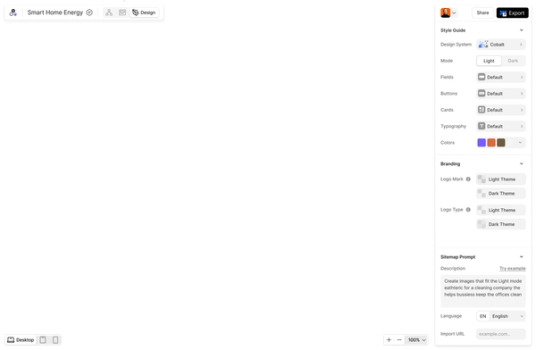
Modulify offers an exceptionally intuitive interface with a clean, modern AI playground that feels more like a creative canvas than a traditional builder. The learning curve is gentle for anyone already familiar with Webflow—most users report being productive within the first 10–15 minutes. Non-Webflow users would face a steeper curve due to the required downstream knowledge.
Interface quality is high: drag-and-drop sitemap editing, instant style previews, responsive toggles, and one-click actions keep the flow frictionless. Chrome is recommended for best performance. Documentation is solid via the official /learn section, which hosts a complete video series covering prompts, sitemaps, wireframing, styling, and export. Additional support includes email ([email protected]), in-app chat for paid users, and an active Reddit community (r/webflow threads frequently praise its productivity). Enterprise adds hands-on dedicated support.
Performance & Reliability
Generation is lightning-fast—users consistently describe building entire sites “in minutes” with 80–90 % of the work completed automatically. Copy-paste into Webflow is reliable and preserves structure, classes, and responsiveness. Reliability is strong with no widespread outages reported as of March 2026; the platform handles complex multi-page projects smoothly.
Known minor issues include occasional layout stacking glitches on mobile (easily fixed with Webflow’s native tools) and output quality that varies with prompt specificity. Users note that very bespoke designs still require 10–20 % manual refinement. Overall, feedback across Reddit and G2 is overwhelmingly positive on speed and efficiency, with no major reliability complaints.
Pricing & Value
Modulify uses a straightforward subscription model with no hidden fees beyond optional extra seats and credit top-ups:
- Free tier (after cancellation): 1 project, 2 pages, 10 AI credits/month.
- Starter: $24/month or $19/month (yearly) — 2 projects, 20 pages/project, 40 components/page, 50 AI credits (yearly billing).
- Pro (most popular): $48/month or $38/month (yearly) — unlimited projects/pages/components, 200 AI credits (yearly), extra members at $19/seat, custom design system.
- Enterprise Scale: Custom pricing — unlimited everything, your own design system, 1,000 credits, hands-on support.
Value is excellent for active Webflow users. At roughly half the price of comparable Relume workflows (and skipping Figma costs), it delivers 10× faster output while maintaining full creative control. Students receive discounts on request. Compared to hiring designers or building manually, the time savings quickly justify the cost for freelancers and agencies.
Practical Tutorial
Official video tutorials are available at https://www.modulify.ai/learn. Below is a complete, real-world walkthrough for the common task of building a sleek digital agency portfolio site (tested and confirmed via official prompts and user reports as of March 2026).
- Go to https://app.modulify.ai, sign up or log in, and click “Generate” or start a new project.
- Enter a prompt such as: “Design a sleek modern agency website for a digital marketing firm featuring a bold hero, services grid, portfolio showcase with project details, testimonials, pricing tiers, about page, and contact form. Use a professional dark/light mode palette.”
- Review the AI-generated sitemap. Drag to reorder sections, add pages (e.g., “/projects/[slug]”), or delete unnecessary ones.
- For each page, click into sections and generate or swap wireframes from the component library (e.g., choose a masonry portfolio grid or testimonial carousel). Switch between light and dark wireframe modes.
- Once the structure feels right, click “Add Style” or “Inject Design System.” Browse the premium style library, select a vibe that matches your brand (e.g., “Minimal Tech” with clean typography and subtle animations), and apply it site-wide. Customize colors, fonts, or spacing in the design-system panel (Pro+).
- Add imagery: replace placeholders with AI-generated images (costs credits) or upload your own. Preview the full site in desktop, tablet, and mobile views.
- Click “Export to Webflow” (or copy components). Open your Webflow project, paste, and make final tweaks—add CMS collections, interactions, or branding. Publish directly from Webflow.
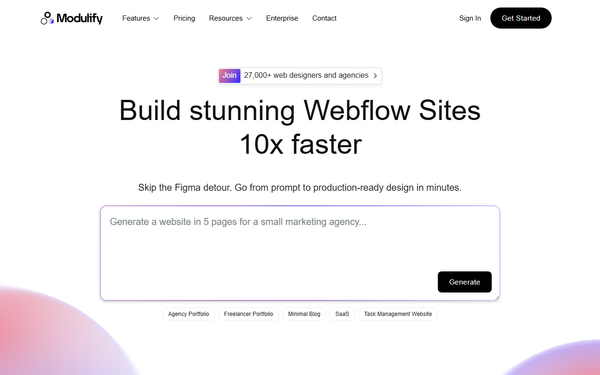
Total time for most users: 15–40 minutes to a production-ready site. For visual examples, check the official template gallery at https://modulify.ai/templates or the demo prompt pre-filled on the homepage.
Final Verdict
Overall rating: 4.5 / 5
Modulify AI is an outstanding choice for Webflow designers, freelancers, and agencies who want to ship professional, responsive websites dramatically faster while retaining full creative and technical control. It excels when you already live in Webflow and need to move from concept to client-ready site in record time.
Avoid it if you do not use Webflow, require a completely standalone builder, or need zero manual refinement for highly unconventional designs.
One-sentence recommendation: If you build in Webflow, Modulify AI is the smartest way to 10× your design speed without sacrificing quality—start with the Pro plan and never look back.