Monster Mash Review: Turn 2D Sketches Into 3D Animations Fast
Overview & Purpose
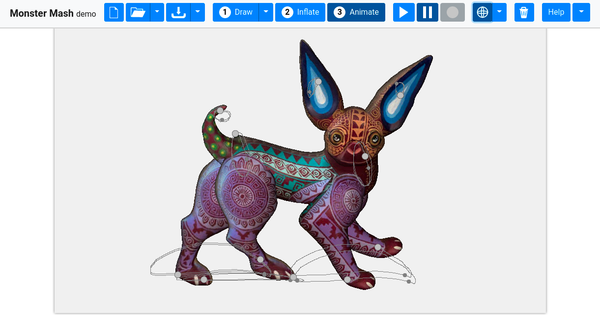
Monster Mash is a sketch-based modeling and animation tool that lets users quickly draw a 2D character, automatically inflate it into a 3D mesh, and animate it directly in the sketching plane—all without any 3D viewport manipulation or complex rigging. Developed as a Google Research collaboration with academic partners and released alongside a 2020 SIGGRAPH Asia paper, it emphasizes casual, playful 3D creation for organic shapes. Primary use cases include rapid character ideation, educational demos, hobbyist animation, and quick previs for more polished 3D pipelines. It targets a broad audience: beginners and educators who want accessible 3D without steep learning curves, digital artists and designers seeking fast prototyping, and even professional animators using it as a lightweight sketch-to-puppet tool. The browser-based demo runs at monstermash.zone and remains freely available as of April 2026.
Key Features & Capabilities
Core functionality revolves around three seamless modes: Draw (sketch closed or open strokes for body parts and limbs), Inflate (instant 3D conversion using Poisson surface reconstruction plus a novel ARAP-L layered deformation model that preserves rigidity while allowing smooth, floppy motion), and Animate (place control pins on the model and record movements in 2D, with automatic timeline syncing). Standout differentiators include single-view interaction (no multi-view or explicit rigs required), automatic depth layering from drawing order, and physics-like deformation that prevents unwanted inter-penetrations—features absent in older sketch-based tools.
Additional capabilities include layer duplication for symmetry, template image import for texturing or guides, background import, current-frame OBJ export (with texture), full animation export to glTF/GLB (compatible with Blender as shape keys), and experimental options like armpit stitching or normal smoothing.
Limitations include a focus on soft, organic, cartoonish styles (less suited for hard-surface or highly precise mechanical models), indirect depth control via drawing order (with a later-added manual depth-move option), no advanced keyframing timeline or motion capture integration, and animation recording limited to control-pin cycles rather than full non-linear editing. The tool produces deformable “puppets” rather than production-ready rigged assets.
User Experience
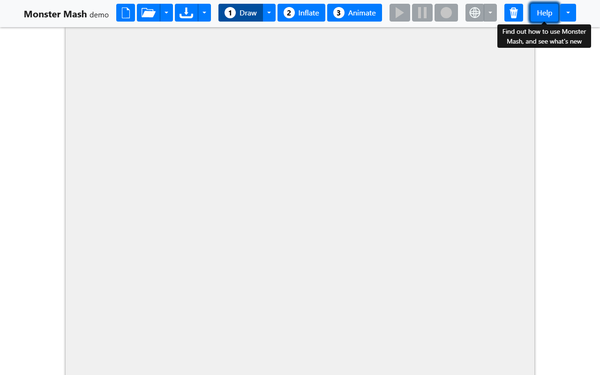
Monster Mash boasts an exceptionally low learning curve for its target casual users. The interface is clean and mode-based, with all interactions (drawing, posing, animating) happening intuitively on a single canvas; a stylus on a tablet is recommended for best results, though mouse works fine. Beginners can create their first animated character in under a minute following the three-step quick-start guide. The UI includes helpful sub-menus for selection, export, and settings, plus example gallery thumbnails.
Documentation consists of an in-app help section (archived snapshots detail every control and shortcut) and an official project page with paper and videos. Community support lives on the active forum at forum.monstermash.zone (61 topics, ongoing posts into 2025). No formal paid support or extensive written manual exists, but YouTube supplementary videos and user-shared tips fill the gap. Overall, the experience feels playful and responsive, though some users note occasional quirks with texture handling or background display.
Performance & Reliability
The web demo delivers real-time inflation and deformation in any modern browser supporting WebAssembly and WebGL, with instant feedback on capable hardware. Complex models with many layers or long animations may generate larger glTF files and risk memory issues during export, but core sketching and playback remain smooth. As a research-grade open-source project (last notable updates around 2021), it has proven reliable for its intended casual scope—no widespread crashes reported in recent forum activity.
Known issues from community feedback are minor: occasional texture projection glitches, limited precision for professional-grade animation timing, and the browser-only nature (desktop build possible from source but requires compilation). No major reliability complaints surfaced in 2024–2026 user discussions; the tool continues to function exactly as described in the 2020 paper.
Pricing & Value
Monster Mash is completely free for evaluation, research, and personal use, with full source code available under Apache 2.0 on GitHub. There are no paid tiers, enterprise options, or hidden costs—the web demo requires only a browser. Compared to alternatives like Blender (powerful but steeper curve), Adobe Animate, or paid sketch-to-3D tools, Monster Mash delivers exceptional value for quick, fun 3D puppet creation. Its open-source nature adds long-term value for developers who want to extend or integrate it. The trade-off is the lack of ongoing commercial support or advanced production features found in paid software.
Practical Tutorial
A complete step-by-step tutorial for creating and animating a simple character (e.g., a walking dinosaur) is available in the official supplementary video and in-app help.
-
Open the tool: Go to https://monstermash.zone/ in a modern browser (tablet + stylus recommended).
-
Draw mode: Select Draw. Sketch the main body as a closed stroke. Add limbs with open strokes that overlap the body (the system auto-connects). Use double-click on a limb to duplicate it symmetrically behind. Draw eyes or details as separate closed regions. Order matters for initial depth.
-
Inflate: Switch to Inflate mode. The sketch instantly becomes a smooth 3D mesh. Click-drag parts to adjust pose if desired. Rotate the view temporarily with middle-mouse or Rotate button to inspect.
-
Animate mode: Switch to Animate. Click to place control pins on key areas (head, feet, tail). Drag pins to pose. Press Record (turns red); move pins to create motion—the first pin sets the full cycle length. Record additional pins for layered animation (e.g., arms then legs). Use +/- keys to offset timing. Press Play/Pause to review.
-
Refine & export: Import a background or template image for texturing. Adjust shading. Export the current frame as textured OBJ or the full animation as glTF/GLB for import into Blender or other tools.
For visual walkthroughs, watch the official tutorial: https://www.youtube.com/watch?v=LQFkiBDgVIE or explore the in-app example gallery (antelope, dino, etc.). Users frequently combine exported glTF with other software for further polishing.
Final Verdict
Overall rating: 4.5/5 — an outstanding casual tool that democratizes 3D character creation through pure 2D intuition.
Who should use this tool: Hobbyists, educators, designers, and anyone wanting spontaneous sketch-to-animated-3D in seconds will love Monster Mash for its joy, speed, and zero 3D barrier.
Who should avoid this tool: Professional studios needing production-ready rigs, hard-surface modeling, or complex non-cyclic animation timelines will find it too limited and should stick to Blender or Maya.
One-sentence recommendation: If you can sketch it on paper, Monster Mash can turn it into a lively 3D puppet faster than any other tool—try it today at monstermash.zone.