Morph Studio Review: The Ultimate All-in-One AI Video Tool
Overview & Purpose
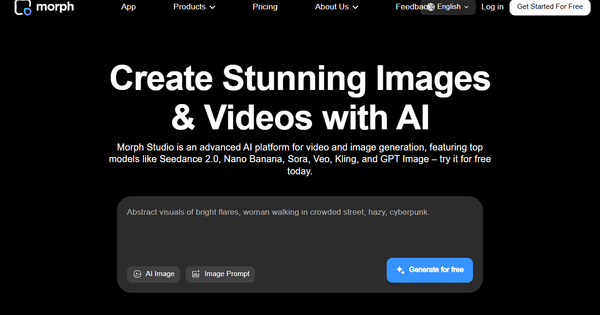
Morph Studio is an AI-powered platform that generates high-quality images and videos from text prompts or reference images, integrating multiple frontier AI models into a single creative workflow. It transforms ideas into cinematic clips, animations, and full story sequences without requiring cameras, actors, or traditional production equipment. Primary use cases include creating short-form social media content (TikTok, Reels, YouTube Shorts), marketing videos, film storyboards and pre-visualizations, viral animations, and professional B-roll or concept footage.
The target audience spans amateur creators and hobbyists experimenting with AI visuals, as well as professional filmmakers, visual artists, marketers, content creators, TV producers, and writers who need fast prototyping or cost-effective alternatives to traditional video production. Originally launched as a Discord-based beta tool, it has evolved into a full web application while maintaining Discord sign-in and an active community server for support and sharing.
Research note: All information is current as of April 2026, based on the official website, pricing page, user testimonials, YouTube tutorials, and third-party reviews.
Key Features & Capabilities
Core functionality centers on text-to-video and image-to-video generation, powered by 10+ leading models including Kling 3.0, Veo 3.1, Sora 2, Seedance, Wan 2.6, Hailuo, Luma Dream Machine, and Nano Banana 2. Users can also perform video style transfer, AI image upscaling, and one-click edits such as hairstyle changes or background replacements.
Standout features that differentiate it from many competitors include the Open Canvas (a flexible visual storyboard tool for arranging, editing, and connecting individual clips into cohesive narratives with precise camera direction controls per scene) and Immersive Space for rapid prompt-based generation. The platform unifies image editing, video generation, and sequencing in one interface, enabling users to maintain character consistency across shots and build longer stories from short clips (typically 5–10 seconds each). Additional tools like motion control, lip sync, and style transfer (e.g., pixel art or 2D animation) add creative flexibility.
Limitations include variable video lengths (often capped at short durations per generation), model-specific credit costs that can add up quickly for premium models, and the need for highly detailed prompts to achieve consistent results. Content moderation can be strict, leading to rejections on certain prompts, and there is no offline editing capability. Free-tier access is extremely limited.
User Experience
Morph Studio offers a clean, modern web interface that feels intuitive for both beginners and experienced creators. Signup is quick via Google, Discord, or email, and the dashboard provides immediate access to tools without a steep learning curve. The Open Canvas feature is particularly praised in user feedback for its drag-and-drop workflow and scene-sequencing capabilities, allowing users to lay out multi-shot stories visually.
Documentation is light on the site itself but supplemented by blog articles, model-specific guides (e.g., Wan 2.2 reviews), and numerous community YouTube tutorials. Support resources include an active Discord server with dedicated channels for technical help, prompt sharing, and creator collaboration (invite: https://discord.com/invite/7eMKy2gTwM).
Overall ease of use is high for prompt-based creation, though mastering prompt engineering and navigating model differences takes some practice. Some users report the interface can feel “heavy” when juggling multiple tools, and generation queues may cause wait times.
Performance & Reliability
Generation speed varies by model and server load—basic models can produce clips in under a minute, while premium ones (e.g., Veo 3 or Kling 3.0 Pro) often take several minutes. Output quality is generally strong, with good motion consistency, cinematic lighting, and style adherence when using detailed prompts and the right model. The platform excels at photorealistic footage, stylized animations, and maintaining subject consistency within single clips.
Known issues include occasional inconsistency across generations (common to most text-to-video tools), failed renders that still consume credits in some cases, and slower processing during peak times. User reviews on Trustpilot highlight complaints about slow performance, strict content filters (possibly due to China-based moderation), and models under-delivering relative to advertised capabilities. Common community feedback also notes that achieving professional results often requires multiple iterations and post-generation editing in external software.
Pricing & Value
Morph Studio uses a freemium, credit-based model with no rollover credits (they expire at the end of each 30-day cycle). Plans include:
- Free: 75 credits/month — extremely limited (often just 1 video on select basic models).
- Basic: $7/month (or lower annually with 30% discount) — 3,000 credits (roughly 12–75 videos depending on model).
- Pro: $24.50/month (annual discount available) — 12,000 credits.
- Premier: $49/month — 30,000 credits.
Higher tiers unlock substantially more generations on premium models (e.g., Veo 3.1 or Kling 3.0 Pro) and commercial-use rights. Failed generations typically do not consume credits.
Value is strong for users who want access to multiple frontier models and workflow tools without subscribing to separate services. It is more affordable than some single-model competitors for multi-tool creators. However, heavy users may find credit consumption unpredictable, and negative reviews cite perceived poor value when outputs require heavy iteration or face moderation blocks.
Practical Tutorial
Official documentation is minimal, but the platform provides clear in-app guidance, and numerous creator-led tutorials exist on YouTube (search “Morph Studio tutorial” for recent walkthroughs). Here is a step-by-step walkthrough for a common task—generating and sequencing a short cinematic story clip—based on current platform behavior:
- Visit https://www.morphstudio.com/ and sign up/log in (Google or Discord recommended for fastest access).
- Navigate to the Text to Video tool (or Image to Video if starting from a reference).
- Write a detailed prompt. Example: “A lone samurai walking through a misty bamboo forest at dawn, cinematic wide shot, golden sunlight filtering through leaves, slow camera pan right, realistic style, 4K detail.”
- Select a model (e.g., Kling 3.0 for motion quality or Veo 3.1 for photorealism), choose aspect ratio (9:16 for social media, 16:9 for widescreen), and any motion parameters.
- Click Generate. Wait for processing (seconds to minutes). Download the clip once complete.
- For a multi-shot video: Switch to Open Canvas, drag your generated clips onto the storyboard, adjust camera directions per scene (0–10 seconds each), add transitions or style transfers, and export the full sequence.
- Refine as needed using style transfer or upscaler tools, then download the final video.
This workflow typically takes 5–15 minutes for a polished 15–30 second story. For visual examples and advanced tips, watch recent YouTube tutorials such as “Complete Morph Studio Tutorial - AI Video Workflow.”
Final Verdict
Overall rating: 7.5/10
Morph Studio is an excellent choice for content creators, marketers, indie filmmakers, and visual artists who want an affordable, all-in-one platform with access to the latest AI video models and a powerful storyboard canvas for turning ideas into complete narratives quickly. It shines when rapid prototyping, short-form social content, or cinematic concept videos are needed.
Avoid it if you require long-form video without external editing, demand zero content moderation risk, or prioritize instant support and perfectly predictable credit usage—some users report frustrations with speed, consistency, and billing transparency.
One-sentence recommendation: If you’re a creator looking for a versatile, cost-effective gateway to frontier text-to-video models and intuitive storyboarding tools, Morph Studio is worth trying—start with the free tier and upgrade once you see the workflow in action.