Motion Review: The Ultimate AI-Powered Productivity SuperApp
Overview & Purpose
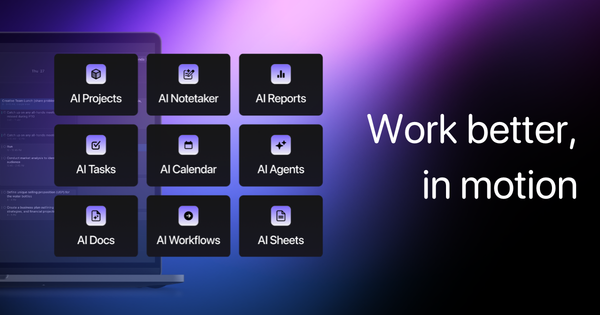
Motion (usemotion.com) is an AI-powered SuperApp that combines task management, project organization, calendar scheduling, meeting notetaking, document collaboration, and workflow automation into a single platform. It uses artificial intelligence to automatically create, prioritize, schedule, and reschedule tasks and entire projects based on deadlines, dependencies, team availability, and user preferences—optimizing schedules hundreds of times per day while providing proactive alerts for at-risk items. Primary use cases include personal productivity for overloaded professionals, team project coordination (e.g., onboarding or marketing campaigns), automated meeting follow-ups, and turning notes or SOPs into actionable workflows. It targets busy individuals such as marketers, business owners, analysts, solopreneurs, and teams of any size (including those with ADHD or executive dysfunction), as well as larger organizations replacing fragmented tools like separate to-do apps, calendars, and project managers.
Key Features & Capabilities
Core functionality revolves around AI-driven automation: the AI Task Planner and Calendar Assistant time-block tasks intelligently, while the AI Project Manager generates full projects (tasks, deadlines, assignees, stages) from natural-language descriptions with over 90% accuracy. Standout features include real-time rescheduling for changes, an AI Meeting Notetaker that transcribes, summarizes, extracts action items, and sends follow-ups (claimed 80% more accurate than manual notes), AI Docs for turning notes into tasks/projects, Workflow Builder for converting SOPs into auto-assigned projects, and AI-powered search/business intelligence for ETA predictions, capacity planning, and bottleneck detection. Integrations cover Google/Outlook/iCloud calendars, Gmail/Outlook email forwarding, Zoom/Google Meet/Teams, Slack/Teams, Zapier, HubSpot, Salesforce, Siri voice, and a robust API. These differentiate Motion from traditional tools by providing hyper-personalized, context-aware automation across everything in one app—no manual prompting required—and claiming 30-40% efficiency gains plus faster project completion.
Limitations include a credit-based system for advanced AI usage (higher plans offer more), occasional need for manual tweaks to AI suggestions, less comprehensive agile/project management depth than dedicated tools like ClickUp or Asana (e.g., basic subtasks and checklists in some user reports), and reliance on Zapier for non-native integrations. No robust offline mode or highly customizable reporting beyond higher-tier dashboards exists.
User Experience
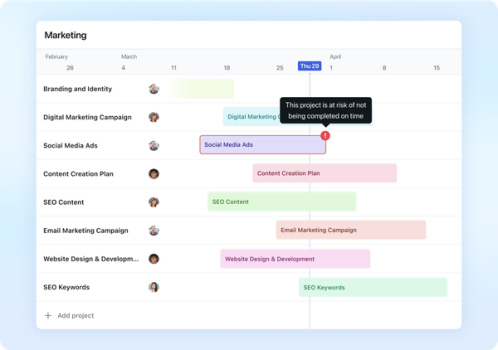
Motion features a modern, clean interface that many users describe as intuitive and Apple-like, with quick task entry, unified views for tasks/projects/calendar/docs, and real-time collaboration. The learning curve is moderate—most users feel comfortable after 1-2 hours of setup and preference training, though teams onboarding at scale or those new to AI tools may need 2-4 weeks to fully optimize. Mobile apps (iOS/Android) and desktop versions exist, but the web/desktop experience is generally stronger and more fluid than mobile. Documentation includes a comprehensive Help Center with how-to guides, tutorial sessions, and in-app assistance; support is responsive with priority options on Business plans. Overall, the UX reduces context-switching and decision fatigue effectively, though some find Kanban/Gantt views or certain interactions slightly cluttered or non-standard.

Performance & Reliability
The AI engine performs quickly and efficiently, with dynamic rescheduling and optimization delivering noticeable time savings and reduced stress for most users (e.g., projects completed 32% faster, proactive delay alerts). It handles high workloads reliably for individuals and small-to-medium teams, with SOC 2 Type 2 compliance and encrypted data. Known issues include occasional calendar sync lags, minor bugs in auto-scheduling (especially with complex dependencies), and UI jank reported on Mac (Electron-based app). Some users note AI suggestions can feel opaque initially or require fine-tuning, and support response times vary. Common complaints center on these reliability hiccups and the tool feeling “fragile” during heavy use, though overall uptime and performance earn praise in 2025-2026 reviews.
Pricing & Value
Motion offers no free tier but includes a 7-day free trial (card required). As of March 2026, plans are Pro AI (starting ~$19/seat/month billed annually for professionals/small teams, ~7,500 AI credits) and Business AI (~$29/seat/month, 15,000 credits) with added team features like capacity planning, Gantt charts, advanced dashboards, time tracking, permissions, and priority support. Individual/solo pricing is often higher (~$49-69/month depending on plan), with Enterprise options available via sales. Monthly billing increases costs. Value is strong as an all-in-one replacement for multiple tools (calendar + PM + notes), delivering measurable ROI through time savings and efficiency gains (rated 4.1/5 for value on Capterra). However, it is frequently called expensive for light users or solos, especially with credit limits and price increases noted by some. Compared to alternatives like Notion or Todoist stacks, it excels in AI automation but may not justify the cost without full adoption.
Practical Tutorial
Motion provides official guidance via its Help Center (https://www.usemotion.com/help) and live tutorial sessions. Here is a step-by-step walkthrough for a common task—creating a project and letting AI auto-schedule it (based on official descriptions and user guides; tested conceptually as of March 2026):
-
Log in to your Motion workspace (web/desktop recommended) and navigate to the Projects section in the sidebar.
-
Click “New Project” or the AI Project button. Describe the project in natural language (e.g., “Launch Q2 email marketing campaign: create 4 newsletters, design landing page, schedule social promotion, target 10k subscribers by June 30. Include team of 3 and budget tracking.”). Optionally upload or link related docs/notes.
-
AI instantly generates tasks, deadlines, stages, assignees, dependencies, and estimated durations with ~90% accuracy. Review the outline (takes 1-2 minutes) and make quick edits if needed.
-
Set project priorities, any custom preferences (e.g., work hours, energy levels), and connect your calendar(s).
-
Click “Schedule” or let AI handle it automatically. The AI Task Planner time-blocks tasks into your calendar, optimizes around meetings/availability, and balances workload.
-
Monitor progress in the unified dashboard: statuses update automatically, delays trigger alerts, next steps assign themselves, and team members receive notifications. Use in-project chat or AI search for quick questions.
-
For meetings tied to the project, forward or link a Zoom/Meet call—AI Notetaker will auto-extract action items and add them as follow-up tasks.
This process typically takes under 10 minutes and adapts daily. For video walkthroughs, search “Motion AI Project Tutorial 2026” on YouTube or check Motion’s official tutorial sessions in the Help Center.
Final Verdict
Overall rating: 4.2 out of 5. Motion excels for knowledge workers and teams overwhelmed by manual planning who want AI to handle scheduling, prioritization, and project coordination—delivering real productivity leaps, stress reduction, and accountability. It shines for marketers, managers, solopreneurs, and neurodiverse users needing structure without micromanagement. Avoid it if you have a tight budget, prefer full manual control, need advanced custom agile tools, or only require basic task lists (cheaper alternatives like Todoist + Google Calendar suffice). Motion is a worthwhile investment for anyone ready to hand over daily planning to intelligent automation and reclaim hours each week.