Mumble Note Review: The Best AI Voice Notetaker for iOS Users
Overview & Purpose

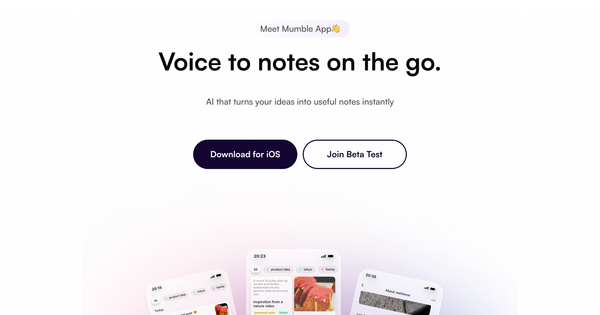
Mumble Note is an AI-powered voice notetaking app primarily for iOS (with full Apple Watch support) that captures spoken words—whether ideas, meeting discussions, tasks, or lectures—and instantly transforms them into clean, structured, actionable notes. Using advanced AI, it handles transcription, generates summaries, extracts key decisions and follow-ups, creates to-do lists, and organizes content automatically, with additional capabilities like image text extraction, link summarization, and querying your notes via chat. Primary use cases include hands-free meeting capture (especially in-person), quick idea brainstorming on the go, task planning, lecture recording for students, and personal voice journaling or brain dumping.
It targets busy professionals such as product leads, consultants, and marketers; content creators and bloggers; students and knowledge workers; entrepreneurs; and notably users with ADHD who prefer verbal idea capture over typing. As of research conducted in March 2026, the tool positions itself as the fastest on-the-go voice notetaker in the Apple ecosystem, emphasizing frictionless capture and immediate usability rather than heavy team collaboration features.

Key Features & Capabilities
Core functionality revolves around voice recording (up to 2 hours per note) that triggers AI-powered transcription with automatic enhancements for clarity, followed by structured output including summaries, tagged sections, decision points, and auto-extracted to-dos that can sync to external apps. Standout features that differentiate it from competitors include Agent Mode for automatic categorization into collections, personal vocabulary learning (so the AI adapts to your unique terms and names), image OCR for text extraction from photos or screenshots, translation into over 40 languages, an AI chat interface to query or expand on your notes, voice follow-ups to extend existing recordings, widgets and Apple Watch one-tap recording, dark mode, and privacy-first encryption that automatically protects sensitive information like names during processing.
Integrations with Apple Reminders, Calendar, Google Tasks, and apps like Things 3 further enhance actionability. Compared to tools like Otter.ai (more focused on scheduled cloud meetings with bots) or basic voice recorders, Mumble Note excels in personal, mobile-first scenarios with tighter Apple hardware integration and smarter on-device organization.
Limitations include its iOS-only availability (Mac version is currently on waitlist/beta with no Android or full web/desktop support), capped voice minutes and AI tool usage on lower tiers, and a lack of enterprise-scale team collaboration or advanced analytics found in larger platforms. It also relies on an internet connection for full AI processing.

User Experience
The app boasts exceptional ease of use with a minimal learning curve—most users can start recording productively within minutes thanks to intuitive controls like Lock Screen widgets, Siri Shortcuts, or Apple Watch buttons that work even with the screen off. The interface is clean, modern, and thoughtfully designed, featuring responsive layouts, block-based note editing, and helpful tooltips for AI functions; dark mode adds to its polish for extended use.
Documentation and support resources are solid for an emerging tool: an in-app and website FAQ covers core questions, the official blog regularly posts update guides and feature walkthroughs, and a YouTube playlist offers visual tutorials. Developer responsiveness stands out positively in user feedback, with quick fixes for reported issues and direct in-app feedback channels.

Performance & Reliability
Processing speed is a highlight, with transcription and AI structuring completing in seconds even for longer sessions, enabling truly instant usability during or right after recordings. Efficiency shines in background operation and low battery impact on Apple devices, while updates have optimized audio file sizes and syncing reliability.
Known issues in early 2025 versions included occasional crashes during uploads or sync glitches, but recent releases (up to v0.7.26 as of February 2026) have resolved these through improved data handling and stability patches. User complaints remain minimal, with App Store feedback emphasizing consistent accuracy for everyday accents and reliable to-do extraction; no major ongoing reliability problems surface in recent reviews or community discussions.
Pricing & Value
Mumble Note follows a freemium model that makes it accessible while scaling for power users:
- Free: $0/month — unlimited text notes, 60 minutes of voice recording per month (max 2 minutes per note), basic AI features.
- Starter: $3/month — 3,000 minutes of voice per month (up to 2 hours per note), 30 AI tool uses, access to advanced models.
- Pro: $10/month — unlimited voice notes and AI tools, full Agent Mode, AI chat, early beta features, and priority support (annual billing offers discounts).
Value is strong compared to alternatives like Otter.ai or Notion AI voice add-ons, especially for individual iOS users; the low Starter entry point and generous Pro limits deliver premium AI organization without excessive cost. The lifetime deal option occasionally promoted adds further appeal for committed users. Overall, it provides excellent return for anyone converting spoken ideas into productivity daily.
Practical Tutorial
Official tutorials are available via the Mumble Note YouTube playlist (“Get Started with Mumble Note”) and blog posts covering specific features like Apple Watch usage. Here is a step-by-step walkthrough for a common task—capturing and organizing meeting notes—based on the app’s interface and documented workflows.
-
Start Recording: Open Mumble Note on your iPhone or tap the dedicated widget/Apple Watch complication for instant launch. Choose “New Meeting Note” (or let AI detect context) and hit the prominent microphone button. Place your phone on the table or use AirPods; the screen can stay off.
-
Record Content: Speak naturally or let the conversation flow (e.g., “Team, let’s review Q2 goals—Marketing needs to launch the campaign by April 15, and we’ll assign design follow-ups to Sarah”). Optionally snap a photo of a whiteboard or add typed notes mid-recording.
-
Stop and Let AI Process: Tap “Done.” Within seconds, AI transcribes the full audio, generates a clean summary, extracts decisions (“Campaign launch date confirmed”), follow-ups, and to-dos (“Sarah: finalize designs by April 10”), and suggests tags like #Q2Planning.
-
Review and Refine: Open the note to see the structured output (transcript + AI-rewritten blocks). Use the built-in AI chat (“What are the priority action items?”) or rewrite button for clarity. Translate if needed for international teams.
-
Organize and Act: Drag to assign to a Collection (or enable Agent Mode for automatic sorting). Tap any to-do to sync directly to Apple Reminders or Google Calendar. Add a voice follow-up later via the “Add Follow-up” button if new details arise.
-
Export/Share: Share the polished note via link, PDF, or messaging apps, or query it later through AI chat (“Remind me of last week’s decisions”).
Real example: Recording a 20-minute product sync yields an instantly organized note with bullet summaries, a prioritized to-do list, and calendar-ready deadlines—eliminating post-meeting cleanup entirely.
Final Verdict
Overall rating: 4.7 out of 5. Mumble Note delivers impressive AI intelligence and seamless integration within the Apple ecosystem, making voice note-taking faster and more actionable than ever, though platform limitations hold it back from universal appeal.
Who should use this tool: iOS-based professionals, students, creators, and ADHD users who thrive on hands-free capture and automatic organization, especially for personal productivity, in-person meetings, or idea brainstorming—it excels at turning casual speech into structured, retrievable insights without friction.
Who should avoid this tool: Android users, those needing full cross-platform desktop/web support, enterprise teams requiring advanced collaboration bots, or anyone satisfied with basic free voice memos who won’t utilize the AI structuring.
One-sentence recommendation: If you live in the Apple ecosystem and want AI to instantly organize everything you say into clean, actionable notes, Mumble Note is a standout productivity upgrade worth downloading today.