Munch Studio Review

Overview & Purpose

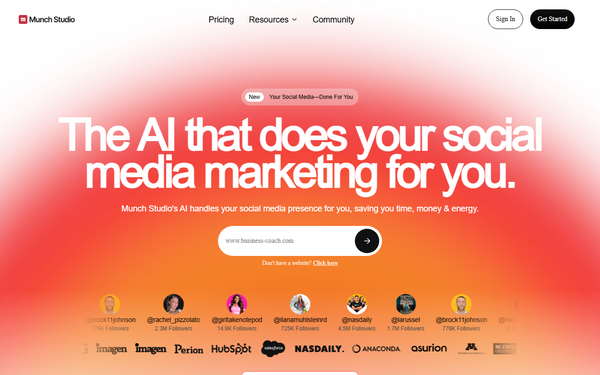
Munch Studio is an AI-powered platform that automates social media content creation and management by transforming long-form videos (such as webinars, podcasts, or recorded talks) into optimized short-form clips while handling the full content lifecycle. It analyzes uploaded or linked videos to detect engaging moments, generates platform-specific clips with auto-captions, branding, and aspect ratios, then builds a custom posting strategy, creates additional content, auto-schedules at peak audience times, publishes directly to connected accounts, and provides performance analytics that feed back into improvements.
Primary use cases include scaling video content across Instagram Reels, TikTok, YouTube Shorts, LinkedIn, Facebook, and X without manual editing; maintaining consistent brand presence with minimal weekly input (around 5 minutes); and repurposing existing long-form assets into high-engagement short-form libraries for lead generation, audience growth, or marketing campaigns.
The target audience consists of small business owners, freelancers, coaches, realtors, marketers, consultants, and content creators who lack time or video-editing expertise but need professional, on-brand social media output. It is not aimed at developers or graphic designers seeking advanced creative tools but rather at non-technical users who want an all-in-one “done-for-you” social media team.
Key Features & Capabilities
Core functionality revolves around intelligent video repurposing: users upload a long-form video or provide a link, and the AI identifies compelling segments, creates multiple short clips tailored to each platform’s requirements (vertical formats, length limits, trending hooks), adds synchronized captions, and incorporates user-defined branding elements. These clips integrate into a broader automation suite that includes AI-generated captions, carousels, static posts, and full content calendars.
Standout features that differentiate it from pure clippers (such as Opus Clip or standalone editors) include end-to-end automation—custom strategy building from a simple website scan or questionnaire, brand-voice learning for authentic tone across all outputs, smart auto-scheduling based on audience data, direct publishing to multiple platforms, and closed-loop analytics that refine future content. Additional capabilities cover weekly idea generation, performance tracking, and a smart editor for quick tweaks.
Limitations include monthly video-processing minute caps (typically 500 minutes on Essential plans, 1,000 on Premium), which can constrain heavy users; occasional need for manual review to correct AI-chosen hooks or captions; and lack of pro-level manual editing tools like precise timeline scrubbing or advanced effects. It also requires an initial brand-setup phase and performs best with clear, high-quality source videos.
User Experience
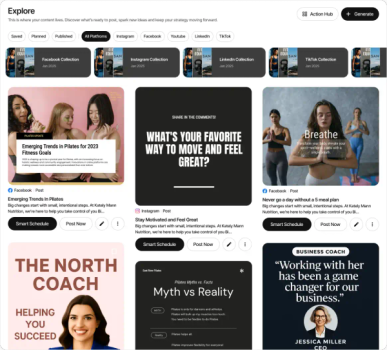
Munch Studio offers a clean, web-based interface with a low learning curve—most users can generate their first clips and schedule posts within minutes of signing up. Setup involves answering a few questions about the business or connecting a website; the AI then auto-generates a strategy and sample content. Navigation centers on a dashboard with sections for content generation, planner/calendar, analytics, and library, making it intuitive for non-technical users.
Interface quality is modern and mobile-friendly, with drag-and-drop elements for clip review and visual previews of how posts will appear on each platform. Documentation includes in-app guidance, a resources/blog section with step-by-step articles, and an active YouTube channel featuring walkthroughs. Support is available via email or in-app chat (with premium plans offering priority assistance), though some users report occasional delays in responses, especially during legacy transitions.
Performance & Reliability
Clip generation and strategy creation are fast—most videos process in minutes to under an hour depending on length—delivering noticeable time savings (users report reducing weekly social media work from hours to minutes). Publishing happens reliably at optimized times, and analytics provide actionable insights that improve engagement over time.
Known issues from user feedback include occasional awkward clip cuts or context misses in captions (requiring quick edits), rare platform-integration hiccups, and processing delays during peak usage. Reliability is generally high for core repurposing and scheduling, with strong testimonials on follower growth and engagement spikes; however, some legacy reviews mention billing or support frustrations. Overall performance earns consistent praise for consistency and brand alignment when source material is strong.
Pricing & Value
Munch Studio offers a 7-day free trial with no credit card required initially. Paid plans are subscription-based with annual discounts:
- Essential: $48/month (or $38/month billed annually at $456/year) — includes 500 video minutes/month, tailored strategy, AI content generation, basic storage, and limited weekly ideas.
- Premium: $60–$75/month (or $60/month billed annually at $720/year) — doubles video minutes to 1,000+, unlimited ideas, higher storage, priority support, and advanced analytics.
No perpetual free tier exists beyond the trial. Enterprise/custom options are available upon request.
Value is strong for users repurposing regular long-form content: it replaces multiple tools (editors, schedulers, agencies) and delivers professional output at a fraction of hiring costs. Compared with standalone clippers plus separate scheduling platforms, the all-in-one approach provides superior efficiency, though heavy video users may hit minute caps quickly.
Practical Tutorial
Official tutorials are available on the Munch Studio YouTube channel and resources section. Below is a step-by-step walkthrough for the common task of repurposing a long-form video (e.g., a 30-minute podcast episode) into short-form clips and scheduling them across platforms. This is synthesized from official demos and user guides (see the recommended video: “Demo: Your First 5 Posts in Under 5 Minutes” at https://www.youtube.com/watch?v=UPHK9RlxB70).
-
Sign up at https://www.munchstudio.com/ and start the 7-day free trial. Complete the quick brand setup by answering two questions or pasting your website URL so the AI learns your voice, visuals, and values.
-
From the dashboard, go to “Create Content” or “Repurpose” and upload your long-form video file (or paste a YouTube/Vimeo link). Example: Upload a 30-minute marketing webinar.
-
Select target platforms (e.g., Instagram Reels, TikTok, LinkedIn) and any preferences (hook style, caption tone). Click “Analyze” — the AI scans for engaging segments, trending moments, and emotional peaks, typically generating 8–15 short clips in minutes.
-
Review the AI-curated clips in the smart editor: Watch previews, adjust start/end points with simple sliders, edit auto-generated captions (font, color, animation), add your logo or branding overlays, and choose aspect ratios automatically optimized per platform.
-
Customize or approve clips, then add them to the smart content planner. The AI suggests optimal posting times based on your audience data and builds a weekly calendar.
-
Connect your social accounts (one-click OAuth for Instagram, TikTok, etc.). Review the full schedule, make final tweaks, and click “Approve & Publish.” The platform handles posting automatically and notifies you of live status.
-
After publishing, monitor performance in the analytics tab. The AI uses results to suggest improvements for future uploads.
For visual guidance and advanced tips (e.g., making videos feel on-brand), watch the official demo series on the Munch Studio YouTube channel (@munchstudio_com) or visit the /resources/step-by-step section on the website.
Final Verdict
Overall rating: 4.3/5 — A highly capable, time-saving tool that excels at turning long-form video into scalable social media presence with minimal effort.
This tool is ideal for busy marketers, content creators, coaches, and small businesses who produce regular long-form content (podcasts, webinars, talks) and want automated, professional short-form distribution without hiring editors or agencies. It shines when you value consistency and brand alignment over pixel-perfect manual control.
Avoid it if you need unlimited video processing, advanced manual editing capabilities, or have very low budgets, as minute caps and occasional AI refinements can add friction.
Munch Studio is a smart investment for non-technical users ready to let AI run their social media video strategy while they focus on creating the original content.