Muse AI Review: The Ultimate AI-Powered Video Hosting Solution

Overview & Purpose

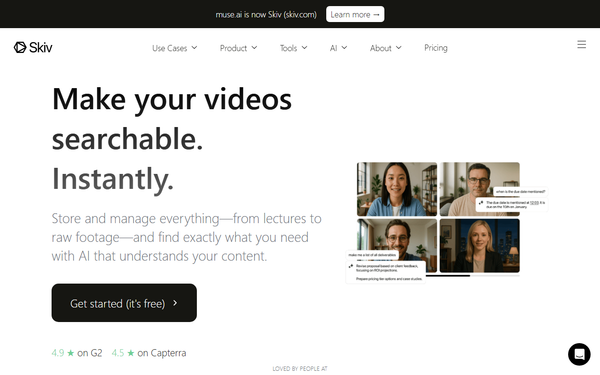
Muse.ai (operating as Skiv on the muse.ai domain) is an all-in-one AI-powered video platform designed for hosting, managing, searching, embedding, and monetizing video content. It combines cloud video storage, a high-performance player, advanced AI indexing and search capabilities, analytics, and customization tools into a single privacy-focused solution. The platform's core purpose is to make large video libraries instantly searchable by speech, objects, people, actions, text, and even abstract concepts, while enabling seamless distribution across websites, courses, teams, and branded portals without ads, tracking, or distractions.
Primary use cases include creating searchable online courses and lecture archives, embedding video libraries on marketing sites or e-commerce pages, building internal company knowledge bases, hosting conference recordings, monetizing content through subscription-based Portals, and facilitating team collaboration with secure sharing and in-browser recording for presentations or demos.
The target audience spans content creators, marketers, educators, course builders, conference organizers, and small-to-medium business teams who need professional video hosting with powerful search and customization—without the complexity or high costs of enterprise alternatives like Vimeo. It appeals particularly to those prioritizing AI-driven discoverability, embed flexibility, and data privacy over live streaming or ultra-high-volume enterprise features.
Key Features & Capabilities
Core functionality revolves around secure cloud hosting with unlimited bandwidth (subject to fair use), a customizable HTML5 video player supporting 4K playback, adaptive DASH/HLS streaming, Chromecast, AirPlay, subtitles, speed control, and keyboard shortcuts. AI tools automatically generate transcripts, smart chapters, labels for objects/people/actions/sounds/OCR, and enable multimodal search (keyword or conversational via a ChatGPT-like interface). Additional capabilities include analytics for views and engagement, in-browser screen/camera recording, clip cutting, and collections for organized libraries.
Standout features that differentiate Muse.ai include its sophisticated AI video understanding (going beyond keywords to abstract queries like “mysterious atmosphere”), fully customizable player embeds with CSS branding/logo/CTA screens, privacy-first design (private-by-default, password protection, geo-restrictions, expiring links, no tracking or data sales), and monetization via branded Portals with subscriptions. Easy no-code embeds and integrations with WordPress, Shopify, Squarespace, Wix, and more further set it apart, along with the ability to create searchable public channels or immersive collection views.
Limitations include the absence of native live streaming (a noted gap compared to competitors like Vimeo), variable AI accuracy for non-English languages (e.g., reduced effectiveness for Arabic or Urdu content), and a credits-based system for video transcoding/indexing (included but potentially limiting for massive libraries). Some users report occasional compression impacting 4K quality in certain scenarios, and advanced AI features like the conversational assistant are add-ons. Fair use policies apply to bandwidth, and offensive content may be flagged.
User Experience
Muse.ai offers an intuitive, minimalist interface with drag-and-drop uploads, a clean dashboard for managing videos/collections, and a responsive bottom-bar for quick actions like sharing or editing. The learning curve is low for core tasks—most users report it as simple and fast, with features like resumeable uploads and one-click embeds praised for accessibility.
Interface quality is modern and distraction-free, with a focus on speed and clarity; the player itself feels premium and embed-friendly. Documentation at muse.ai/docs is well-structured with clear step-by-step guides, examples, and integration notes, making self-service straightforward. Support receives high marks on G2 and Capterra for responsiveness (often within minutes), though Trustpilot reviews show inconsistencies, with some users citing slower replies during outages.
Performance & Reliability
The platform delivers strong performance with fast uploads, quick AI processing/indexing, buffer-free adaptive streaming, and reliable playback across devices. Unlimited embeds and no bandwidth caps (under fair use) support high-traffic use cases efficiently, and features like 4K support and casting enhance viewer experience.
Known issues include occasional recent reports (as of early 2026) of playback instability where videos stop randomly, alongside mixed feedback on support response times during problems. Older user comments noted slower initial processing for large files or quality trade-offs at higher resolutions. Overall uptime is generally solid per positive reviews, but reliability concerns appear in a subset of Trustpilot feedback, suggesting potential scaling challenges during peak loads.
Pricing & Value
Muse.ai uses a straightforward tiered subscription model with no free plan but offers free trials on higher plans. As of April 2026:
- Basic: $16/month ($8/month billed yearly) – 80 GB storage (~250 videos), 1 seat, unlimited embeds, 4K playback, Portals, basic support.
- Plus: $40/month ($20/month yearly) – 200 GB (~625 videos), 3 seats, geo-restrictions, expiring links, CTA, advanced customizations, enhanced privacy.
- Pro: $100/month ($50/month yearly) – 1,000 GB (~3,125 videos), 10 seats, VAST ads, delegated uploads, priority support, custom integrations.
- Enterprise: Custom – unlimited seats/storage, on-premise options, SSO, specialized support.
Value is a major strength: plans are significantly more affordable than many competitors while delivering advanced AI search, customizable embeds, and no hidden bandwidth fees. It excels for small teams and creators seeking professional features without premium pricing, offering strong ROI through time savings on search/organization and improved viewer engagement via branding. Drawbacks include the lack of a generous free tier and potential add-on costs for heavy AI usage.
Practical Tutorial
Official documentation provides clear guidance (full details at https://muse.ai/docs). Here is a step-by-step walkthrough for a common task: uploading a video and embedding it on a website with custom branding and privacy settings (e.g., for a course module).
- Sign up/log in at muse.ai and navigate to your dashboard.
- Upload the video: Drag and drop the file directly onto the grid or click the “Upload” button in the top right, select your file, and confirm. The platform handles transcoding and AI indexing automatically (you’ll receive an email when ready).
- Configure privacy and basics: Select the video, click “Change visibility” in the bottom bar, and set it to “Unlisted” (link-only) or “Password protected.” Add a title, description, and edit the auto-generated transcript under the Speech tab if needed.
- Customize the player: Go to Share > Embed icon. Choose standard embed or iframe code. For branding, add custom CSS (e.g., for logo, colors, centered play button) via the
data-cssattribute or?css=parameter in the embed URL. Example: Include your logo and accent color to match your site. - Embed on your site: Copy the code and paste it into a WordPress Custom HTML block, Shopify/Squarespace code embed, or any HTML page. For collections, use the embedded search version to make the entire library searchable.
- Test and share: Preview the embed—viewers can search inside the video, cast to AirPlay/Chromecast, and see your custom CTA screen. Track analytics directly in the dashboard.
This process typically takes under 5 minutes for basic setups. For advanced options like Portals or Zoom auto-uploads, refer to the dedicated docs sections.
Final Verdict
Muse.ai earns a solid 4.3 out of 5 rating. It shines as an affordable, AI-enhanced alternative to bulkier platforms, delivering exceptional value for searchable video hosting and customization.
Who should use this tool: Content creators, educators, marketers, and small teams seeking powerful AI search, professional embeds, and branded experiences on a budget—especially for courses, knowledge bases, or client video portals.
Who should avoid this tool: Organizations requiring robust live streaming, guaranteed enterprise-level support SLAs, or heavy reliance on non-English AI transcription, where competitors may offer more specialized reliability.
In one sentence: Muse.ai is a smart, cost-effective choice for anyone who wants videos that are not just hosted but intelligently searchable and beautifully embeddable—ideal if your priority is discoverability over live capabilities.