Musicfy Review: The Ultimate AI Voice Cloning & Song Generator

Overview & Purpose
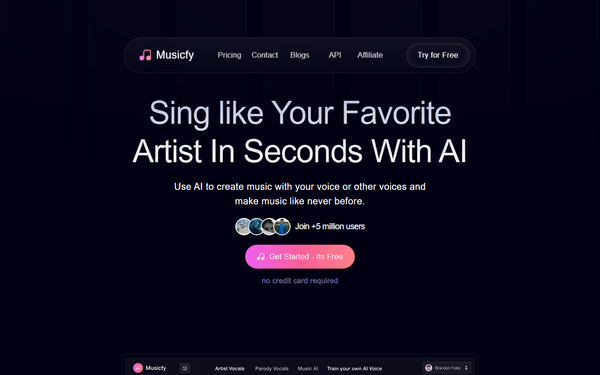
Musicfy is an AI-powered platform designed for creating and discovering AI-generated song covers, voice cloning, and original music compositions. At its core, it functions as an AI voice song generator that lets users transform existing tracks into covers using a vast library of voices—including over 100,000 celebrity, character, parody, and community-created models—or by cloning their own voice for personalized results. It also includes a music library of copyright-free vocals, tools for text-to-music generation, and features for remixes and royalty-free album creation. Primary use cases include producing fun AI covers of favorite songs, generating original tracks from lyrics or descriptions, cloning voices for custom vocals in music production, and creating shareable, royalty-free content for streaming platforms, content creation, or collaboration.
The target audience spans beginners, hobbyist musicians, content creators, songwriters, filmmakers, and independent artists who want accessible AI tools without needing professional recording equipment or musical expertise. It appeals particularly to those interested in voice-focused experimentation, such as parody covers or personalized remixes, rather than full-scale professional production studios. Developers or marketers might use it for quick audio assets, while casual users enjoy the discovery and sharing aspects of community voices.
Key Features & Capabilities
Core functionality revolves around AI voice conversion and song generation: users can upload an acapella track (or YouTube link), select or clone a voice model, and generate a new vocal track in seconds. Standout features include the massive library of AI Voice Artists with copyright-free vocals, easy voice cloning via short vocal uploads to create reusable custom models, text-to-music generation for turning prompts/lyrics into full songs, community-shared models, and integration for royalty-free outputs uploadable to streaming services. The platform also teases upcoming stem splitters for isolating vocals, drums, and instruments from mixed tracks.
Differentiators from competitors like Suno or Udio include its heavy emphasis on voice cloning and conversion (including celebrity parodies and personal models), a focus on quick covers/remixes rather than purely generative composition, and a community-driven voice marketplace. This makes it particularly strong for vocal experimentation and "what if my favorite artist covered this song" scenarios.
Limitations include dependency on clean input audio (background noise often causes glitches or poor quality), no offline access, stem splitters still in development, and text-to-music sometimes producing generic or inconsistent results compared to specialized rivals. Advanced mixing or DAW-level controls are absent, and some features (like unlimited generations or premium sound) are paywalled.

User Experience
Musicfy offers an intuitive, beginner-friendly interface with a low learning curve—most users can start creating covers within minutes via the dedicated create.musicfy.lol portal. The design is clean and mobile-app supported, with straightforward options for uploading audio, selecting voices from categorized libraries (or community models), and generating previews. Navigation between voice cloning, text-to-music, and library browsing feels seamless for casual users.
Documentation is light on the main site, relying more on blog posts, embedded video guides, and external YouTube tutorials rather than comprehensive in-app help or searchable FAQs. Support resources include email/contact forms and community feedback channels, but user reports note inconsistent responsiveness, particularly around subscription or generation issues. Overall, the platform prioritizes quick fun over deep technical guidance, making it accessible but potentially frustrating for troubleshooting.
Performance & Reliability
Generation speed is generally fast (seconds to minutes depending on plan tier and load), with higher plans offering premium sound quality and priority processing. Voice cloning produces realistic results from good-quality samples, and covers often capture style nuances well for entertainment purposes. However, reliability varies: outputs can sound robotic or accent-bleed if inputs have noise/background elements, and some users report incomplete generations, network errors, or inconsistent quality across sessions.
Common complaints from reviews and app stores include occasional glitches, disappearing progress on long generations, and subscription-related frustrations (e.g., charges without full access or cancellation difficulties). While many praise the fun factor and hit-rate for simple tasks, serious users note it falls short of studio-grade consistency. As of April 2026, performance has improved with updates, but it still benefits from quiet, clear vocal inputs.
Pricing & Value
Musicfy operates on a freemium model with a limited free tier (typically 5–10 generations for testing, varying by promotions). Paid plans include:
- Starter: $9/month (or equivalent yearly) – 500 generations/month, standard speed/sound, 25 text-to-music/day, 2 custom voices + unlocked library access.
- Professional (most popular): $25/month (yearly equivalent) – Unlimited generations, premium sound, 100 text-to-music/day, 6 custom voices.
- Studio: $70/month (yearly equivalent) – Unlimited everything, fastest speed, 30 custom voices, advanced priority.
Frequent sales (e.g., Black Friday 60% off) improve value. Higher tiers unlock full voice cloning limits and better quality.
Value is strong for casual creators seeking affordable voice AI without subscriptions to multiple tools—cheaper entry than some competitors for cover-focused use. However, the restrictive free tier and paywalls for core features like extended use or premium output reduce accessibility for light users. Compared to alternatives, it offers competitive voice-specific capabilities at a reasonable price for hobbyists, though power users may find limits on customization or output fidelity.
Practical Tutorial
A common task is creating an AI cover of a favorite song using an existing voice model. Here's a step-by-step walkthrough based on official processes (as of April 2026). For visual guidance, check Musicfy's blog tutorials or YouTube channels like official demos.
-
Prepare your source audio: Search YouTube for the song + "acapella" or "instrumental + vocals only" to find a clean vocal track. Copy the YouTube link or download the MP3/WAV file using a free converter tool. Ensure it's high-quality with minimal background noise for best results.
-
Go to the creation tool: Visit https://create.musicfy.lol/ and sign in (free account works for basics; upgrade for more generations).
-
Upload the audio: Click the upload area or paste the YouTube link. The platform processes it to isolate vocals if needed (or use the upcoming stem splitter on higher plans).
-
Choose a voice model: Browse the AI Voice Artists library (100,000+ options, including celebs, characters, or community models). For your own voice, first go to "Train Your Own Voice," upload 1–2 minutes of clear singing/speaking samples, and create a custom model (available on paid plans).
-
Customize and generate: Select style/genre if prompted, adjust any basic settings (e.g., pitch or intensity), and hit "Generate." Preview the result—regenerate if needed.
-
Download and share: Export the AI cover as MP3. Add it to your royalty-free album or upload to streaming platforms. Share your custom voice model with the community for collaboration.
This process typically takes 2–5 minutes for a full track. For voice cloning specifics or text-to-song alternatives, refer to https://musicfy.lol/blog/how-to-use-ai-voice-generator or search YouTube for "Musicfy AI tutorial 2026."
Final Verdict
Musicfy earns a solid 4/5 rating. It shines as an accessible, voice-centric AI music tool that democratizes covers, cloning, and remixes for creative fun and quick production. Hobbyists, content creators, and aspiring musicians should use it for its low barrier, vast voice library, and royalty-free outputs that spark inspiration without studio costs. Avoid it if you need pro-level audio fidelity, deep customization, reliable free usage, or advanced mixing—its hit-or-miss quality and subscription focus may frustrate perfectionists or heavy producers.
One-sentence recommendation: Musicfy is a playful, beginner-friendly gateway to AI voice magic for anyone wanting to reimagine songs in new voices—grab a free trial and start cloning today.