Nailedit Ai Review: Compare Multiple AI Models Side-by-Side
Overview & Purpose
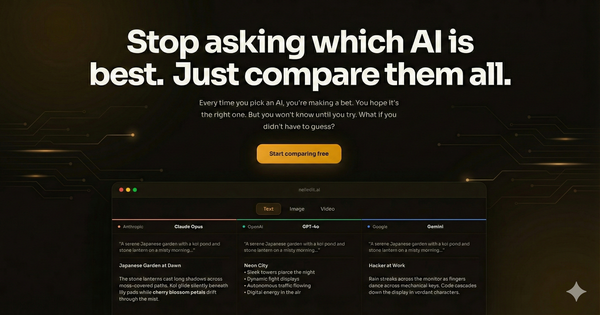
NailedIt.ai is a web-based comparison platform that lets users enter a single prompt and instantly receive side-by-side outputs from multiple large language models and generative AI systems for text, images, and video. It eliminates the need to switch between separate AI services like ChatGPT, Claude, or Gemini, or to subscribe to each individually, by consolidating access and displaying results in one unified view. The primary goal is to help users quickly identify which model performs best for a given task—whether generating detailed explanations, creative copy, photorealistic images, or cinematic video clips—without guesswork or repeated testing.
Key use cases include content creation (marketing copy, blog posts, scripts), research and analysis (comparing explanations or data summaries), creative projects (image or video generation for design and media), education (lesson plans or tutoring prompts), and personal productivity (brainstorming or organization ideas). The target audience spans AI enthusiasts and tinkerers, content creators, marketers, researchers, freelancers, developers experimenting with prompts, and small businesses looking to optimize AI workflows efficiently. It appeals particularly to power users frustrated by fragmented subscriptions and tab-switching, offering a streamlined alternative that can replace multiple paid AI accounts.

Key Features & Capabilities
Core functionality revolves around the side-by-side comparison engine: select up to 2 models on the free tier, 3 on Plus/Pro, or 6 on Ultra; input one prompt; and generate responses simultaneously across supported providers (15+ models total, including OpenAI, Anthropic, Google, xAI, and others). It covers text (e.g., Claude Opus for thoughtful reasoning, GPT-4o for versatility, Gemini for long-context, Grok for real-time knowledge), image generation (DALL·E 3, FLUX Pro, Imagen 3), and video (Sora 2, Kling 2.5, Runway Gen-3). Additional tools include a stats dashboard for tracking preferences, export options (text, images, or videos), history retention, and storage for past generations.
Standout features that differentiate it from competitors include Bring Your Own Keys (BYOK) on Pro and Ultra plans for direct provider billing with zero markup, early access to new models and beta features on Ultra, and a multimodal approach that unifies text, image, and video comparisons in one place—rare among similar tools. A library of pre-tested prompts (categorized by topics like tutoring, budgeting, SEO, and workflow optimization) further speeds up experimentation, with real model comparisons already shown on the site. Users can also track which models they prefer over time.
Limitations include a credit-based system (credits do not roll over monthly; consumption varies by output type, with images and video using more), no public API for programmatic integration, web-only access (no desktop app or offline mode), and reliance on the underlying models' strengths (e.g., hallucinations still possible). Some users note a desire for more view customization, and the free tier restricts image/video generation entirely.
User Experience
NailedIt.ai boasts a clean, distraction-free interface with a simple prompt input field and clearly organized comparison panels, making it highly intuitive even for non-technical users. The learning curve is minimal—most can start comparing models within minutes of signing up, thanks to responsive design that works well on desktop and mobile browsers. Side-by-side layouts highlight differences in style, detail, and creativity at a glance, with options to vote on favorites or export results directly.
Documentation is lightweight but practical: the site features an extensive prompts library with tested examples and pro tips, plus collapsible FAQs covering privacy, savings, and workflow impact. Support includes community access on all plans, email for free users, and priority assistance on paid tiers. No extensive video tutorials or deep technical docs exist, but the platform's simplicity reduces the need for them.
Performance & Reliability
Comparisons are generally fast, with text outputs appearing near-instantly and image/video generation aligning to each model's native speed (a few seconds to tens of seconds). Uptime is reported as highly stable, and the platform handles concurrent requests efficiently for most users. A stats dashboard provides insights into model performance over time.
Known issues are minor: occasional delays during peak traffic and the inherent variability of credit usage or model availability. No widespread complaints about downtime, data loss, or major bugs appear in reviews or public feedback as of March 2026; users praise its reliability for daily workflows. Outputs still require human fact-checking, as with any AI tool.
Pricing & Value
NailedIt.ai offers a generous free tier (50 credits/month, 2-model text-only comparisons, 7-day history) with no credit card required. Paid annual plans (20% savings over monthly) include:
- Plus ($16/month or $192/year): 500 credits, 3-model comparisons, image/video generation, 30-day history, 1 GB storage.
- Pro ($32/month or $384/year): 2,000 credits, BYOK, 90-day history, 10 GB storage, priority support.
- Ultra ($80/month or $960/year): 10,000 credits, 6-model comparisons, unlimited history, 50 GB storage, new models on day one, beta access.
Credit top-ups start at $5 (e.g., 500 credits for $15) and never expire while subscribed. BYOK on Pro+ lets users bypass platform credits entirely by paying providers directly.
Value is strong compared to maintaining separate subscriptions (often $20–$60+ per model monthly), potentially saving users $40–$60/month while unlocking broader experimentation. It outperforms single-model tools for comparison needs and edges out free alternatives through multimodal support and history features. Heavy users may need top-ups or upgrades, but overall it delivers excellent ROI for frequent AI experimenters.
Practical Tutorial
No official video tutorials are provided, but the site's prompts library serves as a built-in guide with ready-to-use examples. Here is a step-by-step walkthrough for a common task: comparing AI models to generate a tutoring session outline (a real use case from the platform's education prompts library).
- Visit https://www.nailedit.ai/ and click "Start comparing free" to sign up with email (or Google) — no payment needed for the free tier.
- Once logged in, you'll land in the comparison playground. Paste or type a prompt, such as one from the site's library: "Create a 30-minute Socratic tutoring session outline for teaching beginners about photosynthesis. Include guiding questions, common misconceptions to address, and interactive exercises. Do not give direct answers—guide the student."
- Select models to compare (e.g., Claude Opus, GPT-4o, and Gemini on a paid plan; limited to 2 on free). Toggle image/video if relevant (not needed here).
- Click Generate. Responses appear side-by-side within seconds, showing differences in structure, depth, question quality, and engagement style.
- Analyze: Use built-in voting or notes to mark preferences (e.g., Claude might excel at thoughtful questions, GPT at concise exercises). Review stats for insight into your model choices over time.
- Export the best output (text or formatted) or refine by editing the prompt and regenerating. Save to history for later reference.
For more examples, explore the official prompts library at https://nailedit.ai/prompts/ (topics include tutoring, personal organization, SEO, and budgeting, each with model-tested results and tips). This process typically takes under 5 minutes and reveals model strengths instantly—far faster than testing in separate apps.
Final Verdict
Overall rating: 4.5 out of 5
NailedIt.ai excels for content creators, researchers, marketers, designers, and any AI power user who regularly experiments with prompts and wants the optimal output without subscription overload or tab chaos—its multimodal comparisons, cost savings, and intuitive design deliver genuine productivity gains. Avoid it if you stick to one favorite model, need API integrations or offline access, or only use AI casually, as the credit system and web-only format may feel limiting.
In one sentence: NailedIt.ai is an essential time-saver that lets you stop guessing and start nailing the best AI responses every time.