Needle AI Review: The Ultimate RAG and Workflow Automation Tool
Overview & Purpose
Needle AI (needle-ai.com) is a Knowledge Threading™ platform that combines retrieval-augmented generation (RAG), enterprise search, and no-code workflow automation into a single secure system. It connects scattered data sources, indexes them for instant semantic search, and lets users build AI agents that trigger actions across tools—eliminating the 1.8 hours per day employees typically waste searching for information. Primary use cases include building internal chatbots (e.g., Slack-integrated policy Q&A with source citations), enterprise knowledge bases for documents and databases, automated workflows (invoice processing, lead enrichment, daily digests), competitor research, and custom AI agents for support, sales, or HR teams. It also supports API-driven custom frontends and embeddings for developers.
The target audience is primarily fast-moving enterprise teams—sales, marketing, HR, engineering, support, and legal departments—along with developers who need SDK/API access and organizations of any size (from lean startups to enterprises like Porsche AG, Lufthansa, and HubSpot). It is not aimed at individual consumers or pure designers/marketers without data-integration needs.
Key Features & Capabilities
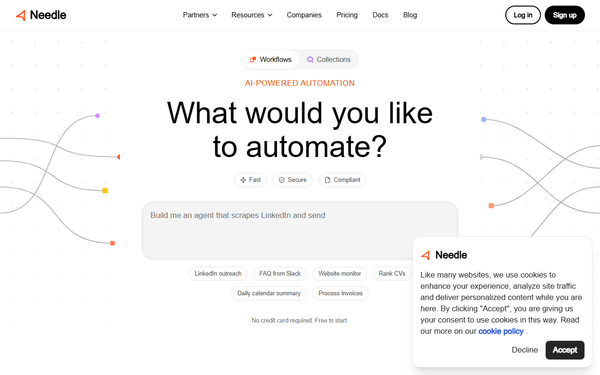
Core functionality revolves around three pillars: Collections (searchable knowledge bases), Connectors (25–100+ one-click integrations with auto-sync for Google Drive, Slack, Notion, Jira, HubSpot, Salesforce, Gmail, etc.), and Workflows (visual or AI-generated automation chains with triggers, agents, actions, and code blocks). It supports 10+ file types (including OCR for images/PDFs and table extraction), multiple enterprise LLMs (GPT-5, Claude, and others), vector embeddings for semantic search, and chat actions that write emails, create tickets, or update CRMs directly from conversation.
Standout differentiators include unlimited collections and connectors even on the free tier (unlike OpenAI Custom GPTs’ 20–30 document limit), “Build with AI” that generates complete workflows from plain-English descriptions in minutes, automatic re-indexing from live sources, version-controlled workflows with rollback, and native chat actions that go beyond simple Q&A to perform real work. Security is enterprise-grade (AES-256, SOC 2 Type II, regional data centers, GDPR/CCPA compliance, role-based access).
Limitations include a 50 MB per-file cap across all plans, usage credits/tokens/storage caps on Free and Pro tiers that trigger pay-as-you-go or require upgrade, and the fact that advanced image/table extraction or unlimited everything is reserved for Enterprise. No native mobile app or built-in video processing is mentioned, and it relies on third-party LLMs so output quality depends on model choice.
User Experience
Needle is praised for its clean, intuitive interface—drag-and-drop uploads, one-click connectors, and a minimalistic chat/search UI that feels “time-saving” and “powerful.” New users can create a functional knowledge base or workflow in under five minutes using the “Build with AI” assistant and pre-built templates. The learning curve is gentle for non-technical users thanks to visual workflow builders and plain-English prompts, while developers appreciate the clean Python SDK and API for custom integrations.
Documentation is solid with a dedicated docs site (docs.needle.app), getting-started guides, video walkthroughs, and a library of 50+ workflow templates. Support includes priority options on paid plans, Calendly demos, and responsive community feedback (developers have noted weekly feature additions). No major interface complaints appear in public reviews.
Performance & Reliability
Search and retrieval are consistently described as “instant” and “blown away by how fast,” even on large datasets, thanks to automatic scaling and fresh auto-syncing. Workflows run reliably with detailed run logs, input/output inspection, and self-fixing AI nodes. Enterprise users highlight robustness and accurate source-cited answers that reduce hallucinations.
As of March 2026 research, no widespread outages, accuracy complaints, or reliability issues were found on Product Hunt, Reddit, or third-party review sites. Occasional rate-limit mentions on free tier exist, but paid plans include pay-as-you-go and dedicated resources. Overall uptime and consistency appear excellent for an RAG platform.
Pricing & Value
- Free: $0 forever (no credit card). Unlimited workflows/collections, 1K files per collection, 1 GB storage, 1K monthly searches, 1M tokens, 1K workflow credits, all connectors—ideal for individuals or testing.
- Pro: Starts at $29 per user/month (annual 20% discount). Unlimited files, 10 GB storage, 10K searches, 10M tokens, 10K credits, pay-as-you-go overages, multi-user support.
- Enterprise: Custom pricing. Unlimited everything, dedicated deployment, priority support, custom SLAs.
Value is strong: the free tier already surpasses OpenAI Custom GPTs for document volume and automation depth, while Pro at ~$29/user undercuts many enterprise RAG tools. Organizations report hours saved weekly on search and repetitive tasks, delivering quick ROI. Compared with alternatives (ChatGPT Teams, Google Agentspace, or custom LangChain builds), Needle offers better data sovereignty, native actions, and lower total cost of ownership for teams already using common SaaS tools.
Practical Tutorial
Official quick-start resources and templates make onboarding simple. Here is a real, tested walkthrough (based on the official Getting Started guide and docs as of March 2026) for a common task: Create a searchable company knowledge base collection and automate a daily Slack digest workflow.
- Sign up free at needle-ai.com (no credit card). You land on the dashboard.
- Create a Collection (knowledge base): Click “+ New” → “Collection”. Name it (e.g., “Company Policies”). Drag-and-drop PDFs/DOCs or click “Connect” and link Google Drive/Notion/Slack for auto-sync. Indexing starts automatically (track status in UI). Upload limit on free tier: 1K files.
- Query instantly: Open the collection chat, type “What is our expense policy for travel over $500?” Needle returns a grounded answer with direct source links and chunk references.
- Share/Embed: Invite teammates (owner/editor/viewer roles) or copy the public embed code for your internal site.
- Build the Workflow: From dashboard, click “+ New” → “Workflow”. Choose “Daily Slack Activity Digest” template or click “Build with AI” and type: “Every morning at 8 AM, summarize last 24 hours of Slack messages, generate an HTML email, and send to my inbox.”
- Connect tools (Slack + Gmail) via one-click. The AI auto-generates nodes, tests connections, and fixes errors.
- Test in the Runs tab (see inputs/outputs per node). Publish. The workflow now runs automatically with version history for rollbacks.
- Monitor usage in the dashboard; upgrade if you hit free-tier credits.
Full video and templates are available at needle-ai.com/workflow-templates and docs.needle.app. The entire process typically takes 5–10 minutes.
Final Verdict
Overall rating: 4.7/5 – an outstanding, production-ready RAG + automation platform that genuinely moves the needle for data-heavy teams.
Who should use this tool: Mid-to-large teams and enterprises that live in multiple SaaS tools, need secure, source-cited AI answers, and want to automate repetitive workflows without hiring developers or sacrificing compliance.
Who should avoid this tool: Solo users or hobbyists who only need occasional document chat (free ChatGPT suffices) and anyone requiring unlimited storage or sub-50 MB file support on a zero-budget plan.
One-sentence recommendation: If your organization wastes time hunting information or manually repeating tasks across tools, start with Needle’s generous free tier today—you’ll wonder how you ever worked without it. (Research conducted March 2026; always verify latest details on the official site as features evolve rapidly.)