Neighborbrite Review: Free AI Tool for Instant Yard Redesign
Overview & Purpose
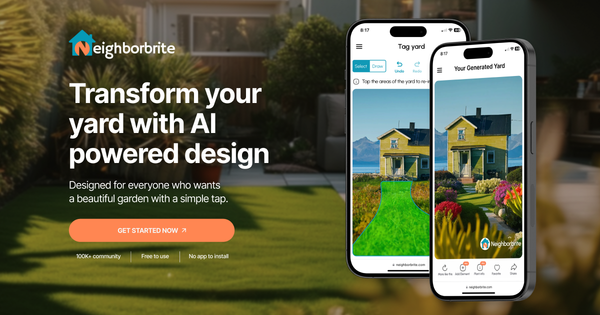
Neighborbrite is a free AI-powered online tool that lets users upload a photo of their yard, select specific areas to redesign, and choose from dozens of preferred styles (such as desert, cottage, modern, Mediterranean, or fairy garden) to instantly generate personalized landscaping visualizations. It serves as a digital inspiration engine, transforming blank or existing outdoor spaces into realistic before-and-after concepts complete with plants, hardscaping, and layout ideas. Primary use cases include sparking creative ideas for yard renovations, helping new homeowners visualize empty lots, and enabling quick client presentations for landscaping professionals.
The target audience consists mainly of homeowners (especially DIY enthusiasts, budget-conscious renovators, and those new to landscaping), as well as landscaping companies seeking fast mockups. It is not aimed at software developers, marketers, or graphic designers but excels for anyone wanting browser-based, no-install access to creative outdoor possibilities. All information in this review is based on research conducted as of March 10, 2026.
Key Features & Capabilities
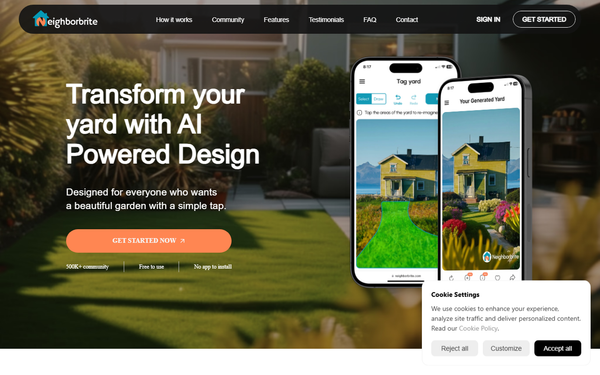
Core functionality revolves around photo upload as the foundation, followed by style selection and AI generation of multiple design variations in seconds. Standout features include unlimited free designs across dozens of aesthetics, “More like this” tweaking options, transformation-level sliders, and browser accessibility with no downloads required. The Pro upgrade unlocks precise control: custom elements (trees, decks, pools, pergolas, fire pits, shrubs), erase/reimagine tools, Magic Edit via text prompts, auto plant identification, climate- and sunlight-tailored plant lists, and satellite view integration. Additional capabilities in the companion iOS app include high-resolution outputs and reference-image uploads for custom elements.
What differentiates Neighborbrite is its completely free core experience paired with rapid, climate-aware results—unlike many competitors that limit free generations or require subscriptions upfront. It also optionally connects users to local landscapers for execution. Limitations include the inspirational (rather than construction-ready) nature of outputs, occasional AI-generated unrealistic elements (e.g., odd plant placements or “fake” appearances), and advanced editing or detailed plant lists locked behind Pro. No offline mode, exhaustive 3D modeling, or professional CAD export exists.
User Experience
Neighborbrite boasts an exceptionally low learning curve—most users can generate their first design in under a minute with “just a few clicks.” The interface is clean, modern, and intuitive, with clear upload prompts, style galleries, and real-time previews that feel responsive on both web and iOS. Testimonials frequently praise its “beautiful” navigation and “smoothest UX” among free AI landscaping tools.
Documentation is light but practical: the official YouTube channel provides short, visual walkthroughs, the site offers a feedback form, and blog posts cover new features like custom elements. No extensive written manual or live chat support exists, though developer responses to App Store issues have been prompt. Overall, it feels welcoming for beginners while offering enough depth for pros.
Performance & Reliability
Design generation is impressively fast—typically 5–10 seconds per variation—and scales well even with large photo uploads. The tool has grown to support 500K+ users and 15M+ designs across 170+ countries with no widespread outages reported. Reliability is solid for inspiration, backed by a 4.8/5 App Store rating (97 reviews) and positive Reddit feedback calling it “fun and inspiring.”
Common complaints are typical of AI tools: occasional unrealistic or “weird” results, rare upload failures (usually fixed quickly via updates), and designs that look photorealistic but may not perfectly match real-world plant hardiness without Pro lists. Users note it excels at ideas but benefits from human verification for execution.
Pricing & Value
Neighborbrite operates on a freemium model: the core tool is completely free with unlimited photo-based designs and style variations. Pro subscription (a one-time or recurring $15 upgrade) unlocks custom elements, editing tools, tailored plant lists, and advanced features. Optional professional human design services start around $287 for more polished plans.
Value is exceptional for the free tier—delivering professional-looking inspiration at zero cost—making it superior to many paid-only competitors for casual users. Pro delivers strong ROI versus hiring a designer for initial concepts, though serious professionals may still prefer dedicated software for precision. Compared to alternatives like iScape or REimagine (often subscription-only with limits), Neighborbrite’s free entry point and browser convenience provide outstanding accessibility.
Practical Tutorial
Official tutorials are available on the Neighborbrite YouTube channel (e.g., “How to Use Neighborbrite Step by Step: Designing with Add Elements, Erase, and Reimagine”). Here is a complete walkthrough for a common task—transforming a bare backyard into a modern oasis—using the web version at neighborbrite.com (or iOS app):
- Visit https://neighborbrite.com/ and create a free account if prompted.
- Click to upload a clear, well-lit photo of your yard (e.g., a recent smartphone shot of your empty backyard lawn and patio area).
- Use the selection tool to highlight the specific area you want redesigned (e.g., circle the lawn zone while keeping the house foundation intact).
- Browse and select a style—choose “Modern” for clean lines, minimalist plants, and geometric hardscaping.
- Tap Generate; the AI instantly produces four or more variations. Review them side-by-side and use “More like this” or the transformation slider for refinements.
- (Free users stop here and download/share.) Upgrade to Pro ($15) for deeper edits: select Erase to circle and remove unwanted existing features (e.g., old fence), use Add Elements to place a tree or pergola (draw green outline, resize/move, then Generate for seamless blending), or type a prompt like “add raised planting beds with native perennials” via Reimagine/Magic Edit.
- Request the auto-generated plant list (Pro only), which factors in your location, climate zone, and sunlight exposure for practical shopping guidance.
- Save high-resolution images or export to share with contractors.
Real example: A user with a new suburban home uploaded a bare front yard photo, selected “Desert” style, and generated xeriscape concepts with succulents and gravel paths in seconds—then used Pro tools to add a custom fire pit exactly where desired. Results were “stunning and inspiring,” per site testimonials. For visual demos, watch the official YouTube tutorial linked above.
Final Verdict
Overall rating: 4.5/5. Neighborbrite shines as an accessible, lightning-fast inspiration engine that democratizes professional-looking landscaping ideas for free. It is ideal for homeowners starting a project, new residents, or professionals needing quick client visuals—anyone who wants creative direction without cost or complexity. Avoid it if you require architect-level precision, offline functionality, or fully executable construction plans, as the AI remains inspirational rather than production-ready.
One-sentence recommendation: Start your landscaping journey with Neighborbrite for instant, free AI inspiration that brings your yard visions to life in seconds.