Neosvg Review: The Ultimate AI Text-to-SVG Vector Generator
Overview & Purpose
neoSVG is an AI-powered text-to-SVG generator that converts simple text prompts into high-quality, scalable vector graphics using Bezier curve paths for true infinite resolution. Unlike raster-based AI image tools that require post-processing, neoSVG produces native SVG files directly editable in design software. It also offers an Image-to-SVG Tracer feature that converts uploaded raster images (PNG, JPG, etc.) into clean vector paths.
Primary use cases include creating icons, logos, illustrations, UI elements, web graphics, branding assets, and technical diagrams for websites, mobile apps, print, AR/VR, and marketing materials. The tool targets developers, designers, UI/UX professionals, marketers, illustrators, and small businesses who need professional-grade vectors without manual drawing skills or expensive software like Adobe Illustrator. It democratizes vector creation for both beginners and agencies.
Key Features & Capabilities
Core functionality revolves around prompt-based generation across three AI models:
- Basic: Monochromatic, fast, excellent curves (0.2 credits per generation).
- Standard 4: Colorful, includes lines between paths, highest context perception (1 credit).
- Pro 2: Colorful with amazing curve quality (5 credits).
The standout Image-to-SVG Tracer delivers lightning-fast (seconds) vectorization with layer separation and pixel-perfect mathematical curves, making it ideal for converting existing artwork. All outputs support infinite scaling without quality loss and are commercially usable (though copyright remains with the AI generation).
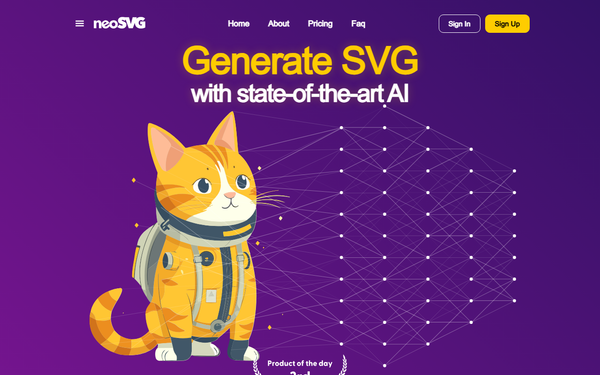
Differentiators from competitors include its specialized focus on native SVG (not raster-to-vector approximations), in-house AI merged with state-of-the-art models, and cloud-optimized performance for complex illustrations. Users can generate everything from whimsical scenes (“astronaut cat”) to technical visuals (“circuit brain”).
Limitations include no batch processing mentioned, credit-based limits that reset monthly, and typical AI variability—prompts must be concise for best results, and multiple generations are often needed. No offline mode or API access is advertised, and there is no free tier or trial.
User Experience
neoSVG features a clean, modern interface with a prominent prompt box, model selector, example gallery, and instant “Generate SVG” button. The homepage showcases real outputs side-by-side for model comparison, making it intuitive even for first-time users. Signing up and subscribing is straightforward via Stripe.
The learning curve is minimal: type a prompt, choose a model, and generate. The FAQ provides clear guidance on improving outputs with concise descriptions. Support is email-based ([email protected]), with account management for billing, cancellations, and history.
Documentation is basic—primarily the FAQ and pricing page—with a lightly populated blog for updates. No extensive video tutorials or in-app guides were prominent as of research, though a YouTube channel exists. Overall, the experience feels professional and focused, with fast cloud processing keeping the UI responsive.
Performance & Reliability
Text-to-SVG generation typically completes in minutes on powerful servers, while the Tracer produces results in seconds. Outputs are reliable for professional use, delivering clean, editable paths with strong curve quality, especially on Pro 2. The AI continues to evolve through ongoing research.
Known issues mirror other AI tools: occasional unnecessary details in complex prompts, variable quality requiring iterations, and past user reports of longer wait times or inconsistencies (though recent feedback indicates improvement). One older review cited subscription cancellation difficulties, but the FAQ states cancellations are straightforward through the account dashboard.
No widespread outages or major reliability complaints appear in current sources; the tool is trusted by professional illustrators for production work.
Pricing & Value
neoSVG operates on a subscription-only model with no free tier or trial:
- Starter ($15/month on sale, regular $25): 50 credits/month — suitable for beginners.
- Professional ($35/month on sale, regular $65): 150 credits/month — for active professionals.
- Enterprise ($95/month on sale, regular $150): 500 credits/month — for high-volume teams.
Credits cover generations and vectorizations (Tracer). All plans include full model access, SVG downloads, and updates. Unused credits reset monthly; no partial refunds.
Value is strong for users needing true vectors regularly—cheaper per asset than hiring illustrators and faster than manual creation. Compared to general AI image tools (which often require conversion), neoSVG’s native SVG output and specialization justify the cost for targeted workflows. However, the lack of a free tier or low-commitment option may deter casual users.
Practical Tutorial
No official in-depth tutorial exists on the site beyond examples and the FAQ, but the process is simple. Here is a step-by-step walkthrough for generating and using an SVG (tested conceptually from site functionality and user descriptions):
-
Visit https://neosvg.com and click Sign Up. Create an account and subscribe to a plan (e.g., Starter at $15/month).
-
Log in and navigate to the main generator (prominent on dashboard/home).
-
In the prompt box, enter a clear description, e.g., “cute astronaut cat floating in space, wearing sunglasses, simple illustration style.”
-
Select a model: Start with Standard 4 for color balance or Basic to save credits.
-
Click Generate. Wait 1–several minutes depending on model and complexity.
-
Review the result in the preview. Download the SVG file if satisfied, or regenerate with refined prompt (e.g., add “minimalist, clean lines”).
-
For the Tracer alternative: Go to https://neosvg.com/tracer, upload a PNG/JPG image, and let the AI vectorize it automatically (seconds). Download and compare side-by-side.
-
Open the SVG in free tools like Inkscape, Figma, or Adobe Illustrator for edits (paths are clean and grouped).
Example outcome: The “astronaut cat” prompt reliably produces a scalable, professional vector ready for web or print. Repeat generations until you get the perfect variation.
Final Verdict
Rating: 4.2/5
neoSVG excels as a specialized, high-quality AI SVG generator for anyone needing native vectors quickly. Designers, developers, and marketers who value infinite-resolution outputs and editability will appreciate its speed, curve precision, and commercial license. It shines for icon sets, illustrations, and UI assets where traditional tools are too slow.
Avoid it if you need a free trial, one-off experiments, or highly complex multi-element scenes without prompt iteration—the credit system and lack of freemium access limit accessibility for hobbyists or budget-conscious users.
One-sentence recommendation: If you regularly create or need professional SVG graphics, neoSVG is a worthwhile investment that saves hours and delivers production-ready vectors. (Research conducted as of April 2026.)