Neural Love Review: The Ultimate All-in-One AI Creative Studio

Overview & Purpose
Neural Love is an all-in-one creative AI studio that provides free and paid tools for generating, editing, enhancing, and restoring images, videos, and audio using advanced AI models like Stable Diffusion 3.5 and Auto-Aesthetics v3. Its primary use cases include creating AI art from text prompts, upscaling and restoring old photos or videos, outpainting (expanding image borders), converting images to short videos, colorizing black-and-white media, training custom DreamBooth-style models for consistent character or style generation, and quick AI photo variations for social media, CVs, or dating profiles from a single upload. It positions itself as a unified platform to replace multiple specialized tools, saving users time and subscription costs while accelerating creative workflows.
The target audience spans hobbyists, content creators, marketers, designers, and everyday users who need fast, high-quality media enhancements without advanced technical skills or software installation. It appeals less to professional developers seeking deep API customization (though an API exists) and more to non-experts focused on practical results for social media, e-commerce visuals, family photo restoration, or indie creative projects.
This review is based on the official website, blog updates, Trustpilot reviews, Reddit discussions, and independent tech analyses as of April 13, 2026.
Key Features & Capabilities
Core functionality revolves around browser-based AI processing with no downloads required. Key tools include:
- Image Generation & Editing: Free text-to-image generation, img2img variations, text-based edits (e.g., change outfits, swap objects, adjust lighting), and background removal/replacement.
- Upscaling & Enhancement: Creative and subtle upscaling for images (up to 4K+), with AI-driven denoising, sharpening, and detail hallucination controls.
- Video Tools: Image-to-video animation, video upscaling/enhancement (including 1080p to 4K, 60 FPS conversion, stabilization, and old film restoration), and video colorization.
- Audio Enhancement: Upsample audio to 48 kHz CD-quality.
- Specialized Features: AI Photo Studio for style-specific generations from one photo (no training needed), Uncrop/outpainting (Uncrop 4.0 with reduced glitches), and custom model training via DreamBooth-style processes for personal characters, faces, or art styles.
Standout differentiators include the seamless integration of all tools under one account, generous free tier access to core image generation and basic enhancements, superior upscaling visual quality compared to competitors like Runway in user tests, and unique additions like WorldModel v1 for prompt-guided photo colorization. Batch processing (up to 100 files on paid plans) and privacy-focused processing (content not used for training unless opted in) further set it apart. The platform donates portions of revenue to Ukrainian humanitarian aid.
Limitations include credit-based consumption for advanced features (free tier restricts video generation, audio editing, high-volume outputs, and watermark removal), occasional prompt adherence issues common to diffusion models, and no native mobile app (web-only, though mobile-friendly). Advanced users may miss granular control options found in local tools like Automatic1111. DreamBooth training is available but consumes significant credits and may require multiple iterations for optimal results.

User Experience
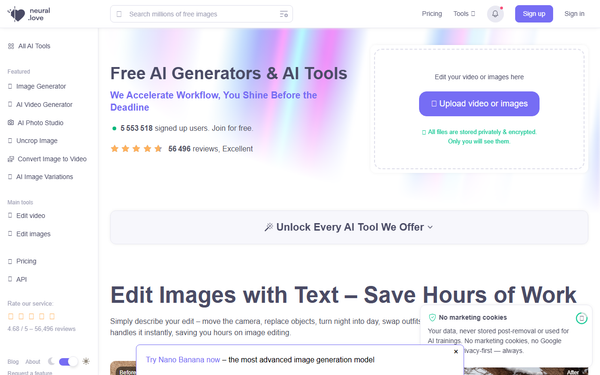
Neural Love offers an intuitive, clean web interface with simple upload buttons, prompt fields, style presets (e.g., Fantasy, Anime, Photo), and one-click toggles for quality, quantity, and filters. The learning curve is minimal—even beginners can generate or enhance media in under a minute after signing up with email (no credit card required for free tier). Galleries for “My Likes” and recent generations help iterate on preferred outputs.
Interface quality is modern and responsive, with real-time previews, before/after comparisons for enhancements, and helpful tooltips. Documentation includes an extensive blog with practical tutorials and release notes, plus API docs for developers. Support is primarily self-serve via blog and email, with generally responsive replies noted in reviews; however, some users report frustration with credit explanations or occasional UI glitches during peak times. Overall, it earns high praise for accessibility and speed of onboarding.

Performance & Reliability
Processing is fast—most image generations and enhancements complete in 10–60 seconds depending on complexity and server load. Video and batch jobs take longer but benefit from queue priority on paid plans. Users consistently highlight exceptional upscaling results, natural colorization, and artifact-free restorations compared to older tools.
Known issues include variable prompt following (e.g., “doesn’t follow instructions” complaints in some reviews), credit depletion surprises for heavy users, and occasional output inconsistencies after model updates. Reliability is strong overall, with millions of processed files and a 4.4/5 Trustpilot score from over 1,199 reviews plus 4.68/5 on the site from 56,000+ users. Rare downtime or quality regressions are addressed promptly via blog updates.
Pricing & Value
Neural Love uses a flexible credit system where credits are consumed per task (e.g., generations, upscales, training runs). The Free Plan allows limited daily/ hourly generations (basic quality, watermarks, no video/audio tools) with no credit card needed. Paid options include Pro subscription plans (monthly credits with rollover) and Pay-As-You-Go at approximately $0.17 per credit, with no monthly commitment and credits valid for one year. Batch processing, watermark-free outputs, and full tool access require paid tiers. Enterprise/custom options are available via contact.
Value is excellent for light-to-moderate users: one subscription unlocks everything versus separate tools like Midjourney or Runway, potentially saving $200+ annually. Heavy professional users may find credits add up quickly for training or video work, though still competitive. Promo codes frequently offer 10–20% off. Compared to alternatives, it delivers strong bang-for-buck for enhancement-focused workflows.
Practical Tutorial
Step-by-Step: Generating and Enhancing AI Art (Common Task)
Here is a simple walkthrough for creating custom AI images and upscaling them, based on official capabilities (links to similar official blog tutorials included).
-
Sign Up & Navigate: Go to https://neural.love/ and create a free account (email only). Click “AI Art Generator” or go directly to the image generation tool.
-
Generate Base Image: Enter a descriptive prompt (e.g., “cyberpunk samurai standing on neon Tokyo rooftop at night, detailed armor, cinematic lighting”). Select style (e.g., Photo or Anime), quality (Medium or HD), quantity (2–4 images), and toggle “Remove watermark” if on paid plan. Hit “Generate for free.” Results appear in seconds. Like preferred outputs to train Auto-Aesthetics to your taste.
-
Edit or Vary (Optional): Use the “AI Image Variations” tool (https://neural.love/image-to-image) by uploading your favorite result and adding a prompt like “change background to rainy street” for refinements. Or try text-based editing for specific changes.
-
Upscale & Enhance: Upload the generated image to the Upscale tool (or “Edit Images” section). Choose “Creative Upscale” for artistic enhancements or “Subtle Upscale” for clean resolution boost. Select target size (e.g., 4K) and preset. Process and download the improved version.
-
Advanced Option – Custom Model Training: For recurring characters, upload 10–20 consistent photos of your subject to the model training section (DreamBooth equivalent). Set parameters per official guidance, train (credit cost applies), then generate consistent images using your custom model trigger word.
Official tutorials for similar tasks: “Tutorial: The Easiest Way to Recreate Your Design Ideas for Existing Images” (https://neural.love/blog/easy-img2img) and “How to restore an old family photo” (https://neural.love/blog/how-to-restore-an-old-family-photo). Experiment with the free tier first to test results.
Final Verdict
Neural Love earns a solid 4.6/5 rating. It excels as a convenient, high-quality all-in-one AI media suite that democratizes advanced generation and restoration tools.
Who should use this tool: Content creators, marketers, designers, social media managers, and hobbyists who want fast, impressive results for images, videos, and audio without managing multiple platforms or steep learning curves—especially those restoring old media or needing quick custom visuals.
Who should avoid this tool: Advanced users requiring pixel-level control, unlimited local processing, or extremely high-volume professional workflows where credit costs could accumulate rapidly without custom enterprise pricing.
One-sentence recommendation: If you’re looking for a beginner-friendly, cost-effective hub that combines free AI image generation with powerful upscaling, outpainting, colorization, and custom model training, Neural Love is one of the best all-in-one choices available in 2026.