NewsBang Review: The AI News App That Makes You Smarter
Overview & Purpose
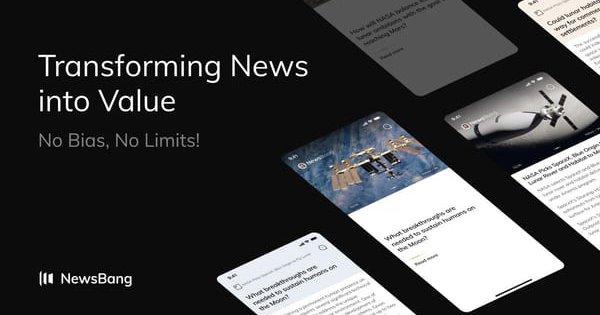
NewsBang is an AI-powered mobile app (available on iOS and Android) and companion website that reimagines news consumption by combining aggregation from verified sources with generative AI to deliver deeper understanding rather than surface-level headlines. As of March 2026 research, it addresses information overload through bite-sized summaries, multi-perspective analysis, interactive questioning, and on-the-go audio features, turning passive reading into active engagement. Primary use cases include daily personalized briefings for time-strapped users, in-depth exploration of current events via Socratic-style AI probes, and multitasking with voice-interactive podcasts. The target audience spans busy professionals such as developers, data analysts, UX designers, product managers, professors, executives, startup enthusiasts, and strategic communicators who seek unbiased insights without wading through endless feeds or biased commentary.

Key Features & Capabilities
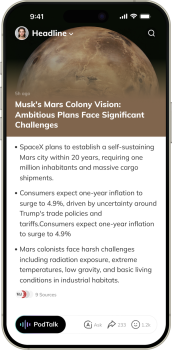
Core functionality centers on a swipeable, TikTok-style feed of AI-generated questions tied to real news stories. Users receive consolidated bite-sized takeaways from multiple balanced sources on one screen, swipe left or up for deeper insights and follow-up queries powered by a proprietary “Questioning Model” (inspired by Socratic methods for critical thinking), and access wiki links or related resources for context. Standout differentiators include interactive AI podcasts hosted by virtual anchors “Alice & Brad,” where users can interrupt playback (even while driving) via voice or text in real-time “PodTalk” mode; personalized “Morning Brew” briefings delivered at 8 AM; a “Joyful News” category for uplifting stories; and an “Ask Anything” feature for verified, unbiased answers on any topic. These elements set it apart from traditional aggregators or basic summarizers by emphasizing conversation, emotional angles, and multi-angle viewing to reduce bias.
Limitations include a relatively small pool of sources (as a newer platform launched around 2025), occasional generic AI-generated insights that users are advised to verify independently, and premium gating for unlimited access or advanced interactions. Missing compared to competitors: no desktop/web app beyond the marketing site, limited customization of sources, and no collaborative sharing tools for teams.
User Experience
The app boasts an intuitive, low-learning-curve interface modeled after short-form video apps, making onboarding effortless for most users—simply download, browse daily questions, and swipe. The clean, modern design prioritizes readability with one-story focus, vibrant visuals, and seamless audio integration, though some find the single-article view and frequent haptic feedback irritating. Documentation is minimal (no comprehensive official guides beyond in-app tooltips and the website), but community YouTube tutorials and responsive developer support via email ([email protected] or [email protected]) fill the gap effectively. Overall, the experience feels fresh and engaging, with high praise for its ability to make complex topics accessible and fun.

Performance & Reliability
The app loads quickly and runs efficiently on modern devices, with recent updates (last major in December 2025) addressing earlier crash reports and improving stability. Interactive features like real-time PodTalk perform smoothly for voice queries, and battery impact remains comparable to other media apps despite AI processing. Common complaints are minor and infrequent: occasional vibration overuse on swipes, higher battery drain during extended podcast sessions, and past reliability hiccups now largely resolved per developer responses. No widespread outages or major security issues reported on established platforms; overall reliability scores well for a young app (4.3/5 on Google Play with 10K+ downloads; 4.6/5 on iOS).

Pricing & Value
NewsBang follows a freemium model: the core experience (daily stories, basic summaries, limited insights and podcasts) is free, while Premium unlocks unlimited swipes, full PodTalk access, ad-free listening, priority briefings, and advanced Q&A. Subscription pricing is in-app only (approximately $9.99/month or equivalent yearly plans), with frequent promotions such as 60-day free trials via referrals or discount codes (e.g., invite three friends or HELLOBANG-style offers). No enterprise tier is advertised. Compared to alternatives like premium news subscriptions or other AI tools, it delivers strong value for users seeking interactive depth at a low entry point, though the lack of transparent upfront pricing on the website frustrates some planners. The proposition shines for time-saving, bias-reduced consumption that goes beyond free aggregators.
Practical Tutorial
No official video tutorials exist on the website, but the app’s in-app onboarding and community YouTube demos (search “NewsBang AI News App”) provide guidance. Below is a step-by-step walkthrough for a common task—deep-diving a news story for insights and interaction—based on real app functionality as of March 2026:
- Download NewsBang from the App Store or Google Play and open the app (sign up with email or quick social login; no credit card required for free tier).
- On the homepage, browse trending questions or your personalized feed (e.g., “Can SpaceX’s proposed cargo realistically terraform Mars?”). Tap any story to view the initial bite-sized takeaways from verified sources.
- Swipe left (or up) to unlock AI-generated deeper insights, follow-up questions, and multi-perspective analysis—read or listen as the “Questioning Model” expands context.
- Tap the podcast icon to launch PodTalk with AI anchors Alice & Brad. Play the discussion, then interrupt anytime with voice or text (e.g., “How does this affect international law?”) for real-time verified answers.
- Explore side elements like wiki links, related videos, or the “Bang” button for expanded research. Save or share the story if desired.
- For daily use, enable Morning Brew notifications at 8 AM for a curated 3–5 story briefing tailored to your interests.
This process typically takes 2–5 minutes per story and works offline for downloaded content. For visual demos, see official YouTube channels or search “NewsBang tutorial 2026.”
Final Verdict
Overall rating: 4.3/5. NewsBang excels for busy professionals, developers, designers, and executives who want an engaging, bias-minimizing way to truly understand news on the go—its swipe-and-chat interactivity and AI depth make it uniquely valuable in a crowded market. Users should avoid it if they prefer exhaustive source libraries, traditional long-form reading, or fully transparent upfront pricing, or if they are concerned about early-stage app quirks and data tracking. One-sentence recommendation: Download NewsBang today if you’re tired of skimming headlines and ready for AI that actually makes you smarter about the world.