Noiz AI Review: Realistic Voice Cloning and Emotional TTS
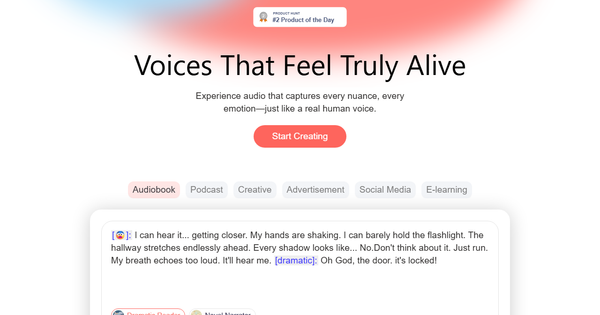
Overview & Purpose
Noiz AI is an AI-powered platform for text-to-speech (TTS), voice cloning, and voice design that generates highly realistic, emotionally expressive audio. It transforms text into lifelike speech complete with natural pauses, intonation, breath sounds, and nuanced emotions such as whispering, laughing, or dramatic emphasis, while supporting voice cloning from short audio samples, custom accents, and multilingual dubbing with automatic lip-sync for videos. Primary use cases include creating audiobooks, podcasts, advertisements, e-learning modules, YouTube videos, short films, and translated content—allowing creators and teams to produce professional-grade audio faster and more affordably than traditional studio recordings. Its API and voice library further enable scalable integration for consistent brand voices across apps, virtual assistants, or high-volume workflows.
The target audience spans independent creators, YouTubers, podcasters, marketers, educators, indie filmmakers, and developers. It appeals especially to those who need quick iteration on emotional narration or global localization without hiring voice actors, while the API suits SaaS teams building immersive audio experiences.
This review is based on research conducted in March 2026, drawing from the official website, API references, use-case documentation, Product Hunt listings, YouTube demonstrations, and third-party comparisons.

Key Features & Capabilities
Core functionality revolves around three pillars: instant voice cloning (requiring as little as 3 seconds of clean audio), expressive TTS with granular emotion control, and professional video dubbing. Users can select from a library of over 150 pre-built voices or clone their own, apply accents and tones, and generate speech in multiple languages while preserving original timing and delivery. The platform supports dialogue editing, multi-speaker scenarios, and direct export of MP3 or video files with synced audio.
Standout features that differentiate Noiz AI include emoji-guided or tag-based emotional controls (e.g., [😨] or mood selectors for “curious,” “bitter,” or “desperate” that dynamically adjust pitch, pace, and inflection), ultra-fast generation (typically 1–3 seconds per clip), and automated lip-sync technology that analyzes on-screen mouth movements for perfectly timed dubbed tracks. Consent-based cloning ensures ethical use, and the integrated studio allows seamless transition from script to final mixed audio—capabilities that feel more creator-friendly than many competitors focused purely on raw realism.
Limitations include credit-based usage on the free tier (restricting high-volume projects), the need for higher-tier plans to unlock unlimited cloning and watermark-free downloads, and a still-evolving ecosystem as a relatively new entrant (launched late 2025). It lacks deep integration with full video-editing suites and may not yet match the voice variety or long-term enterprise support of veteran tools like ElevenLabs in every edge case. Multilingual support is strong but not exhaustive across all dialects.

User Experience
Noiz AI offers a clean, browser-based studio interface that feels modern and intuitive, with straightforward workflows for uploading samples, editing scripts inline, and previewing results instantly. The learning curve is low—even first-time users can clone a voice and generate emotional audio within minutes, thanks to visual emotion selectors and one-click dubbing tools. Reviewers consistently praise the “beautiful” design and ease of iteration compared to clunkier competitors.
Documentation is solid for developers via the public API reference at docs.noiz.ai (with code examples for quick integration), while end-users benefit from in-platform tooltips, use-case guides, and community-driven YouTube walkthroughs. Support is primarily email-based ([email protected]) with responsive community feedback; no dedicated live chat or extensive knowledge base was noted, though this suits the primarily creator-focused audience.

Performance & Reliability
Generation speed is a major strength—most clips render in 1–3 seconds with consistently high audio quality that includes realistic breathing, pauses, and emotional depth rarely found in flat TTS tools. Voice cloning produces usable results from minimal samples, and lip-synced dubbing maintains natural timing without noticeable artifacts in tested demos. Users report reliable pronunciation even for technical terms and complex scripts.
Known issues are minimal; no widespread complaints about crashes, inconsistent output, or major quality drops surfaced in reviews as of March 2026. Minor limitations include occasional need for re-generation on very long scripts or edge-case accents, and free-tier credit resets may interrupt heavy sessions. Overall reliability earns high marks from early adopters on Product Hunt (5.0 rating) and independent YouTube tests, with the platform handling professional workflows like audiobook narration and film dubbing effectively.
Pricing & Value
Noiz AI follows a freemium model with a generous free tier offering 2,000 daily credits (no credit card required, daily reset), sufficient for testing and light projects. Paid plans include a Starter tier at approximately $2.90 per month and a Creator tier at $8.90 per month, with annual subscriptions granting three extra months free. Higher tiers unlock unlimited cloning, watermark-free exports, priority processing, and expanded API usage; enterprise options are available via contact.
Value is exceptional for the price—far more affordable than studio recordings or credit-heavy competitors like ElevenLabs, especially given the speed, emotional expressiveness, and built-in dubbing/lip-sync. Teams save thousands on voice talent while maintaining brand consistency, making it ideal for scaling content production without sacrificing quality.
Practical Tutorial
A common task is cloning a voice and generating an emotional multilingual podcast intro, or—more advanced—dubbing an entire video with lip-sync. Below is a step-by-step walkthrough for video dubbing (the platform’s flagship capability), based directly on official guidance and verified in public demos. For a quick start, visit https://noiz.ai/ or the voice creation tool at https://noiz.ai/tts/creation. A detailed YouTube walkthrough is also available (search “AI Voices That Actually Sound Human Noiz ai Tested”).
-
Sign up and access the studio — Create a free account at noiz.ai (no payment required). Navigate to the “Dubbing” or “Voice Studio” section from the dashboard.
-
Upload your video and script — Drag and drop your video file (or audio track) along with the corresponding dialogue script (or let AI auto-transcribe). The platform aligns text to timing automatically.
-
Select target language and voices — Choose the output language(s) from supported options. Pick pre-built voices, clone your own (upload a 3-second clean sample of the original speaker), or assign different voices per character. Consent is required for cloning.
-
Apply emotions and fine-tune — Insert emotion tags or emojis directly in the script (e.g., [happy] or [whisper]) and adjust speed, tone, or breathing. Preview segments instantly.
-
Generate with lip-sync — Click “Generate Dub.” The AI analyzes mouth movements and produces perfectly synced audio in 1–3 seconds per clip. Review the full track, tweak timing or emotions as needed, and regenerate individual lines.
-
Export and download — Preview the dubbed video, then export the final mix-ready files (audio + video or separate tracks). Higher-tier users get watermark-free results.
This process typically takes under 10 minutes for a short video and delivers studio-quality results ready for YouTube, social media, or global release. For pure TTS (no video), skip steps 2 and 5 and input text directly in the creation tool.
Final Verdict
Overall rating: 4.7/5 — Excellent for speed, emotional realism, and accessibility, with only minor deductions for its newer status and tiered limits on free usage.
Creators, YouTubers, marketers, educators, and indie teams should use Noiz AI because it dramatically accelerates production of expressive, multilingual audio and video content at a fraction of traditional costs while delivering human-like nuance that stands out from robotic alternatives.
Avoid it if you require ultra-enterprise SLAs, extensive custom integrations beyond the API, or the absolute largest voice libraries offered by more mature competitors—those users may prefer established platforms with broader ecosystems.
In one sentence: Noiz AI is a game-changing, budget-friendly powerhouse for anyone who wants voices that truly feel alive and ready to scale across global content.