Note67 Review: The Ultimate Private Local AI Meeting Assistant
Overview & Purpose

Note67 is a free, open-source, local-first meeting notes assistant designed to capture audio from your microphone and system output during meetings or calls, transcribe it in real-time using on-device Whisper models, separate speakers, handle echo, and generate intelligent AI summaries and edits—all processed entirely locally via Ollama LLMs with zero cloud involvement.
Its primary purpose is to provide private, searchable notes for conversations without any data ever leaving your device, making it ideal for one-on-one calls, team standups, webinars, client meetings, or personal voice memos. Use cases include quickly turning raw audio into structured notes with action items, improving transcript accuracy post-recording, and editing content with AI assistance in a rich editor.
The target audience includes privacy-conscious professionals such as developers, marketers, designers, consultants, freelancers, and executives who prioritize data sovereignty and avoid cloud services like Otter.ai or Fireflies due to security or compliance concerns. It appeals especially to users already comfortable with local AI tools like Ollama.

Key Features & Capabilities
Core functionality revolves around seamless audio handling and local AI: microphone + system audio capture (with platform-specific tools like ScreenCaptureKit on macOS and WASAPI on Windows), live transcription with automatic retranscription for higher accuracy, speaker diarization ("You" vs. "Others"), Voice Activity Detection (VAD) for filtering silence/noise, echo deduplication (especially useful when not using headphones), pause/resume recording, external audio upload, and local SQLite storage for notes.
Standout differentiating features include full on-device processing with open models (Whisper for transcription and any Ollama LLM for summaries), an integrated AI writing assistant sidebar (accessible via Cmd+J) for quick actions like "Summarize," "Action Items," "Improve," "Expand," or custom chat-based edits, a Notion-style rich markdown editor with live preview, local image pasting/storage, LaTeX/math support, slash commands, and one-click Markdown export. Recent updates (as of v0.1.18) added advanced AI tools and editor enhancements, all while maintaining minimal resource usage thanks to its Rust and Tauri foundation.
Compared to competitors, Note67 excels in uncompromising privacy and cost (no subscriptions), while supporting speaker separation and system audio without external services.
Limitations and missing features include audio-only capture (no video or full screen recording), the need for a separate Ollama installation and model download, hardware dependency for smooth performance (larger models require more RAM/CPU), desktop-only availability (Windows/macOS primary, with partial Linux audio support), no native mobile app or real-time collaboration/sharing, and limited integrations with calendar or video platforms—users must manually start recordings.
User Experience
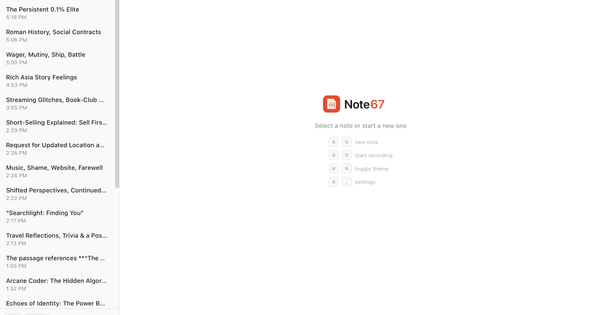
Note67 offers a clean, minimal interface with light and dark modes, live transcript viewing with search/speaker filters, an expandable audio player, and a modern Notion-like editor that feels intuitive for note-taking. Setup involves granting microphone and screen recording permissions (macOS), but the core workflow—create note, record, transcribe, summarize—is straightforward with a low learning curve once running.
The interface quality is high for an indie app: responsive, feature-packed yet uncluttered, with system tray support for quick access and custom context menus. Ease of use shines for tech-savvy users, though non-technical individuals may find the initial Ollama model selection and app permissions mildly challenging.
Documentation consists of concise website pages (including a dedicated Ollama setup guide), a detailed GitHub README covering features and build instructions, and changelog notes—no extensive user manual or video tutorials exist yet. Support is community-driven via GitHub issues, with no dedicated helpdesk or forums, which is typical for an early-stage open-source tool.
Performance & Reliability
Built natively with Rust and Tauri, Note67 delivers fast real-time transcription and minimal resource footprint on capable hardware (recommended: 16GB+ RAM, especially for larger Ollama models). Features like auto-retranscribe and echo filtering enhance reliability, with live transcripts appearing promptly and AI summaries generating in seconds locally.
As of March 2026 research, no widespread user complaints or major bugs are reported across sources—likely due to its recent launch (initial release December 2025, with steady updates through v0.1.18). Common minor issues noted in documentation include reduced transcription quality with poor audio or accents (mitigated by model choice and retranscribe), and echo artifacts if speakers are used without headphones. Performance varies by hardware and model size; smaller models (e.g., gemma3:1b) run lighter but with slightly lower summary quality. Overall reliability is strong for personal use, with all data persisted locally and no cloud outage risks.
Pricing & Value
Note67 is completely free and open-source (AGPL-3.0 license), with a "install once, own forever" model—no accounts, subscriptions, data collection, or paid tiers. Users simply download the app and install Ollama separately (also free).
The value proposition is exceptional for privacy-focused users: it combines powerful local AI capabilities that would otherwise require expensive cloud services (e.g., $10–30/month for tools like Otter or Notion AI) while eliminating data privacy risks entirely. Compared to alternatives like Granola or Hyprnote (which often involve cloud elements or subscriptions), Note67 offers superior control and zero ongoing costs, making it outstanding value—especially for heavy users or organizations with strict compliance needs. The only "cost" is time for initial Ollama setup and potential hardware upgrades for optimal speed.
Practical Tutorial
Official documentation provides no single video walkthrough, but a clear step-by-step process is derivable from the website, GitHub README, and dedicated Ollama guide. Below is a practical tutorial for a common task: recording and summarizing a 30-minute team standup meeting (realistic example). Full Ollama setup details are available at the official guide: https://note67.com/ollama-setup.
-
Install Note67 and Ollama — Download the latest version (e.g., v0.1.18) for your platform from https://note67.com/download (Apple Silicon/Intel or Windows .exe). Install Ollama from ollama.com, launch it, and in Terminal run
ollama pull gemma3:4b(recommended balanced model; ~3GB download). Verify withollama list. -
Configure in Note67 — Open the app, go to Settings > AI tab. Select your Ollama model (it auto-detects running instances). Grant microphone and screen recording permissions on macOS via System Settings.
-
Start a New Meeting Note — Click "New Note," name it "Q1 Team Standup - March 3," and optionally add context in the rich editor (e.g., agenda items).
-
Record the Meeting — Click the record button (ensure headphones for best echo handling). Speak or join a call—live transcription appears in real-time with speaker labels ("You" vs. "Others"). Pause/resume as needed. System audio captures shared screens or presentations automatically.
-
End Recording and Refine — Stop recording; the app auto-retranscribes for accuracy. Review the transcript in the viewer (search or filter speakers), upload additional audio if needed, or retranscribe with a different Whisper model via the audio panel.
-
Generate AI Summary and Edits — Click the "Summarize" button in the header or open the AI sidebar (Cmd+J on macOS). Select actions like "Summarize," "Action Items," or "Improve." For example, prompt: "Extract key decisions and to-dos from this standup." The local LLM inserts polished markdown directly into your note. Use the editor for further tweaks (paste images, add LaTeX if needed).
-
Export and Save — Export to Markdown via the menu. All files (audio, transcripts, images) are stored locally and searchable later.
This process typically takes under 5 minutes post-meeting for a clean, actionable note—far faster than manual typing.
Final Verdict
Overall rating: 4.3/5 — Excellent privacy and innovation score, tempered slightly by setup requirements and early-stage maturity.
This tool is perfect for privacy-conscious individuals or small teams with decent hardware who want powerful, zero-compromise AI meeting notes without subscriptions or data risks—especially developers and professionals already using Ollama.
Avoid it if you need mobile access, effortless cloud sharing/collaboration, zero-setup simplicity, or video transcription features.
One-sentence recommendation: Note67 is the standout local-first choice for anyone prioritizing complete data privacy in AI-powered meeting notes—install it today if cloud tools make you uneasy.