Noteey Review: The Ultimate Visual Knowledge System for Your Second Brain
Overview & Purpose
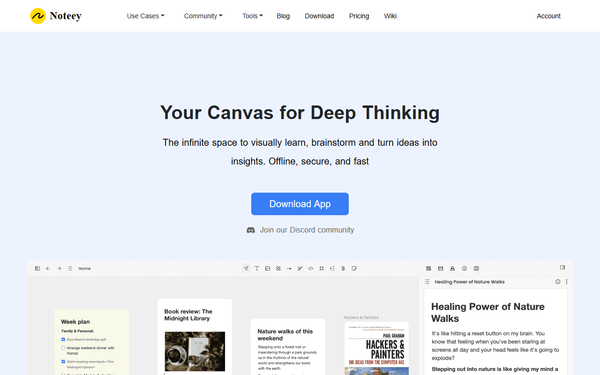
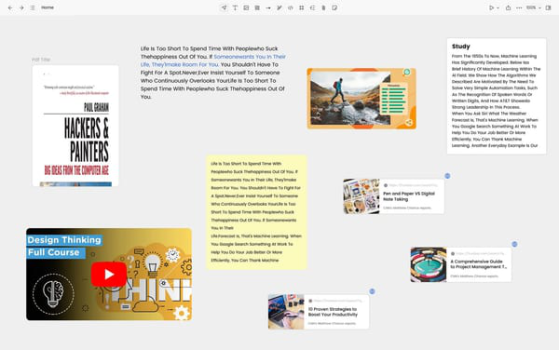
Noteey is a visual note-taking platform and complete Visual Knowledge System designed to help users organize, connect, and transform ideas into insights on an infinite canvas. It unifies text, images, PDFs, videos, audio, mind maps, drawings, and more in one workspace, allowing users to annotate and highlight content while building interconnected knowledge maps. Primary use cases include academic research, building a personal second brain, studying lecture videos or documents, creative brainstorming, mood boards, flowcharts, and visual project management. The tool emphasizes non-linear thinking through its canvas while supporting linear cards and tree-structured mind maps.
The target audience includes students, researchers, knowledge workers, designers, writers, and personal knowledge management (PKM) enthusiasts who value visual, offline-first workflows. It appeals particularly to visual thinkers seeking alternatives to Heptabase, Miro, Milanote, or Obsidian, especially those prioritizing local data control and one-time purchases over cloud subscriptions. Noteey is less suited for large teams needing real-time collaboration. Research for this review was conducted as of March 2026 using the official website, public wiki, Reddit discussions, YouTube reviews, and comparison articles.
Key Features & Capabilities
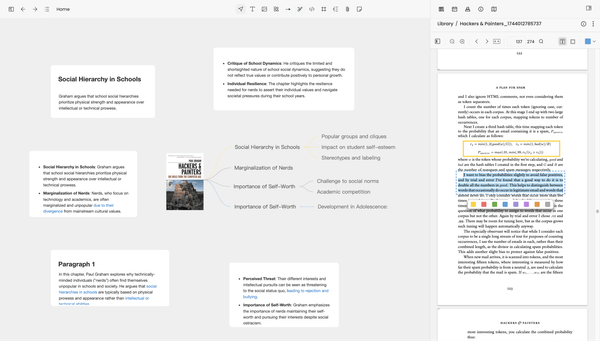
Core functionality revolves around an all-in-one infinite canvas that supports adding and organizing diverse content types seamlessly. Users can create cards for linear notes, embed or annotate PDFs with searchable highlights and area notes, add time-stamped notes to videos or audio (with highlights draggable directly to the canvas), incorporate drawings for sketches and flowcharts, build mind maps, and use sticky notes or frames. A comprehensive highlight system turns annotations from any source into reusable, linked cards. Additional tools include a library for storing and reusing cards/PDFs/videos across projects, floating windows for working with multiple documents simultaneously, deep linking for integration with other apps, and presentation mode to showcase connected insights like a visual slideshow.
Standout features differentiating Noteey include its completely offline-first design (data stored locally with no account required for basics), local backup/export of entire projects (shareable without restrictions), and reusable knowledge via a built-in library with backlinks from highlights. OCR for images, laser pointer in presentation mode, and AI-powered summarizers (YouTube transcript, PDF reader) add value in paid tiers. Deep linking enables seamless workflow connections beyond the app.
Limitations include a desktop-primary experience (Mac/Windows with offline web beta; mobile apps coming soon), occasional bugs or UI inconsistencies typical of a maturing app, limited built-in real-time collaboration, and reliance on premium for unlimited AI/web publishing features. Integrations are basic (deep links only), and documentation is high-level rather than exhaustive. No native mobile support or advanced database querying exists yet.
User Experience
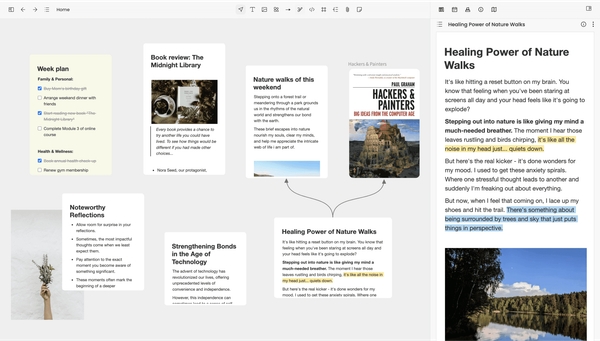
Noteey offers an intuitive interface for users familiar with infinite canvas tools, featuring a clean, modern design with drag-and-drop elements, customizable colors, fonts (importable in Pro), and responsive zooming/panning. The learning curve is moderate: beginners can start quickly with basic canvas additions, but mastering the highlight system, library reuse, and presentation mode takes practice. Visual thinkers praise the fluid organization of multimedia.
Interface quality feels polished and fast due to local processing, with floating windows enhancing multitasking. However, some users report minor rough edges like occasional element disappearing or inconsistent sharing updates, though rapid updates address these.
Documentation includes a public wiki at wiki.noteey.com covering core concepts (offline mode, canvas thinking modes, highlight system) but lacks in-depth step-by-step visuals or searchable guides. Support resources feature a Discord community for direct feedback, YouTube tutorials, and responsive developer interaction on Reddit/YouTube. No extensive in-app help or video library exists, which may challenge new users.
Performance & Reliability
Performance is a strength: the local-first architecture delivers fast loading, smooth canvas navigation, and low resource usage—even with multiple large PDFs—outperforming cloud-heavy competitors in user tests. Offline access is seamless, with projects stored locally and exportable as editable files. Reliability is solid for core use, with quick saves and no data loss reported in reviews.
Known issues include occasional bugs (e.g., disappearing elements or sharing inconsistencies) common in newer apps, though developers actively fix them via updates and user reports. Restarting often resolves glitches. No major outages or security complaints exist, thanks to local storage. Some users note performance dips only in very large projects on lower-end hardware, but overall stability has improved significantly since rebranding from Muenzo.
Pricing & Value
Noteey uses a hybrid model emphasizing ownership:
- Free tier: $0 – Up to 3 projects, 100 cards, annotate 3 PDFs and 3 videos/audios; all visual features included; no signup needed for desktop.
- Desktop Pro: $99 one-time (or $159 Pro Plus for 8 devices) – Unlimited local projects, 4–8 devices, OCR, custom fonts, project export/import, small web publishing (up to 20MB), 30-day money-back.
- Premium (subscription or lifetime): $10/month, $90/year, or $599 lifetime – Adds Desktop Pro benefits plus unlimited web publishing, unlimited YouTube transcripts/AI summarizers, priority support, and upcoming web version.
Discounts like OFF20 (20% off) appear periodically. No enterprise plan is detailed. Value is excellent for solo users or freelancers seeking lifetime ownership and privacy—far cheaper long-term than subscription rivals like Heptabase or Miro—while the free tier allows testing. Premium unlocks full AI/cloud potential but feels transitional as the app shifts toward subscription emphasis.
Compared to alternatives, Noteey delivers strong bang-for-buck through local sharing and media annotations without vendor lock-in.
Practical Tutorial
Official tutorials are available via the wiki (https://wiki.noteey.com/) and YouTube (search “Noteey tutorial” for updated walkthroughs). Below is a step-by-step guide for a common task: creating a visual research summary by annotating a PDF research paper and a related YouTube lecture, then organizing insights on the canvas. This uses real example elements (e.g., summarizing an AI ethics paper and a TED Talk video).
- Download and install the desktop app from https://www.noteey.com/download (Mac .dmg or Windows .exe; offline web beta also available). Open and create a new project—no account required for basics.
- Drag your PDF (e.g., an AI ethics paper) onto the canvas. Double-click to open it in a floating window. Use the highlight tool to select key passages or areas; add annotations or notes. Drag highlighted sections directly onto the main canvas—they become linked cards that jump back to the source on double-click.
- Add a video: Paste a YouTube link or drag a local video file. Play it and use the video note taker to create time-stamped highlights/notes at key moments (e.g., at 2:15 for a definition). Drag these timestamped notes to the canvas as connected cards.
- Organize: Connect cards with lines or arrows. Add text blocks, mind maps, or drawings to group insights (e.g., cluster ethics concerns). Use the library (sidebar) to store reusable cards for future projects. Apply properties or tags for filtering.
- Refine visually: Crop images, adjust colors, or use drawing tools for diagrams. Switch to presentation mode (via menu) to turn your canvas boards into a navigable slideshow with laser pointer.
- Save/export: Use local backup to share the full editable project folder. For Pro users, publish a small version online or export as PDF/image.
This workflow typically takes 10–15 minutes and produces an interactive knowledge map. For video demos, see YouTube guides like “3-Minute Guide to Best Visual Note-taking app – Noteey.”
Final Verdict
Noteey earns a 4.3/5 rating for its innovative visual approach, generous lifetime pricing, and strong multimedia annotation tools, though it loses points for maturing documentation, desktop-only focus, and minor bugs. Users who should adopt it are solo researchers, students, or visual PKM enthusiasts prioritizing offline privacy, local ownership, and flexible canvas organization of PDFs/videos—they’ll gain a true “second brain” without subscription fatigue. Those who should avoid it include mobile-first users, large teams needing robust collaboration/sync, or anyone requiring mature enterprise features and exhaustive support right now.
Noteey is a compelling, affordable choice for visual thinkers ready to escape fragmented note apps and build interconnected knowledge locally.