Novodo Review: The Ultimate All-in-One AI Workspace with Memory

Overview & Purpose
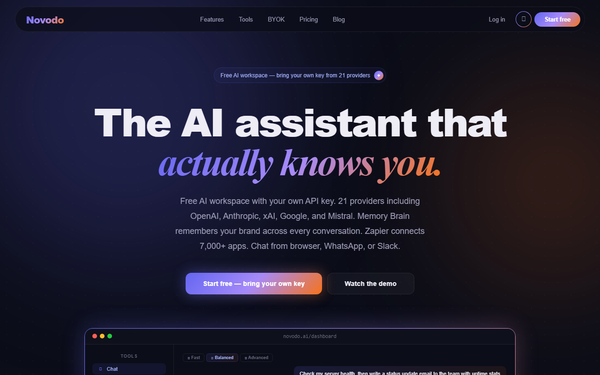
Novodo (novodo.ai) is an all-in-one AI workspace and assistant designed to consolidate multiple best-in-class AI models into a single persistent chat interface. It automatically routes tasks to the optimal model (such as Grok, Claude, Aurora for images/video, ElevenLabs for audio) while maintaining context through its standout "Memory Brain" feature. This persistent memory stores your brand voice, audience details, product info, visual style, and technical preferences, ensuring consistent outputs across text, images, video, audio, code, and research without repeated explanations.
Primary use cases include generating branded marketing content (emails, social posts, ad copy), creating multi-modal assets (product images, short cinematic videos, voiceovers), writing and debugging code tailored to your tech stack, conducting live web research and competitor analysis, running server commands via SSH, and automating workflows through Zapier, Slack, WhatsApp, Gmail, GitHub, and more. It supports Bring-Your-Own-Key (BYOK) from 27+ providers, meaning users can leverage their existing API keys for unlimited access at no extra platform cost beyond provider fees.
The target audience spans creators, marketers, SaaS founders, freelancers scaling to agencies, developers needing on-the-go coding/server management (including via WhatsApp), and small teams seeking brand-consistent automation without juggling multiple apps. It positions itself as ideal for anyone tired of context-switching between ChatGPT, Midjourney, Claude, etc., especially those prioritizing consistency and workflow integration.
Key Features & Capabilities
Core functionality revolves around a unified chat where users describe tasks in natural language, and Novodo handles routing, generation, and memory application. Key capabilities include:
- Text & Code: Real-time streaming from models like Grok 4.1, Claude Sonnet, with code generation/debugging that remembers your stack (e.g., Flask + SQLAlchemy patterns).
- Images & Video: Aurora-powered photorealistic images (with upscaling) and ~8-second cinematic video clips, automatically styled to your brand.
- Audio: ElevenLabs text-to-speech (28 voices, 29 languages), Whisper transcription, and MusicGen for tracks.
- Research & Tools: Perplexity-powered live web search/synthesis, email/calendar access, and direct server SSH commands (e.g., deploy scripts with confirmation).
- Integrations & Automations: Native Zapier (7,000+ apps), Slack, GitHub, WhatsApp AI chat, and Google Workspace.
Standout differentiators include the Memory Brain (set up via a 3-minute 10-question wizard that applies across all modalities), full BYOK support for 27 providers (more than many competitors like TypingMind), free unlimited messaging on the BYOK tier, and seamless multi-modal outputs in one place. It also offers WhatsApp/Slack access for mobile workflows and server control directly from chat.
Limitations include credit-based consumption for media generation (images 5–25 credits, video 50–100, audio ~30/minute) even on paid plans (text is unlimited on Fast mode for paid tiers), short video clips (~8 seconds, no advanced editing), and reliance on third-party models/providers (performance tied to your keys or Novodo's hosted credits). No enterprise custom deployment or advanced team collaboration features (e.g., shared workspaces beyond basic) are highlighted. As of April 2026, it lacks extensive third-party plugin ecosystem beyond Zapier.
User Experience
Novodo features a clean, modern chat interface with model selectors, preview panes for outputs (e.g., image dimensions, video playback, audio players), and inline Memory Brain indicators. Setup is straightforward: sign up, run the Memory Brain wizard, add API keys or subscribe, and connect integrations via simple OAuth or credentials (WhatsApp in ~30 seconds). The learning curve is low for users familiar with ChatGPT-style tools, thanks to natural language prompting and automatic routing.
Interface quality feels polished and focused, with real-time streaming and previews reducing friction. Mobile access via WhatsApp/Slack enhances on-the-go use. Documentation is practical but concise—primarily a Help Center with FAQs on setup, plus a blog with use-case guides and comparisons. Support includes email ([email protected]) and an active Discord community for feedback/feature requests. No extensive video tutorials were noted, but blog posts provide actionable walkthroughs.
Performance & Reliability
Performance is generally strong for a unified workspace: real-time text streaming, quick image/video generation (subject to model speeds), and live research synthesis. Memory Brain reliably maintains context across sessions and modalities, a frequent pain point in standalone tools. BYOK users control costs and can select high-performance models directly.
No widespread user complaints or downtime reports surfaced in searches as of April 2026; the tool appears reliable for its scope. Potential issues include credit burn rate for heavy media use, video length constraints, and occasional dependency on provider API availability. Independent reviews are limited (mostly self-published comparisons on the Novodo blog), but early adopters in blog case studies praise efficiency for small teams and developers.
Pricing & Value
Novodo offers a generous free tier and transparent paid plans (all monthly):
- Free (BYOK): $0 – Unlimited messages with your own API keys (27 providers), full Memory Brain, all integrations, Zapier, server access. Limited to 50 trial credits and Fast models in some configurations; ideal for testing or low-volume use.
- Starter: $39/mo – 1,500 credits, unlimited Fast text, all modes.
- Pro (most popular): $125/mo – 5,000 credits, unlimited Fast text.
- Business: $249/mo – 15,000 credits.
Credits cover premium media generations; paid plans include optional BYOK to stretch them. No annual discounts or enterprise custom pricing listed publicly. Value is high for BYOK users (effectively free platform layer vs. subscribing to multiple tools like Claude Pro + Midjourney + ElevenLabs) and those needing brand consistency/automations. Compared to alternatives like TypingMind (paid BYOK tier) or Poe, Novodo wins on free BYOK breadth, multi-modal support, and Memory Brain.
Practical Tutorial
Official tutorials are embedded in the blog and Help Center rather than a dedicated academy. Here is a step-by-step walkthrough for a common task—setting up Memory Brain and generating consistent branded marketing assets (e.g., a LinkedIn post + hero image + voiceover)—based on official setup flows (as of April 2026).
- Sign up and create workspace: Go to novodo.ai, create a free account (no card needed), and start a new workspace.
- Set up Memory Brain: During onboarding (or via Memory page), complete the 10-question wizard (~3 minutes). Example inputs: "Brand voice: Bold, direct, technical. Audience: SaaS founders 25-45. Tone: No fluff, high signal. Visual style: Dark, geometric, modern. Products: API-first tools with 3-tier pricing."
- Add API keys (optional for free tier): Go to Settings > API Keys, paste keys from supported providers (e.g., xAI, Anthropic, OpenAI). This unlocks unlimited use.
- Connect integrations if needed: Settings > WhatsApp (send message to Novodo number), GitHub/Google (OAuth), or Server Access (add SSH details).
- Run the task in chat: Type: "Using Memory Brain, write a LinkedIn post announcing our new API webhook feature + generate a matching dark minimal hero image + create a 30-second professional voiceover script read in warm tone."
- Novodo routes text to optimal model (e.g., Claude), image to Aurora (5 credits), audio to ElevenLabs.
- Outputs appear with previews; Memory Brain ensures consistency (e.g., same tone/style across all).
- Refine or automate: Reply in chat for edits, or connect Zapier to auto-post to LinkedIn/Notion.
- Export/Share: Download assets or share via WhatsApp/Slack.
For more, see Novodo's blog posts like "How We Use AI to Run a 6-Figure Business" or the Help Center.
Final Verdict
Overall rating: 4.5/5. Novodo excels as a unified, memory-aware AI workspace that genuinely reduces tool fragmentation for multi-modal, brand-consistent work.
Who should use this tool: Creators, marketers, developers, and small teams/SaaS founders who value persistent brand memory, BYOK cost savings, and seamless text-to-video/audio/code workflows in one chat—especially those already using multiple AI subscriptions or needing mobile/automation integrations.
Who should avoid this tool: Users needing only basic text chat (cheaper via direct ChatGPT/Claude), advanced video editing/long-form generation, heavy enterprise team features, or those uncomfortable managing API keys/credits. Also, anyone seeking extensive independent reviews or proven long-term track record (tool is maturing rapidly but still emerging).
One-sentence recommendation: If you're building or scaling branded content and tools across modalities without app-switching fatigue, Novodo's free BYOK tier with Memory Brain makes it a no-brainer starting point worth testing today.