Nuelink Review: The Ultimate AI Social Media Automation Tool
Overview & Purpose
Nuelink is a comprehensive social media management platform designed to automate, schedule, analyze, and centralize social media activities across multiple platforms. It functions as a "social media HQ" that allows users to plan content, set up automations for ongoing posting, manage interactions, and track performance without constant manual effort. Primary use cases include bulk scheduling hundreds of posts via spreadsheets, automating content from external sources like blogs (WordPress, Medium), eCommerce product catalogs, and podcast RSS feeds, repurposing Reels across platforms, maintaining evergreen content through recycling, and handling team collaboration for agencies managing multiple clients.
The tool targets entrepreneurs, creators, small businesses, digital marketers, eCommerce stores, bloggers, podcasters, startups, NGOs, real estate professionals, and especially digital marketing agencies that need to oversee multiple brands efficiently. It appeals to anyone seeking to save time while maintaining a consistent, data-driven social presence.
Key Features & Capabilities
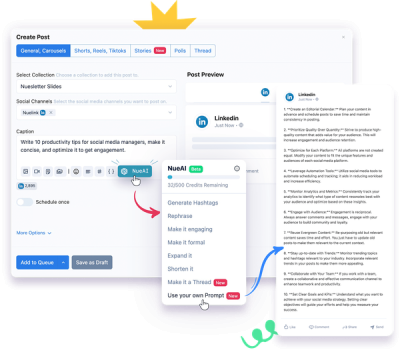
Core functionality revolves around post scheduling with a unified calendar view, bulk imports from CSV/Google Sheets (supporting images, videos, carousels, Stories, Threads, and Reels), AI-powered content assistance via NueAI for generating/rewriting captions and hashtags, and in-depth analytics on engagement, impressions, clicks, and top-performing posts. Platform support includes Instagram, TikTok, YouTube, X/Twitter, Threads, LinkedIn, Facebook, Pinterest, Telegram, Google Business, Mastodon, and Bluesky, with specialized tools like LinkedIn carousel creation from PDFs and Instagram Stories scheduling.
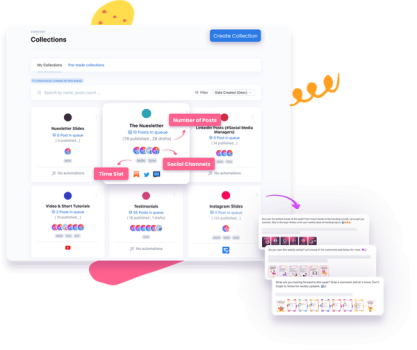
Standout features that differentiate Nuelink include powerful automations that auto-import and post new content (e.g., blog articles via RSS with custom AI captions, eCommerce products with variables like {{link}}, and podcast episodes), Collections for organizing and auto-scheduling themed content queues months in advance, multi-brand workspaces with independent calendars and permissions for agencies, a pre-made library of 1,200+ memes/quotes/videos, evergreen recycling, auto-crossposting Reels, unified comment inbox with bulk moderation, Canva direct integration (design and schedule without downloads), a smart link shortener with custom domains and performance tracking, and browser extensions for on-the-fly content capture. Human customer support from day one (no AI chatbots) and a mobile app add further uniqueness compared to many competitors.
Limitations include no free tier (only a 14-day trial and 30-day money-back guarantee), queue limits on entry-level plans (e.g., 100 scheduled posts on Standard), basic analytics without some advanced export/reporting features on lower tiers (marked as "soon" for branded reports), and occasional user-noted desires for a more modern visual grid preview or additional enterprise-level customization. No native advanced video editing or full social listening beyond comments is present.
User Experience
Nuelink offers an intuitive interface with a low learning curve—users frequently describe setup as "super easy" and achievable in minutes for automations or bulk imports. The unified dashboard, drag-and-drop calendar, one-click actions (e.g., adding to queue, generating hashtags), and clean media library contribute to a streamlined workflow that feels centralized and efficient. Mobile app support extends usability on the go.
Documentation includes a blog with practical guides (e.g., trending TikTok sounds, Reels repurposing), free tools, a public roadmap at feedback.nuelink.com, and platform-specific help articles. Support stands out as a major strength: responsive human assistance via email or chat with screenshot-guided resolutions, earning consistent 4.7+ ratings across review sites. No steep barriers for non-technical users.
Performance & Reliability
Scheduling and automations execute quickly and reliably once configured, with users reporting consistent posting, real-time analytics updates, and successful auto-imports from RSS or eCommerce feeds without frequent failures. Bulk processing handles hundreds of posts efficiently, and the auto-queue system prevents gaps in content calendars.
Known issues are minor and infrequent: occasional initial setup hiccups (quickly resolved by support), rare platform API delays (common to all schedulers), and suggestions for minor UI refinements. No widespread reliability complaints appear in 2026 reviews on G2, Capterra, or Trustpilot; instead, users highlight time savings and "set-it-and-forget-it" performance for automations. Overall uptime appears strong based on status page references.
Pricing & Value
Nuelink uses a tiered subscription model with no free plan but a 14-day trial and 30-day money-back guarantee. Monthly pricing (with up to 50% savings on annual billing) includes:
- Standard — $18/mo ($12 yearly): 1 brand, 1 member, 7 channels, 100 queued posts, 100 NueAI credits.
- Premium — $48/mo ($30 yearly): 2 brands, 2 members, 20 channels, 365 queued posts.
- Business — $78/mo ($46 yearly): 4 brands, 4 members, 40 channels, unlimited queue.
- Agency — $128/mo ($70 yearly): 10 brands, 10 members, 100 channels.
- Agency Plus — $228/mo ($114 yearly): 30 brands, 30 members, 300 channels.
Higher tiers unlock more automations, Collections, AI credits, and collaboration tools.
Value is strong for automation-focused users and agencies due to affordability compared to Hootsuite or Buffer equivalents, especially with human support and deep integrations included. The multi-brand structure and content automations deliver high ROI for eCommerce and content creators by reducing manual work dramatically. Lower tiers suit solo users well, though those needing unlimited everything may scale quickly.
Practical Tutorial
Official tutorials are available via the help center, blog, and YouTube walkthroughs (e.g., detailed scheduling demos). Below is a step-by-step walkthrough for a common task—setting up blog post automation to auto-publish new articles to multiple platforms (based on official feature descriptions, accurate as of March 2026).
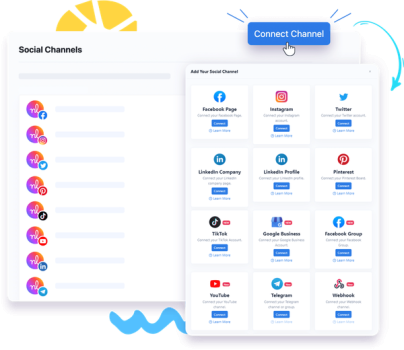
- Log in to your Nuelink dashboard and connect your social channels (Instagram, LinkedIn, etc.) under the Brands section. Ensure at least Premium plan for multi-channel support.
- Navigate to the Automations tab and click "Add New Automation" > select "Auto-post Blog Articles" or "RSS Feed."
- Enter your blog's RSS URL (e.g., yoursite.com/feed or Medium/Substack link). Customize the caption template using NueAI—insert variables like {{title}} or {{link}} and let AI rewrite for engagement.
- Choose target platforms and Collections (create one named "Blog Posts" if needed for organization and scheduled time slots, e.g., Tuesdays at 10 AM).
- Set the posting schedule (e.g., "as soon as new post detected" or weekly). Enable auto-crossposting and first-comment automation if desired.
- Save and test: Publish a sample article on your blog; Nuelink will detect it, generate AI-enhanced captions/hashtags, shorten links, and schedule across channels.
- Monitor via the unified calendar and analytics—adjust queues or recycle evergreen posts as needed.
This setup typically takes under 10 minutes and runs on autopilot. For visual guidance, see official YouTube reviews or the Nuelink blog for similar automations.
Final Verdict
Overall rating: 4.7/5. Nuelink excels for small businesses, creators, eCommerce operators, and agencies seeking powerful, affordable automation and multi-brand management to maintain consistent presence with minimal daily effort—its human support and content recycling features provide excellent value. Avoid it if you require a completely free tool, highly advanced enterprise analytics/reporting, or a visually polished grid-based content preview like some premium competitors. One-sentence recommendation: If time-saving automations and reliable multi-platform scheduling are your priority, Nuelink is a smart, user-friendly choice worth trying on the 14-day trial.