Octopus.do Review: The Ultimate AI-Powered Visual Sitemap Builder
Overview & Purpose

Octopus.do is a lightning-fast visual sitemap builder, website planner, and architecture tool designed for creating interactive visual representations of website structures. It enables users to map out pages, hierarchies, content blocks, wireframes, and user flows through an intuitive drag-and-drop editor, while also supporting project cost estimation, SEO analysis, and even one-click publishing of a simple navigable website. Primary use cases include planning new websites or apps (from landing pages and portfolios to corporate sites and e-commerce), reorganizing existing structures, collaborating on content, generating sitemaps for SEO, and exporting plans for handoff to developers or designers. It stands out by allowing projects to start instantly without sign-up, via AI generation from a prompt, website crawling for metadata import, or pre-built templates.
The target audience spans web designers, UX/UI specialists, developers, SEO experts, project managers, freelancers, marketers, copywriters, product owners, and digital agencies—essentially anyone involved in website development or content strategy who needs a centralized visual planning hub rather than scattered tools like spreadsheets or basic mind maps.
Key Features & Capabilities
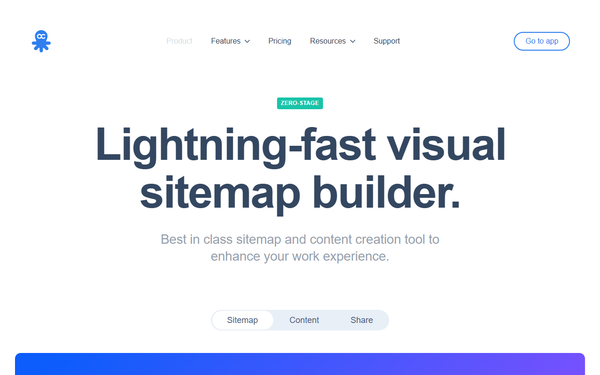
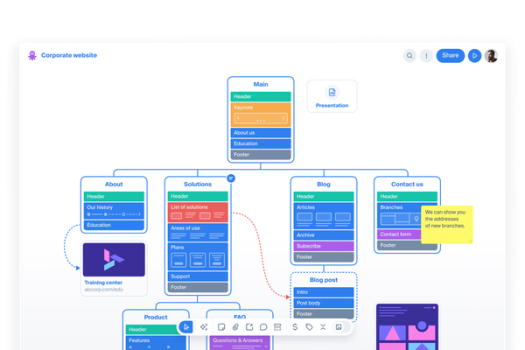
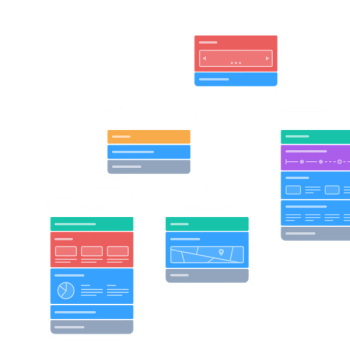
Core functionality revolves around building visual sitemaps with drag-and-drop page addition, parent-child hierarchy management, and content organization. Users can stack wireframes from a built-in library, attach sticky notes, files, or external links, apply color-coded tags for filtering, and explore SEO elements like meta data and structure. Real-time collaboration allows team edits and comments, while AI assists with project generation from text prompts, color palette creation, and content suggestions. Standout differentiators include reusable “symbols” that auto-update across the project, a unique “content brick” method blending mind maps and wireframes, project cost estimation (assign hours/costs per page or task), Figma sync/export for design handoff, sitemap.xml generation for search engines, and one-click publishing of the sitemap as a live, theme-customizable website. Additional exports cover PNG, PDF, CSV, TXT, XML, WordPress, and Webflow integration.
These features set Octopus.do apart from pure diagramming tools (e.g., Lucidchart or Miro) or sitemap-only solutions by combining planning, light wireframing, estimation, and publishing in one visual workspace—ideal for rapid prototyping without coding.
Limitations include capped crawling (300 pages on Free, 3,000 on paid plans), restricted features on the free tier (e.g., no attachments, estimates, or full AI), and a focus on planning rather than deep content authoring or advanced user-journey diagramming. It lacks bulk page editing for very large sites, API access for custom integrations, and robust CMS import beyond basic exports. Some users note the wireframing is more inspirational than production-ready, as blocks are not fully editable like in dedicated tools.
User Experience
Octopus.do boasts an exceptionally low learning curve thanks to its clean, modern interface—no sign-up required to begin, with instant access to templates, AI generation, or a blank canvas. The drag-and-drop editor feels responsive and intuitive, with visual themes, mobile/web frame options, and searchable elements making navigation effortless even for non-technical users. Interface quality is high: colorful, clutter-free, and focused on the artboard, with real-time updates for collaboration.
Documentation includes blog guides on website planning and structure, official YouTube walkthroughs covering sharing, AI usage, and publishing, plus an in-app help center with articles on core tasks. Support options are email and community for all plans, with priority support on paid tiers. Most users report getting productive within minutes, though advanced team features (e.g., folders, admin roles) benefit from the quick-start resources.
Performance & Reliability
The tool is marketed and generally experienced as lightning-fast, with auto-save after every change, smooth real-time collaboration, and quick AI generation even for moderately complex structures. Exports and publishing happen in seconds, and the visual canvas handles dozens of pages without lag on standard hardware.
Known issues are minor and mostly tied to the crawler struggling with secure, password-protected, or highly complex sites (limited controls compared to specialized tools). No widespread reports of downtime or data loss exist as of March 2026; deleted projects cannot be restored, and very large projects (beyond crawler limits) may feel cumbersome without bulk editing. User feedback highlights reliability for daily planning but occasional frustration with page caps on paid plans.

Pricing & Value
Octopus.do offers a generous free tier with no time limit:
- Free: $0 – 1 user, 1 project, 200 MB storage, 300-page crawler, limited AI/wireframes/SEO, basic exports (PNG/PDF/sitemap.xml). Perfect for testing or solo simple plans.
- Pro: $16/month or $14/month (billed annually) – 1 user (pay-as-you-go extras), 8 projects, 10 GB storage, full AI/Figma/estimates, unlimited editors, priority support.
- Team: $24/user/month or $20/user/month (billed annually) – unlimited projects, 25 GB storage, advanced collaboration (admin roles, folders, anonymous editing), invoice options.
- Enterprise: Custom pricing – enhanced security and controls.
Educational discounts are available; a 14-day refund policy applies to paid plans. Value is strong for freelancers and small teams: the free tier plus low Pro entry provides immediate ROI through time saved on planning and estimation, outperforming scattered tools. Compared to alternatives like Slickplan or Relume, it excels in AI speed and publishing but may require upgrading quickly for teams, where the per-user cost jumps. Overall, excellent bang-for-buck for visual-first workflows.
Practical Tutorial
A common task is creating an initial sitemap for a new site. Here’s a step-by-step walkthrough for building a basic e-commerce clothing store sitemap (real example you can replicate instantly):
- Visit https://octopus.do/ and click “Start now” or “Try Octopus” – no sign-up needed. Choose “Generate with AI.”
- Enter a prompt like: “Create a complete sitemap for an online clothing store with homepage, men/women/kids category pages, product detail pages, cart, checkout, account, blog, about us, and contact. Include SEO-friendly page names and basic wireframes.”
- Review the AI-generated structure: Pages appear as draggable cards with hierarchy. Rearrange by dragging, add child pages via the “+” button or right-click, and group sections (e.g., footer links).
- Enhance pages: Select any page, open the content editor for descriptions or copy, stack wireframes from the library (e.g., hero banner + product grid), attach sticky notes for SEO notes (“Target keyword: summer dresses”), and add tags like “In Progress” (color-coded).
- Add estimates: Enable the Estimate tool, assign hours/costs per page (design, development, SEO), and let it auto-calculate totals.
- Collaborate or finalize: Click Share to generate a link with view/comment/edit permissions. Or export to PDF for clients, Figma for designers, or sitemap.xml for developers.
- Publish: Hit the Publish button to turn the sitemap into a live, navigable website with custom theme.
This entire process takes under 10 minutes for a starter plan. For deeper guidance, see official YouTube tutorials (e.g., “Welcome to Octopus.do” or “Sharing Your Project”) or the blog post on website planning.
Final Verdict
Overall rating: 4.5/5. Octopus.do shines for speed, AI assistance, and visual clarity in website planning, earning consistent praise for its intuitive interface and all-in-one capabilities.
It is ideal for web designers, UX specialists, project managers, freelancers, and small agencies who want to streamline early-stage planning, collaboration, and handoff without switching tools. Users focused on quick visualization, SEO structure, and light prototyping will love the no-friction start and powerful exports.
Avoid it if you need advanced bulk editing for massive enterprise sites, full CMS content management, deep user-flow diagramming, or heavy custom integrations—tools like Figma (for wireframing) or dedicated sitemap platforms with unlimited crawling may suit better.
One-sentence recommendation: Octopus.do is the go-to visual planning powerhouse for anyone who wants to turn website ideas into clear, collaborative, AI-boosted structures in minutes.