Omnara Review: The Ultimate Command Center for AI Coding Agents
Overview & Purpose

Omnara serves as a unified command center for AI coding agents, enabling developers to launch, monitor, control, and hand off sessions seamlessly across terminal, web dashboard, and mobile/voice interfaces. It mirrors the native experience of popular CLIs (such as Claude Code and Codex CLI, with extensible support for tools like Cursor and GitHub Copilot via SDK) while streaming real-time activity—including logs, Git diffs, prompts, and agent outputs—via Server-Sent Events (SSE). Human-in-the-loop features allow push notifications, one-tap approvals or interventions, and integration with workflows like n8n (as a dedicated approval node) and GitHub Actions. Primary use cases include asynchronous, long-running AI coding tasks where developers need mobility (e.g., continuing work while commuting or away from the desk), team oversight for safety, and automated notifications without constant terminal babysitting. It is ideal for individual developers, engineering teams, and anyone leveraging AI agents for productivity, especially those frustrated by being "chained to the laptop" during agent runs.
Target audience is primarily software developers and engineering teams already using AI coding agents like Claude Code, Codex, Cursor, or Copilot. It appeals less to non-technical users or those without existing agent workflows, though its voice interface lowers the barrier for hands-free ideation.
Key Features & Capabilities
Core functionality revolves around a lightweight CLI wrapper that starts agents locally (using your own API keys) while syncing everything to a central platform for multi-device access. Standout features include:
- Seamless session handoff and real-time SSE streaming across terminal, web, and native iOS/Android apps.
- Human-in-the-loop controls: push notifications for input requests, visual Git diffs for review, and instant approve/reject or chat interventions.
- Voice-first mobile interaction for dictating complex prompts without typing.
- Integrations with n8n for automated approval workflows and GitHub Actions for triggering agents, monitoring PRs, and sandboxed environments.
- Background/headless mode and cloud sandbox options so agents continue even if the local machine sleeps or closes.
These differentiate Omnara from pure terminal wrappers (like basic Claude forks) or SSH tools, which lack clean diffs, push notifications, or one-tap mobile control. It works with any custom agent via REST API, Python SDK, or MCP protocol.
Limitations include heavy optimization for Claude Code and Codex CLI (other agents require SDK integration, which adds setup time); dependency on a running local machine or paid cloud sandbox for persistence; and no full end-to-end encryption noted for conversations (data is stored on Omnara servers for sync features, creating a minor privacy trade-off). GitHub repository for the core wrapper was archived in February 2026 after migration to a new voice-first platform, though the product remains actively maintained.
User Experience
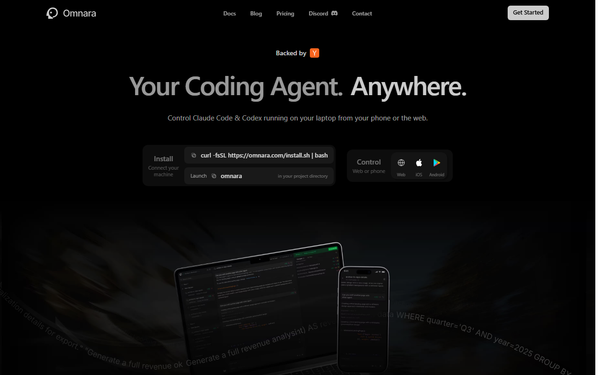
Installation is straightforward and takes under five minutes: install your base agent CLI, run the one-line curl -fsSL https://omnara.com/install.sh | bash script, then launch omnara in your project directory. The learning curve is minimal for anyone familiar with CLIs, and the web/mobile interfaces feel native and polished. Users consistently praise the intuitive dashboard for reviewing diffs and the mobile app's voice input as a productivity booster. App Store ratings hover around 4.3/5, with feedback highlighting fast team updates and seamless device switching. Documentation at docs.omnara.com is clear, with quickstarts, API references, and examples; community support via Discord, email, and GitHub Discussions is responsive. Minor early complaints about tool-output display on mobile were addressed quickly.
Performance & Reliability
Streaming performs reliably in real time via SSE, with low latency for logs, diffs, and responses even during long-running tasks. Local execution keeps coding speed high (using your hardware and API keys), while optional cloud sandbox handles persistence without laptop uptime. Reliability has improved since launch, with past scaling hiccups during viral growth resolved. Common user feedback notes reduced "babysitting" anxiety and smooth handoffs; occasional reports of confirmation popup glitches or network-dependent sync delays exist but are rare and quickly patched. No major outages or widespread complaints appear in reviews as of March 2026.
Pricing & Value
Omnara uses a simple tiered model:
- Free: $0/month — 10 agent sessions per month, core features.
- Pro: $20/month — unlimited sessions, priority support.
- Enterprise: Custom pricing — team seats, SSO, SLAs, dedicated integrations.
Sessions count as individual agent conversations; local runs leverage your existing Claude/Codex subscriptions with no extra token costs. Value is strong for active users: the mobility, safety controls, and workflow integrations deliver significant time savings compared to manual terminal monitoring or clunky SSH alternatives. At $20/month, Pro pays for itself quickly for developers running multiple daily agents. The free tier suits light experimentation, but heavy users will upgrade promptly.
Practical Tutorial
Official quickstart and full documentation are available at https://docs.omnara.com/. Below is a step-by-step walkthrough for a common task: launching a Claude Code agent to build a feature and intervening/approving changes from your phone while away from your desk (tested workflow as of March 2026).
-
Prerequisites — Install and authenticate Claude Code (or Codex CLI) on your machine via its official instructions. Ensure Python 3.10+ is available.
-
Install Omnara — In your terminal, run:
curl -fsSL https://omnara.com/install.sh | bash
(On Windows, use Git Bash or equivalent.) -
Launch in Your Project — Navigate to your codebase:
cd /path/to/your/project
Then start the synced session:
omnara
A browser window opens—sign up or log in to your Omnara account (free tier works). -
Start the Agent Task — In the terminal (or web/mobile interface), enter a prompt such as:
"Implement a user authentication endpoint in my FastAPI backend with JWT tokens, validation, and basic tests. Create the necessary files and run tests." -
Switch to Mobile/Web and Monitor — Close your laptop or open the Omnara iOS/Android app (download via QR code on the site) or web dashboard. Real-time SSE streams logs, Git diffs, and prompts instantly. Use voice dictation on mobile: "Add password reset flow and update the README with usage examples."
-
Human-in-the-Loop Intervention — When the agent requests approval (e.g., "Should I overwrite file X?"), receive a push notification. Review the diff in-app, approve/reject with one tap, or reply via text/voice to guide further. For n8n/GitHub Actions workflows, configure the Omnara node to route approvals automatically.
-
Complete and Review — Continue the session on any device. Session history persists in the dashboard for later reference or export.
This entire flow typically takes minutes to set up and transforms long-running tasks into truly mobile experiences. For advanced custom-agent integration or GitHub PR automation, refer to the SDK examples in the docs.
Final Verdict
Overall rating: 4.5 out of 5. Omnara excels for developers and teams already invested in AI coding agents who need real visibility, safety controls, and the freedom to work from anywhere without losing momentum. It shines for solo engineers on the go or distributed teams managing automated workflows. Avoid it if you prefer fully local/offline setups with zero server data sharing, operate on a strict zero-budget for heavy usage, or rely on unsupported custom agents without SDK effort. One-sentence recommendation: If you're tired of babysitting AI coding agents from your desk, Omnara is the seamless command center that puts control in your pocket—well worth the Pro plan for the productivity leap.