Omnisearch Review: The Ultimate AI Tool for Multimedia Search
Overview & Purpose

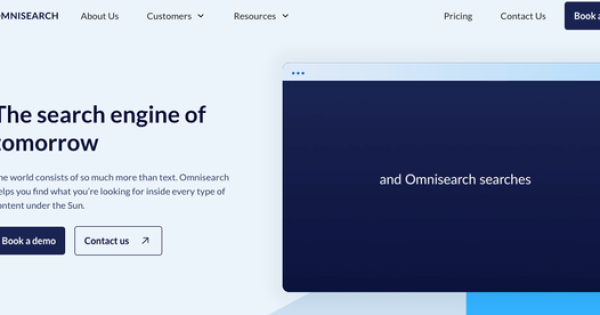
Omnisearch is a multimodal AI-powered search platform that automatically indexes and makes fully searchable all types of digital content—including videos, audio files, documents, presentations, and images—by transcribing speech, performing OCR, analyzing visuals (faces, logos, scenes), and applying semantic understanding. It delivers precise results with timestamps, highlights, and contextual insights, eliminating the need to manually scrub through hours of media. Primary use cases include enhancing navigation in online courses, corporate training libraries, media archives, and large content portals, where users instantly locate specific moments or information to boost learning outcomes, conversion rates, and productivity.
The target audience consists primarily of EdTech providers (especially those using platforms like Thinkific), corporate training teams, media and entertainment companies, archivists, and organizations managing extensive multimedia libraries. It is particularly valuable for e-learning platforms, content creators, and enterprises needing to surface insights from recorded training, lectures, or video assets, rather than general marketers, designers, or pure developers without heavy video/document repositories.
Key Features & Capabilities
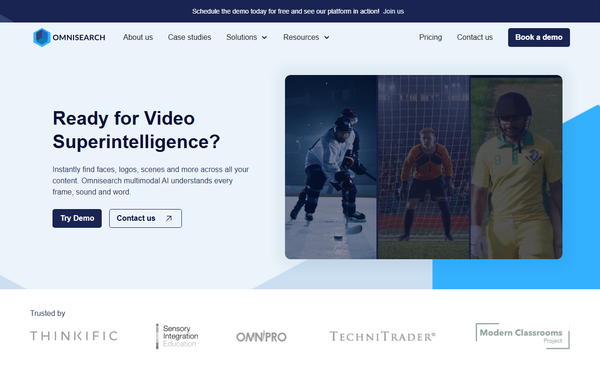
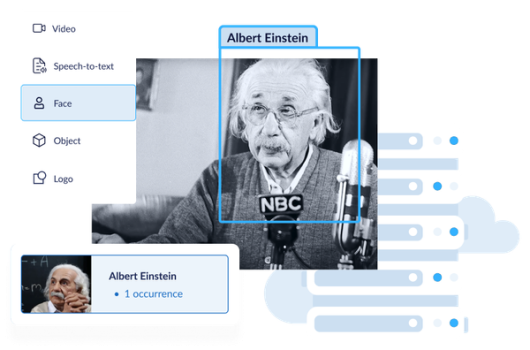
Core functionality revolves around zero-setup, real-time indexing that processes content 10x faster than legacy tools, supporting 30+ languages and multimodal analysis across audio, video frames, text, and images. Users receive timestamped search results, suggested terms, customizable ranking signals, and API-driven integration for embedding search into existing sites or apps. Standout differentiators include visual intelligence (searching for faces, logos, or scenes inside videos), automatic extraction of every frame/sound/word, seamless Thinkific course-player integration with in-video navigation, and enterprise-grade privacy via isolated cloud or on-prem deployments with zero data sharing.
Other capabilities encompass scalable architecture for heavy loads, search analytics to uncover user habits and content gaps, and support for any data type or mixed collections. Limitations include strict monthly processing quotas (e.g., audio/video hours, image megapixels, document pages) that require purchasing extra units or upgrading plans for high-volume use, potential delays in initial large-batch indexing, and a niche focus on site/EdTech search rather than broad enterprise knowledge management or advanced BI analytics. Missing features noted in reviews include deeper keyword-clickability enhancements in video results and more extensive third-party integrations beyond core APIs and Thinkific.
User Experience
Omnisearch boasts an impressively low learning curve with “zero setup” for most integrations and a modern, intuitive interface featuring a prominent Google-like search bar with real-time suggestions, highlighted matches, and direct timestamp jumps in video players. Non-technical users (such as course administrators or students) find it straightforward, while admins appreciate the clean dashboard for monitoring indexing status and quotas. Documentation is primarily blog-based (with API overviews and best-practice guides) plus in-dashboard Swagger-style references after registration; full public knowledge bases are limited, though responsive customer support via quick calls or chat receives consistent praise for attentiveness and rapid issue resolution.
Overall interface quality feels functional and focused—embedding seamlessly into course players or websites without clutter—making daily use effortless for end-users searching long-form content.
Performance & Reliability
Indexing occurs in real time with claimed 10x speed gains over traditional tools, delivering instant search updates and scalable performance across cloud or on-prem environments even under heavy loads. Users and case studies report reliable accuracy for both keyword and semantic queries across large libraries (800k+ video hours indexed in production), with minimal latency in results. Known issues are few; common feedback highlights occasional quota-management overhead for growing libraries and rare initial processing delays for very large uploads, but no widespread bugs or downtime complaints appear in aggregated reviews as of March 2026. Reliability is further bolstered by enterprise privacy controls and automatic handling of mixed content types.
Pricing & Value
Omnisearch offers tiered subscription plans starting at approximately $49/month (Base) and scaling to $99/month (Standard), $199/month (Advanced), and higher Power/Enterprise tiers, with usage-based quotas (e.g., 20 AV hours, 20,000 document pages, and image megapixels per month on mid-tier plans). A 14-day free trial is available, extra processing units can be purchased on-demand without upgrading, and custom enterprise solutions are offered via contact. Thinkific-specific app pricing begins around $99/month. No prominent always-free tier exists beyond the trial.
Value is strong for organizations with significant multimedia libraries: the time savings in e-learning navigation and archive search often justify the cost compared to manual review or less capable alternatives like basic Algolia text search or more expensive video-only AI tools. It outperforms keyword-only solutions for context-aware needs while remaining more accessible and faster to deploy than full enterprise search suites, though high-volume users may face rising costs from quotas.
Practical Tutorial
Official demos and blog resources exist (including YouTube walkthroughs and API introduction posts), but here is a step-by-step guide for the most common task—integrating Omnisearch into a Thinkific course platform for instant video and document search (completed in ~10 minutes with zero coding). This is based on the platform’s documented 3-step Thinkific App Store process and real user testimonials.
-
Install the App in Thinkific: Log into your Thinkific account, navigate to the App Store, search for “Omnisearch,” and click Install. Authorize the connection (takes seconds).
-
Create or Connect an Omnisearch Account: You’ll be redirected to sign up or log in at omnisearch.ai. Choose a plan (trial available) and complete the quick onboarding. Your Omnisearch dashboard will appear.
-
Content Auto-Indexes and Search Activates: All existing and new course videos, audio, PDFs, and presentations automatically begin processing. New uploads index in real time. In your course player, students now see an enhanced search bar: typing a keyword (e.g., “photosynthesis” in a biology lecture) instantly shows timestamped video clips, highlighted transcript sections, and matching document pages with direct navigation links.
Example in action: A postgraduate student in a 3-hour lecture module searches “sensory integration techniques.” Omnisearch returns exact timestamps (e.g., 00:45:12) with playable previews and related PDF references—no scrubbing required. For custom sites, use the dashboard API key: POST video URLs to /index and GET /search for JSON results with timestamps (full cURL examples available in your dashboard).
For deeper API customization or advanced tips (e.g., optimizing relevance or results-page UX), refer to the official blog at https://omnisearch.ai/blog or the in-app API documentation.
Final Verdict
Omnisearch earns a solid 4.2 out of 5 for its innovative multimodal capabilities, exceptional ease of integration, and transformative impact on multimedia search—particularly within e-learning and media environments—balanced against usage quotas and a still-maturing review ecosystem (research conducted as of March 2026). Organizations with large video, audio, or document libraries in education or training should use it to slash search time, improve learner engagement, and unlock previously hidden insights. Avoid it if your needs are purely text-based knowledge management, you have extremely high-volume indexing without budget for overages, or you prefer fully open-source tools with extensive public documentation. One-sentence recommendation: If you record it, Omnisearch will find it—making it the smartest choice for any team tired of wasting hours hunting through multimedia content.