NVIDIA Omniverse Audio2Face Review: AI-Powered 3D Facial Animation
Overview & Purpose
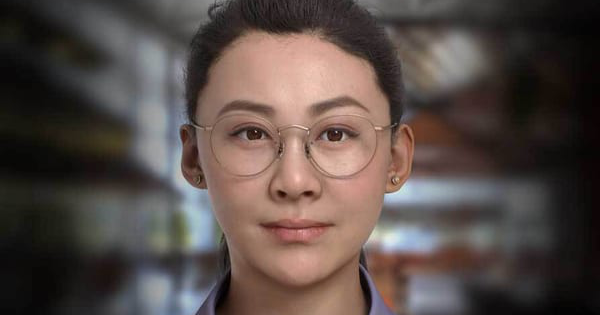
Omniverse Audio2Face (now evolved into Audio2Face-3D as part of NVIDIA ACE and NIM microservices) is NVIDIA's AI-powered reference application and SDK that generates realistic facial animations and lip-sync for 3D characters directly from any audio input, such as voice-over tracks or live speech. It analyzes acoustic features like phonemes, intonation, and emotion to drive blendshapes on a character's face mesh in real time, eliminating the need for manual keyframing or motion capture. Primary use cases include creating lifelike digital humans for video games, virtual assistants, film and animation pre-visualization, real-time avatars in virtual production, marketing content, and interactive experiences. It excels in rapid prototyping of talking characters and scaling animations across multiple avatars.
The tool targets a broad audience of 3D developers, game artists, animators, VFX professionals, AI researchers, and content creators—particularly those working in Unreal Engine, Autodesk Maya, Blender, or iClone pipelines. It appeals to both indie creators and enterprise teams building digital twins or AI-driven characters, with support for realistic or stylized human-esque faces. Research conducted as of April 14, 2026, draws from official NVIDIA documentation, developer blogs, and user forums.
Key Features & Capabilities
Core functionality revolves around feeding audio into a pre-trained deep neural network (with regression and advanced diffusion models in v3.0+) that outputs blendshape weights or vertex deformations for facial animation. Standout features include:
- Real-time lip-sync and emotion inference: Supports Audio2Emotion-3D models to detect and apply dynamic expressions, including non-verbal cues, with improved liveliness from the 2025 diffusion-based architecture.
- Character retargeting and transfer: Seamlessly maps animations to any 3D human or stylized face mesh, with multi-character scaling in a single scene.
- Export and integration options: Blendshape conversion, weight export, and direct plugins for Unreal Engine 5 (up to 5.6), Maya (v2.0+), Blender, and iClone. Full USD and animation cache support for pipelines.
- Headless API and microservice deployment: Run via NIM containers for cloud/on-device inference, REST/gRPC endpoints, or embedded in custom apps.
- Customization and training: Open-source training framework (Apache license) for fine-tuning models on custom datasets; supports multilingual audio and burst-mode streaming controls.
Differentiators from competitors (e.g., traditional mocap tools or simpler lip-sync plugins like those in Adobe Character Animator) include its fully AI-driven, audio-only approach with generative enhancements for natural expressions—no markers or video required—and its open-source accessibility since September 2025, enabling community extensions and on-prem deployment without vendor lock-in.
Limitations include hardware dependency (requires NVIDIA RTX GPU for optimal performance), potential sensitivity to low-quality or accented audio, and the need for post-processing tweaks for ultra-premium film work. It may not handle highly stylized non-human faces as robustly without custom training, and legacy Omniverse app versions had occasional setup friction now mitigated by plugins and NIM.
User Experience
The learning curve is moderate: beginners can launch the standalone Omniverse app and animate the preloaded character in minutes, but full pipeline integration (e.g., retargeting custom meshes or UE Live Link) requires familiarity with USD, blendshapes, and NVIDIA tools. The interface is clean and modern within the Omniverse ecosystem—simple audio file loading, real-time preview viewport, sliders for emotion intensity, and one-click export—though some early users noted initial installation hurdles with the launcher.
Documentation is excellent, with comprehensive NVIDIA docs covering getting started, API references, performance tuning, and troubleshooting. Official forums, Discord communities, and YouTube walkthroughs provide strong support. Recent updates have addressed past complaints about setup complexity, making it more accessible for non-experts. Overall, it's intuitive for its power level, with high praise for the "wow" factor of instant, believable results.
Performance & Reliability
Audio2Face-3D delivers real-time performance at up to 30 FPS on recommended hardware (e.g., RTX 4070 or higher with 16GB+ VRAM), supporting concurrent streams in microservice mode. Diffusion models offer superior expressiveness but demand more GPU memory than regression variants. Reliability is strong for pre-rendered or offline use, with consistent lip-sync accuracy reported at 90-95% in user tests.
Common complaints from forums and Reddit include RAM accumulation or frame drops in long real-time UE sessions on mid-range GPUs (e.g., RTX 3090), occasional audio quality sensitivity, and the need for optimal configurations to avoid stuttering in live deployments. These issues have improved with 2025-2026 updates, but it's not "set-and-forget" for resource-constrained environments. No major outages or model drift reported in recent benchmarks.
Pricing & Value
Omniverse Audio2Face and its Audio2Face-3D core are free for individuals and small teams under the standard NVIDIA Omniverse individual license (commercial use allowed for up to two users per entity). Open-source components (SDK, plugins, models) fall under MIT/Apache or NVIDIA Open Model License with no royalties for most uses. Enterprise subscriptions (via Omniverse Enterprise) are required for larger teams (>2 users), scalable collaboration, Nucleus server features, or high-volume cloud inference—pricing starts around $1,000–$2,000 per named/floating user annually, depending on components.
Value is exceptional: it dramatically cuts animation time and costs compared to manual methods or paid alternatives like Reallusion's tools or custom mocap services. For RTX-equipped creators, the free tier offers professional-grade output with seamless engine integrations, making it a high-ROI choice over subscription-heavy competitors. Cloud NIM usage incurs only compute credits.
Practical Tutorial
Official tutorials are available via NVIDIA Developer resources and YouTube (search "Audio2Face-3D Unreal Engine"). Here's a step-by-step walkthrough for a common task—animating a MetaHuman in Unreal Engine 5.6 with live audio (based on current plugins as of 2026):
- Install prerequisites: Download the Omniverse Launcher and install Audio2Face (or the ACE Unreal Engine Plugin from NVIDIA). Ensure you have Unreal Engine 5.5+ with the MetaHuman plugin and an RTX GPU.
- Launch Audio2Face-3D: Open the app or run the NIM microservice via Docker (e.g.,
docker runwith your model preset likejames_v2.3.1). - Set up your character: In Unreal, create or import a MetaHuman. Install the Audio2Face Live Link plugin and connect it via the Live Link Hub.
- Configure mapping: In Audio2Face, load or retarget your MetaHuman face (use the built-in retargeter for blendshapes). Enable Audio2Emotion for dynamic expressions.
- Input audio: Load a .wav file or enable live mic input. Adjust emotion sliders (e.g., +20% "happy" intensity) and hit Play for real-time preview.
- Stream to Unreal: Activate Live Link in UE—the character's face will animate in the viewport. Record or bake the animation to keyframes via the plugin's export.
- Export if needed: For offline use, generate a USD cache or blendshape animation cache directly from Audio2Face and import into UE/Blender.
For full visual walkthroughs, see NVIDIA's "Getting Started With NVIDIA Audio2Face-3D in Unreal Engine 5" on YouTube or the official docs quick-start guide. Test with sample voice-overs for best results; fine-tune blendshape weights for your specific mesh.
Final Verdict
Overall rating: 4.7/5 – A transformative tool that delivers impressive realism and speed, with minor deductions for hardware requirements and occasional real-time optimizations needed.
Who should use this: Game developers, indie animators, and AI avatar creators with access to NVIDIA GPUs who want to slash facial animation time while achieving production-ready lip-sync and expressions—especially those already in Unreal or Omniverse workflows.
Who should avoid this: Teams without RTX hardware, those needing zero-setup 2D solutions, or ultra-high-end film projects requiring 100% manual polish without any post-edits.
One-sentence recommendation: If you're building talking 3D characters and value AI-driven efficiency over traditional methods, Omniverse Audio2Face (Audio2Face-3D) is an essential, future-proof addition to your toolkit.