OnCallClerk Review: The Best No-Code AI Phone Agent for SMBs
Overview & Purpose

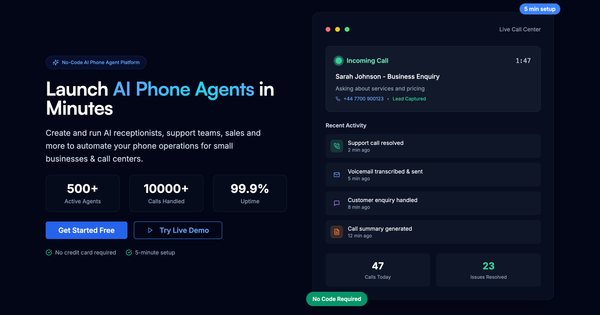
OnCallClerk is a no-code AI phone agent platform that deploys intelligent voice agents to handle inbound business calls 24/7. It uses speech recognition, large language models, and natural-sounding voice synthesis to answer calls, book appointments, capture leads, route urgent matters, filter spam, transcribe conversations, generate summaries, and provide analytics. The platform positions itself as a complete replacement for traditional receptionists or answering services, allowing businesses to automate repetitive tasks while integrating seamlessly with calendars and CRMs.
Primary use cases include acting as a virtual receptionist for service-based businesses, managing support inquiries, qualifying leads during off-hours, and scaling call handling without additional staff. It is especially suited for high-volume or after-hours scenarios where missing calls leads to lost revenue.
The target audience consists primarily of small-to-medium businesses (SMBs), solo entrepreneurs, agency owners, and service professionals in industries such as plumbing, dental practices, law firms, HVAC, electricians, salons, veterinary clinics, auto repair, property management, and more. It appeals to non-technical users who want professional AI-powered telephony without coding, infrastructure management, or long development cycles.

Key Features & Capabilities
Core functionality revolves around instant phone number provisioning, a visual no-code agent builder, smart call routing, real-time transcription/summaries, and one-click integrations. Users can customize voice, personality, greetings, knowledge base (FAQs), and escalation rules in minutes. The system automatically handles voicemail transcription, lead capture, and data syncing to tools like Google Calendar or Gmail.
Standout features that differentiate it from competitors include:
- Sub-5-minute setup and deployment (no servers, APIs, or dev work required).
- Pay-only-for-what-you-use scaling that supports 1 to 10,000+ calls per day without infrastructure headaches.
- Automatic AI model updates for continuous improvement.
- Built-in analytics dashboard with call trends, success rates, and exportable data.
- Enterprise-grade security (GDPR, encryption, 99.9% uptime SLA).
Compared to developer-centric platforms like Vapi or Retell AI, OnCallClerk emphasizes simplicity and speed for non-technical users while still offering API options at higher tiers. Limitations include a current focus on US phone numbers (international expansion in progress), a finite set of nine voice options, and plan-based restrictions on concurrent agents or advanced integrations. Complex emotional or highly nuanced conversations may trigger escalation rather than full resolution, which is standard for current voice AI but worth noting for high-touch industries.

User Experience
OnCallClerk is designed for extreme ease of use with a clean, intuitive dashboard and visual builder—no coding or technical background required. The learning curve is minimal; most users can deploy a functional agent in under 10 minutes. The interface feels modern and dashboard-focused, with tabs for voice, personality, knowledge base, call rules, and integrations, plus clear previews and one-click actions.
Documentation is practical and blog-driven, featuring step-by-step guides rather than exhaustive reference manuals. Support resources include email (tier-dependent), priority help at higher plans, and in-app guidance. Community feedback on platforms like Reddit highlights the “super cheap and reliable” setup for small businesses, with users praising how quickly they could configure calendar booking and escalation rules.
Performance & Reliability
The platform claims fast response times with natural-sounding voices and reliable 24/7 operation backed by 99.9% uptime. It scales automatically and handles real-world tasks like lead qualification and appointment booking effectively, as evidenced by user testimonials and Reddit anecdotes from service businesses (e.g., plumbing companies using it to book jobs and escalate emergencies).
Known issues are minimal in available feedback. As a relatively new platform (launched or gaining traction in 2025–2026), public reviews are sparse, but early adopters report solid reliability for after-hours and routine calls. Common AI voice limitations (occasional latency variance or need for escalation on complex queries) exist but are mitigated by configurable rules and transcripts for ongoing refinement. No widespread complaints about downtime or major failures appear in current searches.
Pricing & Value
OnCallClerk follows a transparent, usage-based model with a 14-day free trial and no setup fees or long-term contracts. Plans start at approximately $29–$30 per month for basic coverage (e.g., limited minutes suitable for low-volume solo users), scaling to $100–$200+ depending on call volume, agents, and features. Higher tiers unlock advanced analytics, multiple agents, priority support, and custom integrations. Businesses pay only for actual usage beyond included minutes, making it highly cost-effective versus human receptionists ($4,000+/month) or traditional answering services.
Value is strong for SMBs: many users report ROI in the first month by replacing $5k/month services or freeing owner time. Compared to developer-heavy alternatives, it offers lower barriers and predictable costs for non-technical teams. The built-in ROI calculator on the site helps quantify savings.
Practical Tutorial
OnCallClerk provides an official step-by-step guide: “How to Set Up an AI Phone Agent in Under 10 Minutes.” Here is a real walkthrough based on that tutorial (conducted as of April 2026):
-
Create Account (1 min): Go to oncallclerk.com/signup. Sign up with email/Google, enter business details, and select a plan (Basic/Professional/Enterprise). Complete via Stripe—$0 during trial.
-
Choose Voice (2 min): In the Agent Setup dashboard, go to the Voice & Speech tab. Preview and select from nine options (e.g., Sarah—confident American female). Commit the choice.
-
Define Personality (2 min): Switch to Personality tab. Name the agent, pick a type (Professional/Friendly/Helpful/Concise), write a custom greeting, and add system instructions. Use templates for your industry and specify escalation triggers.
-
Build Knowledge Base (2 min): In the Knowledge Base tab, add FAQs (hours, services, policies). These power accurate responses.
-
Configure Call Rules (1 min): Set escalation policy (e.g., “Complex queries only”), business hours, and forwarding number.
-
Get Phone Number (1 min): In the Phone Number tab, search US numbers by area code and claim one instantly.
-
Add Integrations & Test: Connect Google Calendar for booking, Gmail/Sheets for logging. Call the number yourself to test scenarios, then review transcripts in the dashboard and refine as needed.
The full official guide is available at oncallclerk.com/blog/setup-ai-phone-agent-10-minutes. Additional resources cover starting an AI call center or industry-specific agents.
Final Verdict
Overall rating: 4.5/5 — Excellent for speed, simplicity, and cost savings; slightly docked for limited third-party reviews and typical voice-AI constraints.
Businesses that should use this tool are small service providers, solo operators, or agencies seeking an affordable, no-code way to achieve 24/7 professional call handling, lead capture, and appointment booking without hiring staff. It shines for anyone tired of expensive answering services or missed after-hours calls.
Avoid it if you need deeply custom developer-level workflows, international numbers right now, or have extremely high call volumes requiring enterprise SLAs beyond the current offering—more code-heavy platforms may suit advanced needs better.
One-sentence recommendation: OnCallClerk is the fastest, most accessible way for non-technical businesses to deploy a reliable AI receptionist that pays for itself almost immediately.