OneSky Review: The Ultimate AI-Powered Localization Platform
Overview & Purpose

OneSky is an AI-powered localization platform, officially described as an "AI Translation & QA Hub" and "Multi-Agent Localization" system (branded as OneSky Localization Agent or OLA). It automates the end-to-end translation and quality assurance process for digital content, including websites, mobile apps, games, documents, and marketing campaigns. By leveraging a team of specialized AI agents, it delivers context-aware, brand-consistent translations across 100+ languages and 800+ dialects while supporting over 30 file formats such as JSON, XML, XLIFF, .strings, and more. Primary use cases include streamlining localization workflows for global product launches, maintaining consistent brand voice across multilingual assets, and reducing manual effort in translation management for ongoing updates.
The platform targets developers, product teams, marketers, and small-to-medium businesses expanding internationally—particularly those handling app localization (iOS/Android), web content, or game releases. It appeals to teams seeking efficiency without building complex custom LLM pipelines, with seamless integration into existing tech stacks via API, webhooks, CLI, and direct file uploads. As of March 2026 research from the official site and review aggregators, OneSky positions itself as a centralized hub that replaces fragmented tools, enforcing glossaries, style guides, and translation memories for scalable global reach.

Key Features & Capabilities
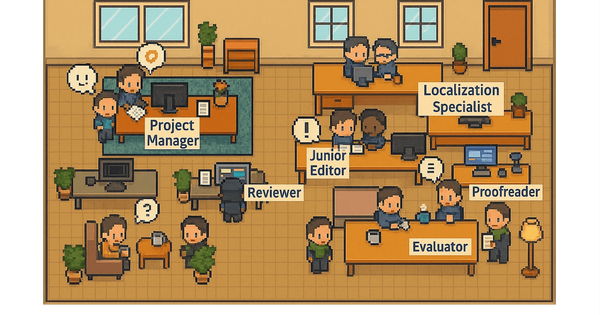
Core functionality revolves around an AI multi-agent system where specialized agents (Translator, Reviewer, and LQA Evaluator) collaborate in real time: the Translator generates drafts using context from project briefs, tone preferences, glossaries, screenshots, string descriptions, translation history, and length limits; the Reviewer and Evaluator then assess quality via built-in algorithms, flagging issues for export or human review. Users define a style guide once (e.g., "playful for Gen Z apps" or "light and encouraging error messages"), and the system self-improves through feedback loops. Additional tools include AI quality reports, string editors, translation memory migration, auto-ordering, and dashboard insights with email digests.
Standout differentiators include its multi-LLM approach (selecting from GPT, Claude, Gemini, Grok models for optimal results), achieving over 90% human-like quality without manual prompting, centralized enforcement of brand rules across all content types, and hybrid workflow support (AI-first with optional human post-editing). This surpasses single-LLM tools by mixing models and context engineering for consistency that traditional machine translation often lacks.
Limitations include a base plan cap of only 5 languages and 5,000 AI words/month (with add-on packages available), potentially restrictive for enterprises handling dozens of locales simultaneously. Advanced collaboration features (e.g., extensive in-platform team workflows or crowdsourcing) appear less robust than competitors like Lokalise or Transifex for very large-scale projects. No native no-code website widget is highlighted, focusing instead on developer-friendly file/API workflows.

User Experience
OneSky earns consistent praise for its intuitive interface and low learning curve, with users noting it simplifies multilingual project management without steep onboarding. The dashboard provides transparent tracking of progress, AI performance, and issue flagging, while the content editor (with inline screenshots and history) feels modern and collaborative. Setup involves a quick project creation flow, style guide configuration, and file upload—most teams can start translating within minutes.
Interface quality is clean and scannable, with email digests for insights and export options for flagged items. Documentation includes a helpful Zendesk-style support center, blog tutorials, and developer resources (API reference and integration guides). Customer support receives high marks for responsiveness, especially during trials. Minor drawbacks: some users in comparisons note the UI feels simpler than deeper enterprise platforms, which could require supplemental tools for highly complex team permissions.

Performance & Reliability
Translations process quickly thanks to the multi-agent architecture and auto-selection of optimal LLMs, with users reporting fast turnaround times and high accuracy for context-heavy content like UI strings or marketing copy. The platform reliably handles large string volumes (unlimited hosted strings) and maintains consistency via enforced memories and glossaries, with self-evolving agents improving over time through flagged feedback.
Known issues are minimal in public feedback; occasional mentions involve word credit limits prompting upgrades for high-volume users, or the need for occasional human post-editing on highly nuanced cultural content. No widespread reliability complaints appear in 2026 reviews—most highlight dependable outputs exceeding standard AI tools, with over 90% human-like results claimed and validated in user anecdotes. Integration stability via API/webhooks is a strong point for automated workflows.

Pricing & Value
OneSky offers a subscription model starting with a 14-day free trial (no credit card required). The entry-level plan begins at $29/month, providing unlimited hosted strings, 1 team user, 5 languages, 5,000 AI words, access to multiple LLMs, full multi-agent translation/QA, string editor tools, glossary/TM support, and API integrations. Higher tiers scale to 10+ users, 30 languages, and 25,000+ AI words (exact pricing scales upward; additional word packages range $70–$300/month). Human post-editing is available pay-as-you-go at competitive per-word rates. Enterprise custom options exist for larger needs.
Value shines for cost-conscious teams: it can reduce traditional translation expenses by up to 75% through AI automation while delivering professional-grade quality. Compared to alternatives like Crowdin or Phrase, OneSky stands out for affordability and simplicity in small-business segments, though larger enterprises may find competitors offer more unlimited scaling or advanced analytics at higher price points. The unlimited strings and trial make it accessible for testing.
Practical Tutorial
OneSky provides official blog guides and developer resources for hands-on learning. Below is a step-by-step walkthrough for a common task—localizing a mobile app's strings file (e.g., JSON or .strings format)—based on the platform's current AI workflow and supported formats. This mirrors official patterns from the style guide setup and integration examples (full details at developers.onesky.ai and blog tutorials).
-
Sign up and create a project: Go to dashboard.onesky.ai/register for the 14-day trial. Log in, click "New Project," name it (e.g., "MyApp Localization"), select source language (English), and add target languages (up to your plan limit). Upload a project description and tone brief (e.g., "Friendly and concise for a productivity app").
-
Configure brand assets: In the project settings, build your style guide: add glossary terms, upload TMX translation memory files, attach contextual screenshots for UI strings, set length limits, and add notes (e.g., "Error messages should be encouraging"). This takes 5–10 minutes and powers the AI agents.
-
Upload content: Drag and drop your strings file (JSON, .strings, XML, etc.) or connect via API/CLI for automated sync. OneSky auto-detects strings and previews them in the editor.
-
Trigger multi-agent translation: Select "Translate with AI" or enable auto-order. The Translator agent generates drafts using your context; Reviewer and LQA Evaluator score and refine. Monitor progress on the dashboard (typically minutes for small files).
-
Review and iterate: Check the AI Quality Report for scores. Flag issues directly in the editor—comments feed back into the system for future improvements. Export flagged strings for human review if needed (optional post-editing).
-
Download and integrate: Export translated files in your original format. Push back to your repo via API/webhook or manually import into Xcode/Android Studio. Test in-app, then repeat for updates.
For web/JS-specific flows, see the official JavaScript Localization Guide using i18next + OneSky JSON support. Full API reference and more examples are at developers.onesky.ai/reference/. Official support articles cover file formats and quickstarts.
Final Verdict
Overall rating: 4.5/5. OneSky excels for developers, marketers, and growing teams needing fast, consistent, cost-effective localization without managing multiple tools or LLMs—ideal if you're localizing apps, games, or web content on a budget and value brand voice automation. Avoid it if you require unlimited languages/users out-of-the-box, heavy enterprise collaboration, or no-code website plugins, where more mature platforms like Lokalise or Transifex may fit better. Highly recommended for startups and mid-sized companies scaling globally: start your free trial and let the AI agents handle the heavy lifting.