Open Paper Review: The Ultimate AI Assistant for Researchers
Overview & Purpose
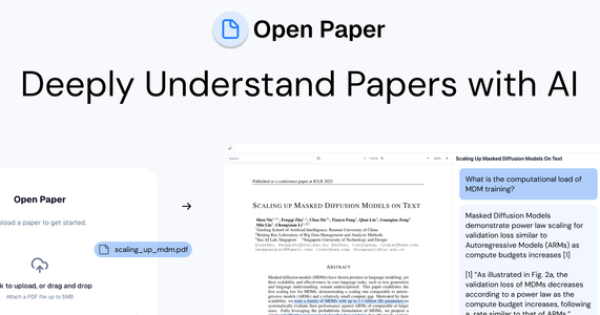
Open Paper (openpaper.ai) is an AI-native workbench designed specifically for researchers to read, annotate, and deeply understand academic papers in one unified interface. It combines PDF viewing with a context-aware AI assistant that provides grounded responses complete with clickable citations directly linked to specific sections of the source material. Primary use cases include accelerating literature reviews, managing personal research libraries, extracting structured data from multiple papers, and generating audio overviews or annotations to combat information overload from the flood of daily publications.
The tool targets PhD students, academics, and industry researchers at leading institutions who regularly grapple with dense technical content, citation management, and cross-paper synthesis. It is especially valuable for those conducting systematic reviews or working across large collections of PDFs, offering a privacy-focused, human-centered alternative to generic AI chat tools.
Key Features & Capabilities
Core functionality revolves around uploading research PDFs and interacting with them through a split-pane viewer where the paper and AI chat appear side-by-side. Users can highlight text, add rich annotations or markdown notes, ask questions with guaranteed contextual citations, and receive audio summaries. Upon upload, the AI automatically generates brief summaries and starter questions to kickstart understanding.
Standout features that set it apart from competitors (such as generic PDF readers or less transparent AI tools) include:
- Fully grounded AI responses with verifiable, page-specific citations that reduce hallucinations and support academic integrity.
- Projects for cross-paper analysis, enabling chat across collections, theme synthesis, and one-click CSV exports of structured data tables built with custom schemas.
- Open-source codebase (AGPL-3.0 on GitHub) allowing full transparency, community contributions, and potential customization.
- Knowledge-base search across your entire library and seamless annotation-AI integration.
Limitations include strict free-tier caps (only 10 uploads and 200 MB storage), no native support mentioned for non-PDF formats or non-English papers, and self-hosting that is explicitly not optimized (development setup exists but is complex). Teams/enterprise collaboration features remain “coming soon,” and advanced integrations (e.g., with reference managers like Zotero) are absent.
User Experience
Getting started is exceptionally straightforward: simply sign up and drop a PDF into the upload area—no complex configuration required. The clean, split-pane interface feels intuitive for anyone familiar with academic reading tools, with one-click highlighting, synchronized annotations, and inline AI actions keeping the learning curve minimal even for non-technical users.
Interface quality is modern and focused, emphasizing readability and flow rather than cluttered dashboards. Cross-device sync for annotations adds convenience. Documentation is light but practical: the official blog offers workflow guides (e.g., systematic literature reviews), a public manifesto explains design philosophy, and YouTube demos provide visual walkthroughs. Community support flows through GitHub issues, with responsive recent activity. Overall, the experience prioritizes researcher workflows over flashy extras.
Performance & Reliability
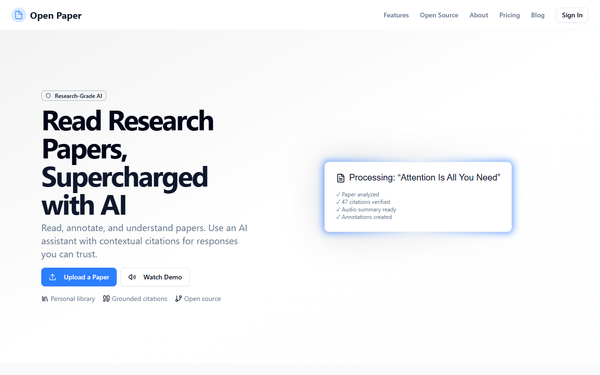
Processing is fast—example papers like “Attention Is All You Need” are analyzed with dozens of verified citations, audio summaries, and annotations generated in moments. The AI consistently delivers context-aware answers tied to exact document sections, building user trust and minimizing verification time. Weekly chat credits and audio limits scale appropriately with plans.
As of March 2026, no widespread outages or major reliability complaints appear in user discussions on Product Hunt, TikTok, or GitHub. The platform receives steady updates (latest GitHub commit days ago) and maintains an active repository with 212 stars. Minor limitations for heavy free-tier users (quickly hitting upload caps) represent the primary friction point rather than performance failures.
Pricing & Value
Open Paper offers a generous free Basic plan and a paid Researcher tier (with Teams planned). The free tier provides 10 paper uploads, 200 MB storage, 5,000 weekly chat credits, 5 audio overviews, and basic projects—sufficient for occasional or light users. The Researcher plan dramatically expands limits (500 uploads, 3 GB storage, 150,000 chat credits, 100 audio overviews, 100 projects) with annual billing discounts. Exact Researcher pricing appears on the site after sign-up; no enterprise options exist yet beyond the upcoming Teams plan.
Value is strong for the target audience: the free tier already outperforms many paid competitors in citation transparency and open-source ethos, while the paid upgrade removes practical barriers for serious researchers. Compared with closed-source alternatives, Open Paper delivers superior trust and customizability at lower (or zero) cost, though users needing unlimited free capacity or heavy collaboration may find the caps restrictive until Teams launches.
Practical Tutorial
A step-by-step walkthrough for a common task—conducting an initial literature review on a single paper—is available directly from official sources and matches real user demos.
- Visit https://openpaper.ai/ and create a free account (Google or email signup takes seconds).
- On the dashboard, click the upload box and drop your PDF (example: the classic “Attention Is All You Need” transformer paper).
- Once processed (usually under a minute), the paper opens in split-pane view. The AI instantly generates a brief overview and suggested questions.
- Highlight any confusing section (e.g., the self-attention mechanism), then ask the AI in the chat pane: “Explain this formula with simpler terms and cite the relevant page.” Responses appear with clickable citations that jump straight to the source text.
- Add annotations or markdown notes directly on highlighted passages; these sync and can be referenced in future chats.
- (Optional) Create a new Project, upload related papers, and ask cross-document questions such as “Compare attention mechanisms across these three works” to generate structured data tables exportable as CSV.
- Listen to the auto-generated audio overview while commuting or exercising.
For visual guidance, watch the official demo video: https://www.youtube.com/watch?v=ilI1heLZ5R0. Additional workflows (e.g., full systematic reviews) are detailed in the blog post at https://openpaper.ai/blog/systematic_review.
Final Verdict
Overall rating: 4.5/5. Open Paper excels as a trustworthy, researcher-first AI companion that genuinely saves time on dense academic reading without sacrificing accuracy or privacy. Researchers, PhD students, and academics handling frequent literature reviews should use it—especially those who value open-source transparency and citation integrity over flashy extras. Avoid it if you need unlimited free uploads, support for non-PDF documents, or immediate team collaboration features.
One-sentence recommendation: If you read research papers for a living and want an AI copilot you can actually trust, start with Open Paper today—research conducted March 2026.