Opus Clip Review: Turn Long Videos Into Viral Shorts Instantly
Overview & Purpose

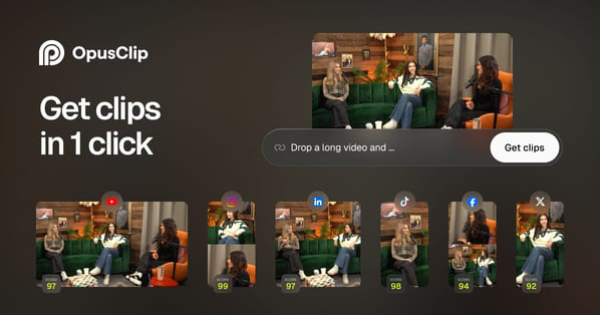
Opus Clip is an AI-powered video repurposing tool designed to automatically transform long-form videos into multiple short, viral-ready clips optimized for social media platforms like YouTube Shorts, TikTok, and Instagram Reels. By analyzing visual, audio, and sentiment cues, it identifies highlight moments, reframes content for vertical formats, adds dynamic captions, and applies professional edits—often styled after high-engagement creators like Alex Hormozi. Its primary purpose is to enable creators to repurpose existing content (podcasts, interviews, vlogs, gaming footage, sports, explainer videos, or even low-dialogue material) into 10 or more shareable shorts in minutes rather than hours or days, boosting reach, watch time, subscriber growth, and monetization potential across platforms.
Key use cases include scaling social media output for busy creators, testing multiple clip variations to identify winners, driving traffic back to long-form content, and maintaining consistent posting schedules without a full editing team. The target audience primarily consists of video creators, podcasters, YouTubers, marketers, influencers, and businesses adopting a "video-first" strategy—ranging from individual solopreneurs to larger teams and studios. As of April 2026, it has been used by over 16 million creators and businesses, including high-profile names like Logan Paul, Mark Rober, and Tom Bilyeu.
Key Features & Capabilities
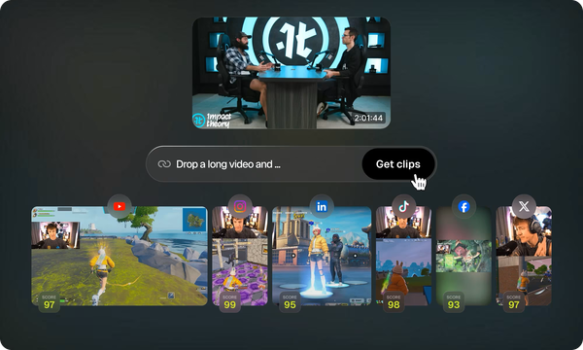
Core functionality revolves around one-click AI clipping: users upload a video or paste a link (from YouTube, Vimeo, Zoom, etc.), and the tool generates multiple vertical shorts with auto-detected highlights. Standout features include:
- ClipAnything: An advanced AI model that works across any video genre—not just talking-head podcasts—using visual, audio, and sentiment analysis, plus natural language prompts for custom moment extraction.
- ReframeAnything: AI-powered object tracking and face detection that intelligently resizes and centers subjects for vertical formats, with manual override options.
- AI curation, highlights, and viral score: Analyzes content against social trends to select, rearrange, and score clips for virality potential.
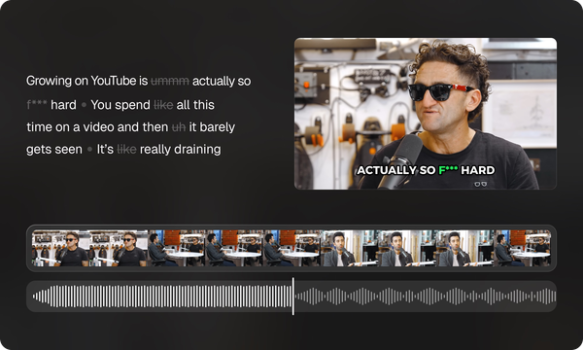
- Auto captioning, emojis, transitions, and cropping: 97%+ accurate, editable captions with dynamic styling (including Hormozi-style presets), auto emojis, smooth transitions, and precise cropping.
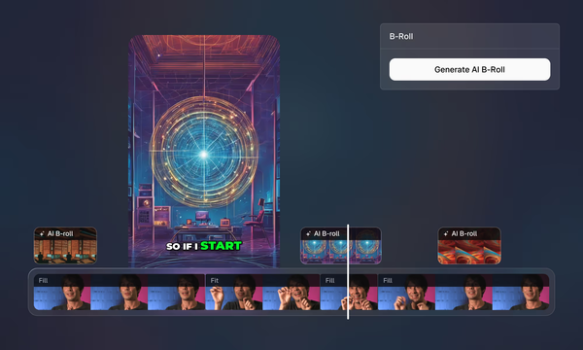
- Additional AI tools: AI B-roll (stock or generated footage on higher plans), audio enhancement, voice-over generation, and brand templates for consistent styling.
- Publishing and collaboration: One-click export or direct posting to multiple social accounts, team workspaces, API access, and autopilot workflows.
These differentiate Opus Clip from basic clippers by handling diverse content types, providing trend-aware curation, and offering end-to-end repurposing with minimal manual input. Limitations include inconsistent AI clip selection (often requiring 20-40% manual review for nuance, humor, or context), a basic built-in editor that lacks advanced controls (users frequently export to external software for final polish), credit-based processing limits that can feel restrictive for high-volume users, and occasional struggles with multi-speaker or highly complex videos.
User Experience
Opus Clip boasts a polished, intuitive interface with a low learning curve for core tasks—most users can upload a video and generate clips within minutes of signing up. The dashboard is clean and modern, with clear workflows for uploading, AI customization via co-pilot prompts, clip review, and editing. However, the in-app editor receives criticism for being overly basic or "comically bad" in some advanced scenarios, forcing reliance on external tools for precise tweaks.
Documentation is solid via the official Learning Center, which includes step-by-step guides, quick-start videos, and bi-weekly webinars. Support resources include Discord, email, and in-app chat, with generally positive feedback on responsiveness for basic issues—though higher-tier plans unlock priority help. Overall, it's accessible for non-technical creators while offering enough depth for power users, though some report occasional glitches in the UI during heavy editing sessions.
Performance & Reliability
Processing speed is a major strength: most videos generate clips in minutes, delivering 5-10x faster turnaround than manual editing. Users frequently report significant gains in engagement metrics, such as doubled views, 40-50% higher watch time, and increased long-form traffic. Reliability is generally high for standard talking-head or scripted content, with strong accuracy in reframing and captioning.
Common complaints include occasional slow rendering (5+ minutes or hangs for longer videos), inconsistent AI highlight detection (especially in comedic or narrative-driven material), and export/scheduling glitches. Processing failures or credit overconsumption appear in some user reports, though these are not universal. G2 users rate it approximately 4.6/5 for ease and time savings, while Product Hunt sits at 4.5/5; Trustpilot scores are lower due to isolated reliability and support frustrations.
Pricing & Value
Opus Clip offers a tiered structure as of April 2026:
- Free Forever: 60 processing minutes per month, watermarked exports, basic features—ideal for testing.
- Starter: $15/month (150 minutes), removes watermark, adds core AI tools and social posting.
- Pro: $29/month or $14.50/month (billed annually), 300 minutes/month (or 3,600/year), unlocks AI B-roll (up to 50/day), full editor, team workspace (2 seats), virality score, brand templates, and unlimited social connections.
- Business/Enterprise: Custom pricing for larger teams, higher credits, advanced security, and dedicated support.
Credits equate to processing minutes and scale with plan level; additional packs can be purchased. Value is strong for mid-to-high-volume creators who leverage the time savings (often recouping costs through increased content output and engagement), especially compared to hiring editors or using less intelligent tools. The Pro plan provides the best balance for professionals, though heavy users may find the credit system limiting without upgrades. Free tier limitations (watermark and storage) make paid plans nearly essential for serious use.
Practical Tutorial
Opus Clip provides official tutorials through its Learning Center and YouTube channel. Below is a step-by-step walkthrough for the common task of turning a long YouTube podcast into 5-10 viral Shorts (based on official guides as of April 2026).
- Sign up and upload: Create a free account at opus.pro and navigate to the dashboard. Paste a YouTube link or upload a video file directly (supported sources include Zoom, Vimeo, etc.).
- Customize with AI Co-pilot: Select ClipAnything mode (or use natural language prompts like "extract motivational moments with strong calls-to-action"). Choose platform targets (e.g., TikTok/Reels) and any brand template for consistent styling.
- Generate clips: Click to process. AI analyzes the video, scores potential clips by virality, and auto-generates 10+ vertical versions with captions, transitions, reframing, and B-roll (Pro plan).
- Review and edit: Browse the clip gallery sorted by viral score. Open the timeline editor to refine captions (switch to Hormozi-style presets if desired), add/remove emojis, insert AI B-roll, adjust audio, or manually tweak framing. Discard or reorder clips as needed.
- Export or publish: Apply final touches, then export in 1080p or schedule direct posting to connected YouTube, TikTok, and Instagram accounts. Use team workspaces for collaboration if applicable.
For visual walkthroughs, visit the official Learning Center at https://www.opus.pro/learning-center or search YouTube for "Opus Clip Full Tutorial 2025." Expect 5-15 minutes total for most videos, with best results on clear, structured content.
Final Verdict
Overall rating: 4.4/5 — A powerful time-saving tool that excels at scaling short-form content but requires some human oversight for optimal results.
Content creators, podcasters, and marketers producing regular long-form videos who want to amplify reach on social platforms without hiring editors or spending hours in Premiere Pro should strongly consider Opus Clip—its AI curation and one-click workflows deliver measurable growth in views and engagement.
Avoid it if you need pixel-perfect editorial control, work with highly nuanced or comedy-heavy material where AI frequently misses context, operate on a very tight budget with high volume (due to credits), or prioritize flawless customer support and billing transparency.
One-sentence recommendation: Opus Clip is an excellent AI companion for busy creators looking to 10x their short-form output from existing long videos, provided you're willing to review and tweak results for the best performance.