Ordinal Review: Scale Your Social Media with AI Automation
Overview & Purpose

Ordinal is an end-to-end social media management platform that enables marketing teams and creators to draft, plan, schedule, cross-post, engage with, and analyze content across all major social channels. Its core purpose is to streamline the entire social workflow—from AI-assisted ideation to automated publishing and performance insights—allowing users to focus on strategy rather than logistics. Primary use cases include generating consistent content calendars for B2B growth (especially on LinkedIn), enabling team collaboration on approvals and feedback, automating initial post momentum through engagements, and deriving actionable analytics to replicate viral success.
The tool targets marketing teams at startups, B2B software companies, agencies, and individual creators who treat social media as a serious revenue or audience-growth driver. Examples include teams like Clay, which scaled from 8,000 to 120,000 LinkedIn followers with over 1,000 posts in a year using Ordinal. It is particularly suited for LinkedIn-heavy strategies while supporting full cross-platform execution.

Key Features & Capabilities
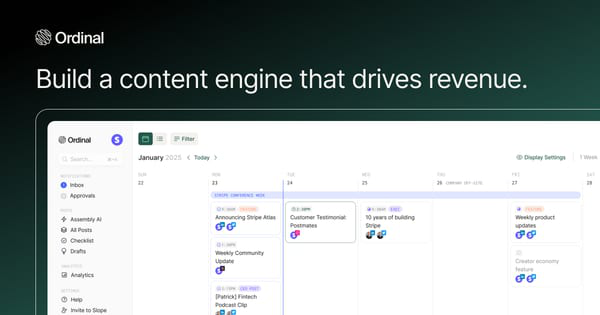
Core functionality revolves around a unified dashboard for content creation (Notion-like editor with briefs, checklists, and campaign overviews), scheduling (recurring posts, realistic previews, CSV import, Webflow integration), cross-posting, collaboration (approvals, inline comments, Slack notifications), and analytics (daily reports, filters by content type, all-time history in higher plans).
Standout features that differentiate it from competitors include:
- AI post drafting and 500 monthly AI credits (Pro plan) plus MCP/API integration for connecting custom AI tools like Claude.
- Auto-engagements (auto-likes over 10 minutes, first comments, and reposts up to 12 hours later) on LinkedIn, X, and Instagram to drive early algorithmic momentum—rare in tools like Buffer or Hootsuite without add-ons.
- AI Reporting (Beta) for pattern detection and virality insights.
- Slack Boost Channels for internal team pings when posts go live.
- Leads data extraction from LinkedIn (Enterprise).
Supported platforms encompass LinkedIn (deepest feature set), X/Twitter, Instagram, Facebook, TikTok, YouTube, Threads, plus scheduling to Slack, Discord, and Webflow.
Limitations include plan-based caps (e.g., only 50 scheduled posts and 30 AI credits monthly on Starter), additional fees ($20/mo per extra social profile beyond 4; $10/mo per engagement-only profile), AI Reporting still in Beta, and no native advanced video editing or social listening suite. External integrations are strong via API but require setup for custom AI workflows.

User Experience
Ordinal offers an intuitive interface with a clean, visual content calendar and Notion-like editor that minimizes the learning curve for most users—basic drafting and scheduling can be mastered in under an hour, while team workflows and auto-engagements take 1–2 weeks for full optimization. Realistic post previews and inline commenting enhance collaboration without switching tools.
The Help Center is well-structured with over 50 articles across categories like Integrate Accounts (13), Posts & Campaigns (29), Analytics (5), and a dedicated AI section, making self-service straightforward. No video tutorials are prominently featured, but comprehensive written guides and the option to book personal onboarding calls provide solid support. Email and chat support are included on all plans, with prioritized Slack channels and dedicated onboarding on Enterprise. Overall, the experience feels modern and team-focused compared to cluttered legacy tools like Hootsuite.
Performance & Reliability
Scheduling and cross-posting execute reliably and quickly, with users in case studies reporting high-volume posting (1,000+ posts/year) without downtime. Auto-engagements and Slack notifications deliver consistent results for early visibility boosts.
As a platform launched in 2023 (previously referenced under Assembly on some directories), external complaints are minimal; searches across Product Hunt, G2 alternatives, Reddit, and review sites yield primarily positive or neutral mentions, with no widespread reports of failed posts or outages. Beta features like AI Reporting may occasionally lack polish, and very high-volume agencies might encounter profile-add-on costs. Overall performance earns praise for efficiency in testimonials, positioning it as dependable for scaling teams.
Pricing & Value
Ordinal offers a 14-day Pro trial with no free tier. Plans (as of March 2026) include:
- Starter: Limited to 3 users, 50 scheduled posts/month, 4 social profiles, 30 AI credits, and 14-day analytics history (pricing entry-level, suitable for individuals).
- Pro: $265/month (or ~$235 in some references) for unlimited users/posts, 500 AI credits, full auto-engagement, all-time analytics, API/MCP access, and CSV/Webflow scheduling.
- Enterprise: Custom pricing with SSO, custom permissions, LinkedIn leads data, prioritized support, and shared Slack channels.
Additional costs apply for extra profiles or engagement-only accounts. Value is strong for teams: unlimited seats (unlike many per-user competitors) and built-in auto-engagement make it more cost-effective than combining Buffer + separate AI tools or Hootsuite add-ons. It delivers premium LinkedIn power and workflow automation at a competitive mid-tier price, especially for B2B growth-focused users.
Practical Tutorial
Official documentation is available at the Ordinal Help Center (https://help.tryordinal.com/). Below is a step-by-step walkthrough for a common task—using AI to draft, collaborate on, and schedule a LinkedIn post (based on core platform flows; adaptable via help articles on Posts & Campaigns and AI).
-
Sign up and connect accounts: Visit https://www.tryordinal.com/, start the 14-day Pro trial, and create a workspace. Navigate to Settings > Integrate Accounts, authorize your LinkedIn (and other) profiles—OAuth is straightforward and supports company pages/personal profiles.
-
Generate content with AI: Go to the Drafts or Ideas section. Click “Ordinal AI” or the AI composer. Enter a prompt like: “Write a professional LinkedIn post about how AI agents are transforming B2B marketing in 2026. Include a hook, 3 key stats, a CTA to comment, and keep it under 250 words with emojis.” Review and regenerate as needed (Pro gives 500 credits/month).
-
Edit and collaborate: Use the Notion-like editor to refine text, upload images/videos, and add hashtags or tags. Invite teammates via workspace permissions for inline comments or approvals. Add a brief/checklist (e.g., “Include company logo? Check brand voice”).
-
Preview and schedule: Click the preview icon for realistic platform rendering. Open the Content Calendar, drag the post to your desired date/time, or use “Schedule” for immediate queuing (supports recurring). Enable auto-engagement (likes/comments from linked accounts) and Slack Boost notification.
-
Publish and monitor: Confirm and let it post. Post-live, track in Analytics for impressions/engagement; use AI Reporting (Beta) to identify patterns for future posts.
Example: A B2B marketer drafting “Why your CRM needs AI agents in 2026” could cross-post the same draft (with auto-formatting) to X and Instagram Stories while auto-liking from team accounts on LinkedIn for instant visibility. Full guides for each step are in the Help Center under “Posts & Campaigns.”
Final Verdict
Ordinal earns a strong 4.5/5 rating for its seamless AI integration, unique auto-engagement tools, and team scalability in a clean interface.
Teams and agencies serious about LinkedIn-driven B2B growth or multi-channel efficiency should use it—the end-to-end workflow and automation save hours weekly while boosting reach. Solo creators or budget-conscious users on simple needs should avoid it, as the pricing and team-focused features may feel overkill without a free tier or lighter alternatives like Buffer.
Try Ordinal if you want AI-powered content that actually amplifies itself through smart automation.