Outtloud Review: The Best AI Audio Reader and Podcast Creator
Overview & Purpose

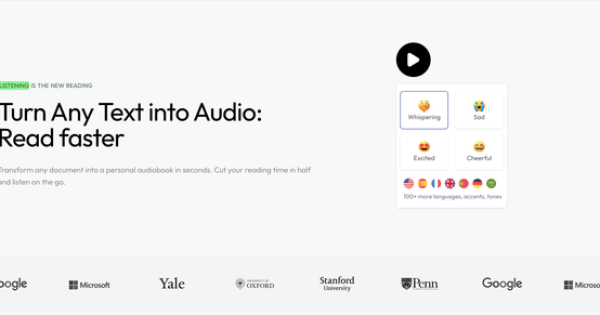
Outtloud is an AI-powered audio reader designed to convert documents, research papers, PDFs, EPUBs, DOCX files, web URLs, and scanned images (via OCR) into natural-sounding, high-fidelity speech. It enables users to listen to content at up to 4x speed while offering AI-generated audio summaries and multi-host podcasts, dramatically reducing reading time for large materials. Primary use cases include multitasking during driving, commuting, exercising, cooking, or studying, as well as creating personal audiobooks from any text source. The tool emphasizes accessibility, with specific optimizations for dyslexia and ADHD users through read-along highlighting, customizable fonts, and focus modes.
Target audience spans students tackling academic or STEM papers, professionals digesting reports and articles, avid readers converting ebooks, and neurodiverse individuals seeking efficient information consumption. It also appeals to content creators needing quick podcast-style audio from written material. (All research conducted as of March 12, 2026, drawing from the official site and supporting comparisons.)

Key Features & Capabilities
Core functionality revolves around seamless text-to-speech conversion: upload or paste content, select from over 200 natural-sounding HD voices across 50+ languages and accents (including celebrity-inspired options like Morgan Freeman or emotional tones such as whispering or excitement), adjust playback speed up to 4x, and listen instantly. Standout differentiators include AI audio summaries that condense long documents and AI podcasts that transform content into engaging, multi-host conversational formats—features that go beyond basic TTS tools like Speechify or Google Cloud TTS. Additional capabilities encompass read-along focus mode with font/highlight customization, bookmarking, note-taking/annotating, reading goal tracking with weekly stats and streaks, and support for technical/scientific terminology.
These elements set Outtloud apart by combining high-fidelity voices with productivity tools like unlimited personal audiobook creation and progress analytics, making it ideal for on-the-go learning. Limitations include primary iOS app focus (with web onboarding), potential OCR inaccuracies on complex scanned documents, and no confirmed offline playback or strong Android/desktop equivalents in public materials. Voice cloning or advanced API integration appears absent compared to some enterprise TTS platforms.

User Experience
Outtloud boasts an intuitive interface with a low learning curve: users simply upload files or enter URLs via the clean iOS app or web onboarding, choose voices/speeds, and start listening with real-time text highlighting for read-along immersion. Customization options for fonts, colors, and emotional tones enhance accessibility without overwhelming beginners. The design prioritizes multitasking, with minimal distractions and easy navigation for notes or goals.
Documentation includes an in-app FAQ covering basics like supported languages, data security, and usage, plus site-based questions on features and target users. Support resources appear limited to email or in-app channels, with sparse external tutorials; early user feedback notes responsive app flow but occasional subscription management hiccups. Overall, the experience feels polished and welcoming, especially for neurodiverse users.
Performance & Reliability
Conversion and playback are efficient, delivering high-fidelity audio with minimal lag even for lengthy research papers or at accelerated speeds. The AI handles technical content effectively, and summary/podcast generation provides quick value for time savings. Reliability is strong for core TTS functions, with natural voices praised in comparisons as nearly indistinguishable from human narration.
Known issues are minimal based on available feedback: occasional pronunciation quirks with niche terms (despite claims of effortless handling) and standard OCR limitations on poor-quality scans. Public complaints are rare and mostly center on support response times or early subscription UI glitches rather than core performance; no widespread outages or quality degradation reported as of research date. Users highlight consistent 4x speed stability during commutes.
Pricing & Value
Outtloud offers a free trial/onboarding period for testing core features, with a Premium plan starting at approximately $8 per month for unlimited listening, audiobook creation, AI summaries, podcasts, and 4x speed access—no per-minute or document caps. No public enterprise tier or detailed annual discounts are listed on the homepage, though competitive positioning emphasizes affordability.
Value shines against alternatives like Speechify (often criticized for higher costs and limits) or ElevenLabs Reader, delivering unlimited high-quality output plus unique podcast/summary tools at a fraction of the price. The proposition is excellent for heavy users seeking time savings, though those needing cross-platform desktop access or free unlimited tiers may find it less compelling.
Practical Tutorial
No detailed official video tutorials were located on the site or App Store as of March 2026; users rely on in-app prompts and the FAQ. Below is a step-by-step walkthrough for a common task—converting a research paper PDF into an AI podcast summary—based on the app's described flow. Example: Upload a 20-page PDF on "AI Ethics in 2026" (freely available from arXiv.org).
- Download the Outtloud iOS app from the App Store or visit https://outtloud.com/ and tap "TRY FOR FREE" to onboard via web/app.
- Create a free account and start the trial (no card required initially).
- Tap the upload/import button; select "PDF" or paste a web URL, then choose your example file (e.g., the AI ethics paper). OCR processes scanned elements automatically if needed.
- Once loaded, review the text preview with highlighting options; customize font size/color for focus mode if reading along.
- Select a voice (e.g., "Morgan Freeman: Iconic Soothing Voice" for calm narration) and language (English default); enable emotional tones if desired.
- Choose "Audio Summaries & AI Podcasts" mode; set speed to 2.5x initially and opt for multi-host podcast style to generate a concise 5-10 minute conversational overview with two AI hosts discussing key points.
- Tap "Generate & Play"; add bookmarks at chapter breaks or notes on specific sections (e.g., "Highlight ethical concerns"). Track progress in the goals dashboard.
- Export the audio or continue listening offline where supported; monitor weekly stats for words listened or streak maintenance.
This process typically takes under 2 minutes before playback begins. For more, explore the in-app FAQ or site navigation.
Final Verdict
Outtloud earns a strong 4.5/5 rating for its natural voices, innovative AI podcast and summary tools, unlimited Premium access at an affordable price, and dyslexia/ADHD-friendly design that genuinely saves time. Students, professionals, and neurodiverse readers who multitask with documents should use it for efficient, engaging consumption on the go—especially as a budget-friendly Speechify alternative. Avoid it if you require robust Android/desktop support, extensive free unlimited features, or heavily reviewed enterprise integrations, as the platform remains iOS-centric with limited external validation. Highly recommended for anyone seeking a versatile, high-fidelity audio reader that turns reading into effortless listening.