PageGPT Review: Create Custom AI Landing Pages in Minutes
Overview & Purpose
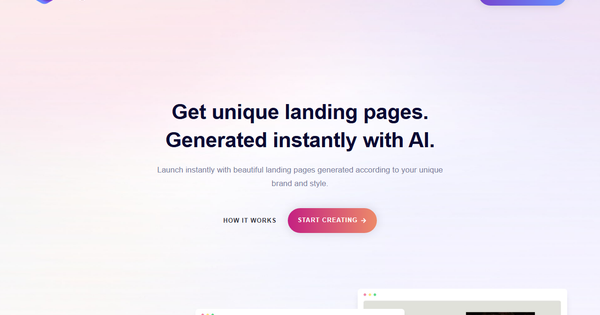
PageGPT (https://pagegpt.pro/) is an AI-powered landing page generator designed to create unique, personalized landing pages instantly from a simple description of a product, service, brand theme, colors, and style. It generates custom designs (no templates), AI-written copy, and relevant images, then allows further refinement through natural language chat. The resulting pages are automatically optimized for fast load times, full mobile responsiveness, and conversion-focused elements like strategic CTAs.
Primary use cases include building high-converting single-page sites for e-commerce product launches, SaaS sign-ups, portfolios, service promotions, or marketing campaigns. It eliminates the need for designers, developers, or complex builders, enabling non-technical users to launch professional pages in minutes. Earlier descriptions sometimes referred to the underlying technology or early branding as “Moatless,” but the current product is fully positioned as PageGPT.
Target audience: small business owners, e-commerce entrepreneurs, digital marketers, solopreneurs, and startups who need fast, brand-aligned landing pages without coding or design skills. It is less suited for large enterprises requiring complex multi-page websites or heavy custom development.
Key Features & Capabilities
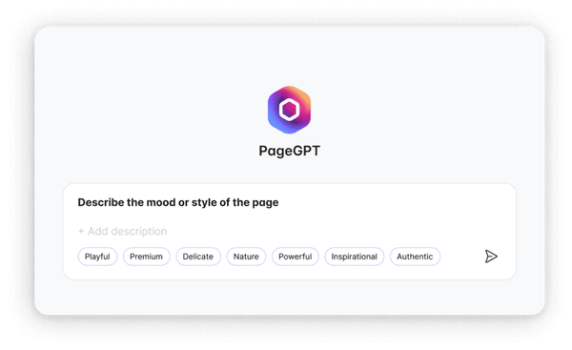
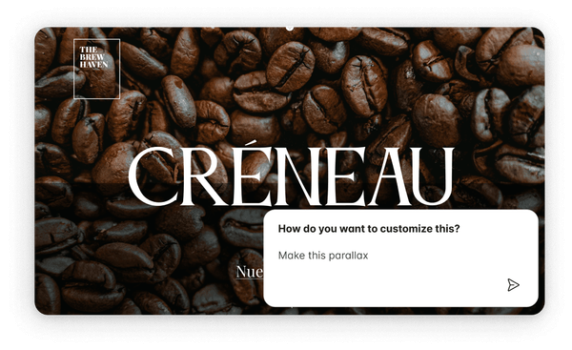
Core functionality revolves around a four-step workflow: (1) input product details, theme, mood, and colors; (2) AI generates a fully formed page with layout, copy, and images; (3) refine via conversational AI chat (e.g., “add parallax scroll to hero,” “make text gradient animated,” “change button hover effect”); (4) publish, export code, or sync to WordPress/Shopify.
Standout features that differentiate it from competitors (such as Unbounce, Leadpages, or template-heavy AI builders like Durable or Hocoos):
- Truly unique, non-template designs tailored per product.
- Natural-language chat editor for unlimited custom effects and animations without coding or Webflow-style complexity.
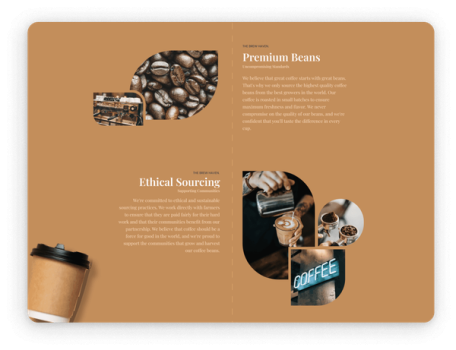
- Built-in AI copywriting and image generation that matches brand voice and aesthetics.
- Automatic performance optimization (speed, mobile, conversion elements).
- Webflow-style drag-and-drop editor available in paid plans alongside the AI chat.
Limitations or missing features: Image editing remains basic; very niche branding may require multiple regeneration prompts; focused primarily on single-page landing pages rather than full multi-page sites; smaller selection of pre-built sections compared to traditional builders. Some users note outputs occasionally need manual tweaks for pixel-perfect results.
User Experience
Ease of use is one of PageGPT’s strongest points. The learning curve is minimal—users simply describe their needs in plain English and chat to iterate. No prior design or coding knowledge is required, making it accessible for complete beginners. The interface combines a clean visual preview with an always-available AI chat sidebar, plus optional drag-and-drop controls in higher plans.
Interface quality feels modern and intuitive, with real-time updates from chat commands. Documentation consists of an active blog (blog.pagegpt.pro) featuring comparison guides, effect tutorials, and best practices. Support resources include in-app chat and email; user reviews praise quick onboarding but note limited public help-center articles. Overall sentiment on platforms like G2 highlights “invaluable ease of creation.”
Performance & Reliability
Generation is fast—most pages appear in under a minute, with chat refinements happening near-instantly. Published pages load quickly due to built-in optimizations and are fully responsive across devices. Reliability appears solid based on available feedback, with no widespread outages reported in 2026 reviews.
Known issues or common complaints are minimal and mostly anecdotal: occasional need for prompt refinement to match exact vision, and isolated older mentions of post-payment glitches or support delays. Current aggregator reviews (G2, directory sites) report consistent positive experiences around speed and output quality, with no major reliability red flags.
Pricing & Value
PageGPT offers a mix of trial and subscription options (research date: April 10, 2026):
- Trial: $7 for 7 days (1 page, limited variations, images, text generations, full editor access).
- Personal/Starter: ~$5/month (1 site, 50 GB bandwidth, drag-and-drop editor, animations).
- Teams: $89/month (10 sites, 500 GB bandwidth, advanced features).
- Enterprise: Custom annual contracts for unlimited sites and compliance needs.
- One-time pay-per-page options (Single Page $19; Bundle $39 for 3 pages) also appear available for lighter users.
Value proposition is strong for speed-to-launch scenarios: users avoid hundreds or thousands in designer/developer fees for a professional, conversion-optimized page. Compared to alternatives, PageGPT’s chat-based uniqueness and effect customization offer better personalization at a lower entry point than traditional no-code builders. It shines for occasional or rapid prototyping use cases rather than heavy ongoing site management.
Practical Tutorial
PageGPT provides no single official video tutorial, but its blog and product flow deliver a clear 4-step process. Here is a practical walkthrough for creating an e-commerce cosmetics landing page (based on real examples from PageGPT’s own comparison blog):
- Describe your product and theme: Go to pagegpt.pro, enter your company name (e.g., “GlowHaven”), add a short description (“modern organic skincare line targeting eco-conscious millennials”), specify mood/style (“sleek, minimalist, feminine”), and main theme colors (e.g., soft pink and ivory).
- Generate the page: Click generate. AI instantly produces a complete landing page with hero section, product benefits, testimonials, images, and copy—all matched to your inputs.
- Customize via chat: Open the AI chat and type natural commands such as: “make the hero background have a subtle parallax zoom on scroll,” “add hover tilt effect to product cards,” “regenerate the headline to be more benefit-focused,” or “change button color to deep rose.” The editor updates live. Use drag-and-drop for any fine positioning.
- Publish or export: Preview on mobile, then publish (hosting included in plans), download code, or sync directly to WordPress/Shopify. Total time: typically under 10–15 minutes.
For advanced effects, the official blog offers additional prompt examples (e.g., animated gradients, scroll-triggered animations).
Final Verdict
Overall rating: 4.5/5 – Excellent for speed, uniqueness, and conversational customization, with minor deductions for limited third-party reviews and basic image tools.
Who should use this tool: Small businesses, e-commerce founders, marketers, and non-technical creators who want stunning, brand-specific landing pages in minutes without hiring help or learning complex builders. It delivers high value when time-to-launch and conversion focus matter most.
Who should avoid this tool: Teams needing full multi-page websites, advanced custom coding, or pixel-perfect control beyond AI assistance; or users on extremely tight budgets who prefer completely free open-source alternatives.
One-sentence recommendation: If you need a truly unique, AI-customized landing page that converts—without the usual design headaches—PageGPT is one of the smartest and fastest options available in 2026.