Pagevibe Review: Boost PPC Conversions with AI Personalization
Overview & Purpose
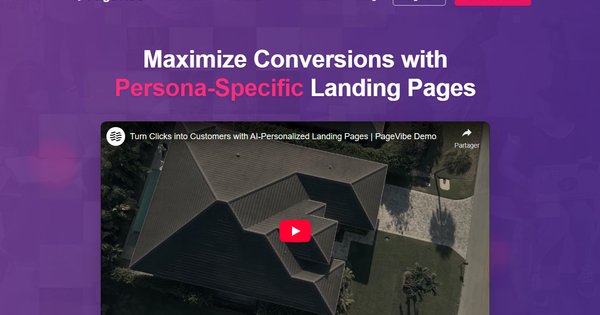
PageVibe is an AI-powered, no-code landing page personalization platform designed to boost the effectiveness of PPC campaigns. It allows users to create and serve dynamic, persona-specific versions of landing pages using a single line of JavaScript code, adapting content like text and images in real-time for different audience segments. Primary use cases include matching specific ad groups or keywords to tailored landing experiences to improve relevance, Quality Scores, lower CPCs, and increase conversions. It targets digital marketers, PPC advertisers, digital agencies, and marketing teams at businesses of all sizes who want to avoid the time and cost of manually building multiple page variants or relying on developers.
Key Features & Capabilities
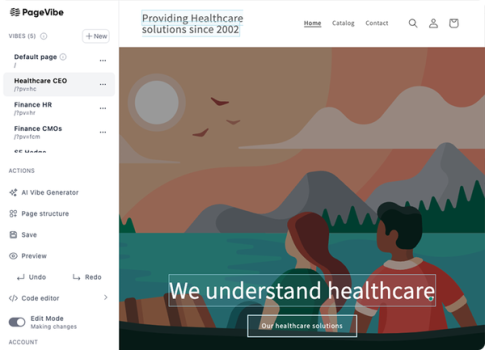
Core functionality revolves around one-script deployment for instant personalization across WordPress, Shopify, Wix, and custom websites. The platform uses AI to suggest and generate content variations for different customer personas, paired with a no-code visual editor for manual customizations and scaling. Standout features include a unique live demo technology where users can experience and test personalization directly on the PageVibe site without any installation, unlimited page variations without additional cost or effort, and seamless A/B testing at scale. These differentiate it from traditional page builders or more complex personalization engines that often require heavy setup or coding.
Limitations: Public details on advanced integrations (e.g., deep CRM or specific ad platform analytics) are limited. For extremely complex or interactive page elements, it may not replace full custom development. As a relatively new tool, some enterprise-grade security or compliance features may still be maturing. Results depend on the quality of AI inputs and site setup.
User Experience
The tool emphasizes ease of use with its no-code approach and visual editor, resulting in a relatively low learning curve for marketers familiar with basic web tools. Onboarding is described as seamless with priority support. Interface quality appears modern and intuitive based on demo descriptions, focusing on visual editing of elements. Documentation is basic at launch stage, primarily through the live demo and in-app guidance; support includes dedicated options for higher plans. Overall, accessible for non-technical users.
Performance & Reliability
Setup is quick—adding the script and creating variations can be done in minutes to hours versus weeks for traditional methods. Personalization happens in real-time for visitors. Promotional materials claim conversion rate improvements of 40-120%. No widespread user-reported issues or complaints found in searches, likely due to its recent launch. Reliability seems strong for standard CMS platforms, but real-world long-term performance across high-traffic sites would benefit from more case studies. Tracking and efficiency for campaign optimization are highlighted as key benefits.
Pricing & Value
PageVibe offers a 14-day free trial (no credit card required) and a money-back guarantee. Paid pricing starts at $14 per month for the entry plan, covering up to three websites with unlimited page variations. Enterprise options are available with dedicated account management. The value proposition is strong compared to hiring developers for custom pages or using more expensive A/B testing suites, especially for agencies and PPC-focused teams seeking scalability at low cost. It delivers high potential ROI through improved conversions with minimal effort.
Practical Tutorial
Extensive official video tutorials or in-depth guides were not prominently available in public searches as of March 2026; the platform relies on its interactive live demo for initial exploration. Here is a practical step-by-step walkthrough for a common task: setting up persona-specific personalization for a PPC campaign (synthesized from platform descriptions—always refer to current dashboard for exact steps and verify compatibility):
- Go to https://pagevibe.net/ and click to start the free trial (no credit card needed). Create an account.
- After login, locate and copy the unique one-line JavaScript code provided in the dashboard.
- Install the script on your website: For WordPress, use a header plugin or edit theme files; for Shopify, add to theme.liquid; similar for Wix or custom HTML sites. Test to ensure it loads.
- Back in PageVibe, define your audience personas or link campaign data (e.g., from Google Ads UTM parameters or audience segments like 'price-sensitive buyers' vs 'feature-focused').
- Input or select your main landing page URL. Open the no-code visual editor to highlight elements (headlines, body text, images, CTAs).
- Create variations: Either manually edit for each persona or use AI to automatically generate tailored content based on prompts or persona descriptions (e.g., emphasize 'affordable' for one group, 'premium quality' for another).
- Set up rules and targeting in the dashboard for when each version displays (based on traffic source, location, device, etc.).
- Use the preview mode or built-in demo features to test different variations. Activate the personalization.
- Integrate with your analytics (Google Analytics, ad platforms) to track performance metrics like conversions and bounce rates. Monitor and iterate on variations.
For a risk-free test without site changes, use the live demo on the homepage to experiment with editing. Check the site for updated resources or book a demo.
Final Verdict
Overall rating: 4.0 out of 5. PageVibe is a promising solution for marketers seeking to efficiently personalize landing pages at scale. It is ideal for PPC specialists, digital agencies, and businesses running targeted ad campaigns who want to improve conversion rates without significant technical investment or time. Users will appreciate the simplicity, AI assistance, and cost-effectiveness. Those who should avoid it include teams requiring highly custom-coded functionality, intricate data integrations beyond basic personalization, or those hesitant about newer tools without extensive independent reviews and long-term case studies. One-sentence recommendation: If you're struggling with generic landing pages killing your PPC ROI, PageVibe's one-script AI personalization is a low-risk, high-reward way to test persona-specific experiences and potentially double your conversions. (Research conducted as of March 2026.)