Paragraphica Review: The AI Camera That Captures the Essence of Place
Overview & Purpose
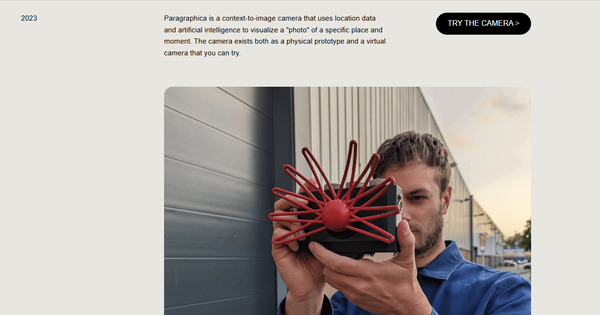
Paragraphica is a conceptual context-to-image camera created by Danish interaction and experience designer Bjørn Karmann in May 2023. Rather than capturing light through a traditional lens and sensor, it uses geolocation data and open APIs to gather contextual information about a specific place and moment—including address, weather conditions, time of day, and nearby points of interest—then composes this into a descriptive paragraph. An AI text-to-image model (powered by the Stable Diffusion API) transforms the paragraph into a generated "photo" that visualizes the essence, mood, and unseen attributes of the location through the lens of artificial intelligence.
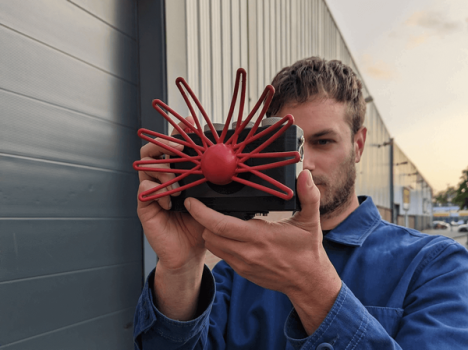
The project's primary purpose is artistic and philosophical: to challenge conventional notions of photography, explore how AI "perceives" the world, and draw parallels to non-visual senses, such as those of the star-nosed mole (which inspired the camera's snout-like design). It serves as a tool for deeper reflection on place, data visualization, and the blurring boundaries between human perception, technology, and machine intelligence. Primary use cases include conceptual art installations, interactive exhibitions, educational demonstrations on AI ethics and creativity, and experimental photography for those interested in generative media. It is not designed for documentary or commercial photography.
Target audience includes interaction designers, digital artists, AI enthusiasts, photographers exploring new media, educators in design or technology fields, and tech-curious hobbyists. It appeals less to developers seeking production tools or marketers needing practical visuals, as it prioritizes provocation over utility.
Key Features & Capabilities
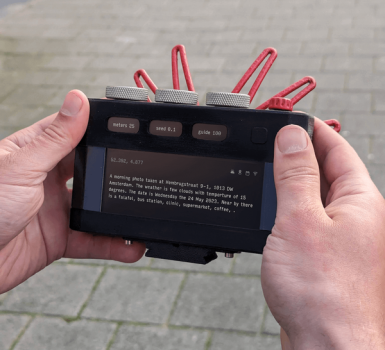
Core functionality revolves around real-time location data synthesis: the device (or web version) builds a contextual prompt automatically and generates an AI image representing the "scintigraphic" (data-visualized) essence of the moment. The physical prototype integrates a Raspberry Pi 4, 15-inch touchscreen, 3D-printed housing, and custom electronics, while a virtual web app mirrors the experience for anyone to test.
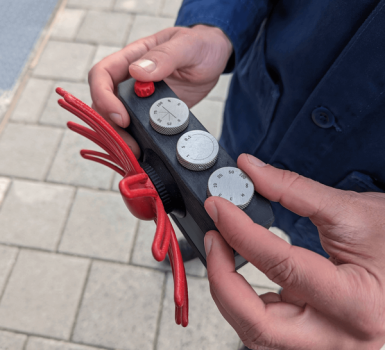
Standout features include three physical (or simulated) dials that emulate traditional camera controls in a novel way:
- Dial 1 adjusts the search radius (in meters) for nearby places and data, analogous to focal length.
- Dial 2 sets the noise seed (0.1–1.0) for the AI diffusion process, similar to film grain.
- Dial 3 controls the guidance scale, influencing how closely the AI adheres to the prompt—higher values yield "sharper," more literal outputs; lower values create "blurrier," more interpretive results.
These dials differentiate Paragraphica from standard AI image generators by adding tactile, camera-like agency and encouraging experimentation with parameters. The resulting images often capture uncanny moods or emotional resonances of a location without replicating its literal appearance, providing a unique form of data-driven art.
Limitations and missing features are significant: it produces no actual photographs, relying entirely on AI generation which can introduce hallucinations or inconsistencies; there is no optical capture, storage of raw data, or editing tools beyond the dials; the project remains a one-off prototype with no API for integration, batch processing, or mobile app equivalent. As of April 2026 research, the virtual demo appears intermittently unavailable or limited in functionality (e.g., geographic restrictions in some areas). No support for video, high-resolution exports, or advanced prompting exists.
User Experience
Ease of use is high for the virtual version, with a low learning curve: grant location access, observe the live paragraph description in the viewfinder, tweak dials if available, and press a trigger button to generate the image. The physical prototype offers a more immersive, tactile experience reminiscent of operating a vintage camera, though building or accessing one requires technical know-how.
Interface quality is clean and minimalist in the web app (built with Noodl), displaying the textual prompt alongside the generated image for immediate comparison. The design emphasizes transparency in how data becomes visual. However, with the demo potentially offline or unstable in 2026, accessibility has diminished since launch.
Documentation is limited to the project page on bjoernkarmann.dk, which includes clear explanations, videos of the prototype, and background on the concept. No extensive user guides, forums, or official support resources exist, as it is an artistic project rather than a supported product. Community discussions on platforms like Reddit, forums, and YouTube provide supplementary insights, though these are informal.
Performance & Reliability
Generation speed depends on the underlying Stable Diffusion API and internet connection; at launch, it produced images within seconds to a minute, suitable for interactive demos but not instantaneous like a traditional shutter. Efficiency is solid for a prototype, leveraging efficient APIs and lightweight hardware in the physical build.
Known issues include occasional API downtime, variable image quality due to AI stochasticity, and geographic limitations (e.g., sparse data in remote areas leading to generic outputs). Common user feedback from 2023 coverage highlights delight in the "uncanny" results but frustration with non-literal representations or slow loads in early tests. No widespread complaints or major bugs reported in later references, though the lack of updates means reliability has not evolved with newer AI models. Some photographers have critiqued it philosophically rather than technically, debating whether it qualifies as photography at all.
Pricing & Value
Paragraphica is entirely free to explore via its virtual web version (when accessible) and was never commercialized as a product. The physical prototype is a custom build not available for purchase, though its open conceptual nature invites DIY replication using the documented components (Raspberry Pi, etc.). There are no tiers, subscriptions, or enterprise options.
Value proposition shines as an experimental art piece: it offers profound insight into AI-mediated perception at zero cost, outperforming generic text-to-image tools in its contextual automation and camera metaphor. Compared to alternatives like Midjourney or standard Stable Diffusion interfaces, it provides a more guided, location-aware experience without manual prompting. However, its niche appeal limits broader value; those seeking practical AI photography tools may find greater utility in apps with real-time camera integration or commercial generative features. As an artistic provocation, it delivers exceptional conceptual return on (zero) investment.
Practical Tutorial
The virtual camera demo, originally hosted via links from the official site (such as camera.sandbox.noodl.app or equivalents), provided a browser-based simulation. Note that as of April 2026, accessibility may be limited due to hosting changes; check the project page for current status or archived videos. Here is a step-by-step walkthrough for a common task—generating a contextual "photo" of your current location—based on documented usage at launch:
-
Access the tool: Navigate to the "TRY THE CAMERA" section on https://bjoernkarmann.dk/project/paragraphica and follow the link to the web app (grant browser location permissions when prompted).
-
Observe the viewfinder: The interface displays your real-time location data and auto-generates a descriptive paragraph incorporating address, weather, time, and nearby places (e.g., "A quiet residential street in [City] on a cloudy afternoon in spring, with a nearby park and café at 18°C").
-
Adjust parameters with dials (if the web version includes sliders simulating the physical controls): Set the radius dial to control search scope (e.g., 100m for precise local data vs. 1000m for broader context); tweak noise for grain-like texture; adjust guidance scale for sharper adherence to the prompt or more abstract results.
-
Capture the image: Press the virtual "trigger" button. The system processes the paragraph via AI and displays the generated image alongside the source text for comparison.
-
Experiment and iterate: Change dials or move locations, then regenerate. For example, testing in a public park might yield an image evoking serene greenery with subtle weather influences, while an urban alley could produce moody, crowded interpretations.
Real examples from early demos include evocative street scenes or park visualizations that captured atmospheric "essence" rather than exact visuals. For video demonstrations, refer to the official project page or YouTube coverage of the prototype in action. No official step-by-step tutorials exist beyond the site itself, but community recreations using similar APIs offer extensions.
Final Verdict
Overall rating: 8/10 (exceptional as conceptual art and interaction design; lower for practical utility).
This tool is ideal for artists, designers, educators, and AI explorers who want to interrogate the future of imaging, data perception, and machine creativity—its strength lies in sparking dialogue and delivering surprising, mood-rich outputs that transcend literal photography. Avoid it if you need reliable, literal image capture, commercial-grade tools, or consistent high-fidelity results, as its interpretive nature and prototype status introduce variability and limited accessibility.
One-sentence recommendation: Paragraphica is a must-experience artistic provocation for anyone intrigued by how AI can reimagine our sense of place, best approached with curiosity rather than expectations of traditional photography.